↑
×
![Zoomed Image]()
The Ultimate Guide to Veeam Backup – Part 01 Toàn Tập Veeam Backup – Phần 01
Table of Contents Mục lục nội dung
Veeam Backup Installation Cài đặt Veeam Backup
Download ISO Community Edition (<10 VMs) Download file ISO phiên bản Community Edition (<10 VMs)
Installation Process Cài đặt
- Step 1:Bước 1: Select “Install Veeam Backup & Replication” Chọn mục Install Veeam Backup & Replication
- Step 2:Bước 2: Select “I Accept” to continue Chọn I “Accept” để tiếp tục
-
Step 3:Bước 3:
Select optional checkboxes based on requirements and proceed:
Chọn hoặc không chọn các checkbox (tuỳ theo mục đích sử dụng) và tiếp tục:
- Update license automatically: Auto-update license when new versions are available.Tự cập nhật license khi có bản mới.
- Receive proactive support: Agree to send reports to Veeam center.Đồng ý gửi các report về Veeam center.
- Step 4:Bước 4: Click “Install” to begin the installation process Nhấn “Install” để tiếp tục quá trình cài đặt
- Step 5:Bước 5: After completion, open Veeam backup & start configuration Sau khi hoàn tất cài đặt, mở Veeam backup & bắt đầu cấu hình
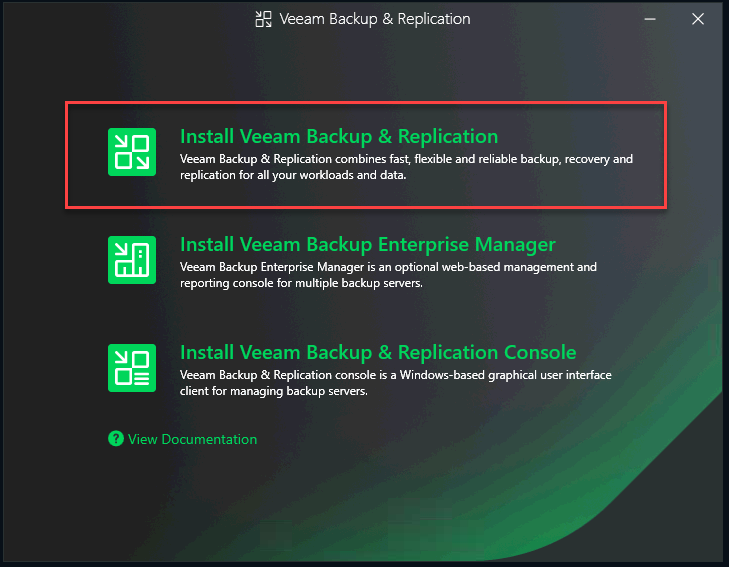
Fig 1: Select Install Veeam Backup & ReplicationHình 1: Chọn Install Veeam Backup & Replication
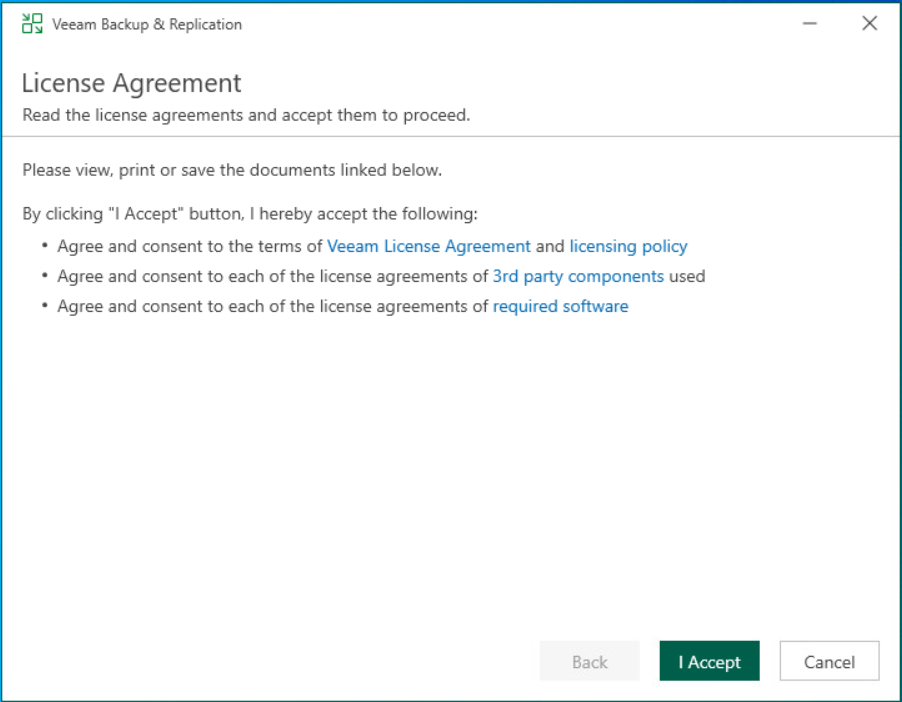
Fig 2: Accept License AgreementHình 2: Chấp nhận điều khoản sử dụng
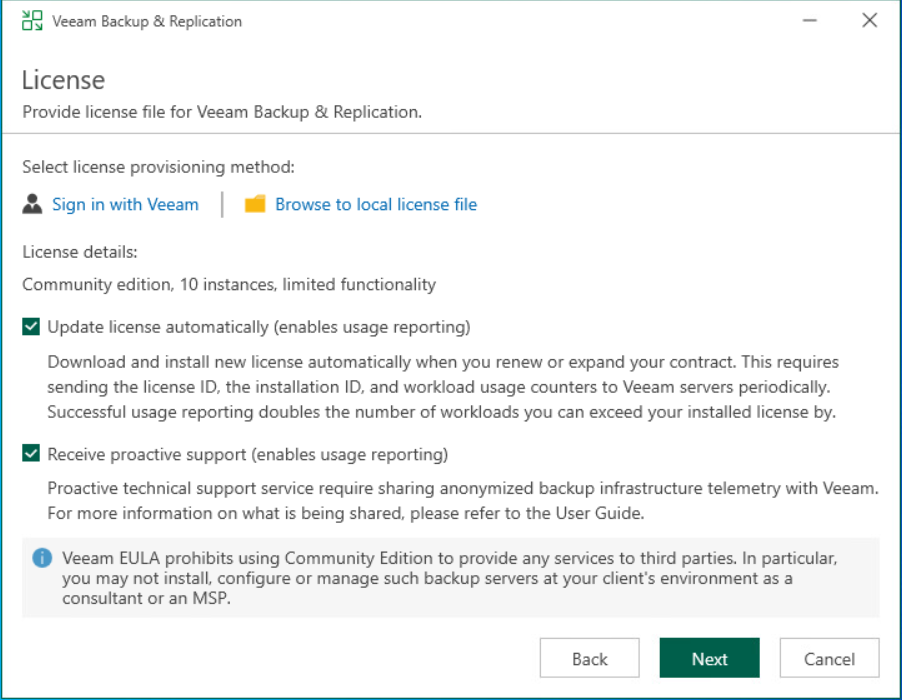
Fig 3: Configuration CheckboxesHình 3: Chọn cấu hình tự động cập nhật
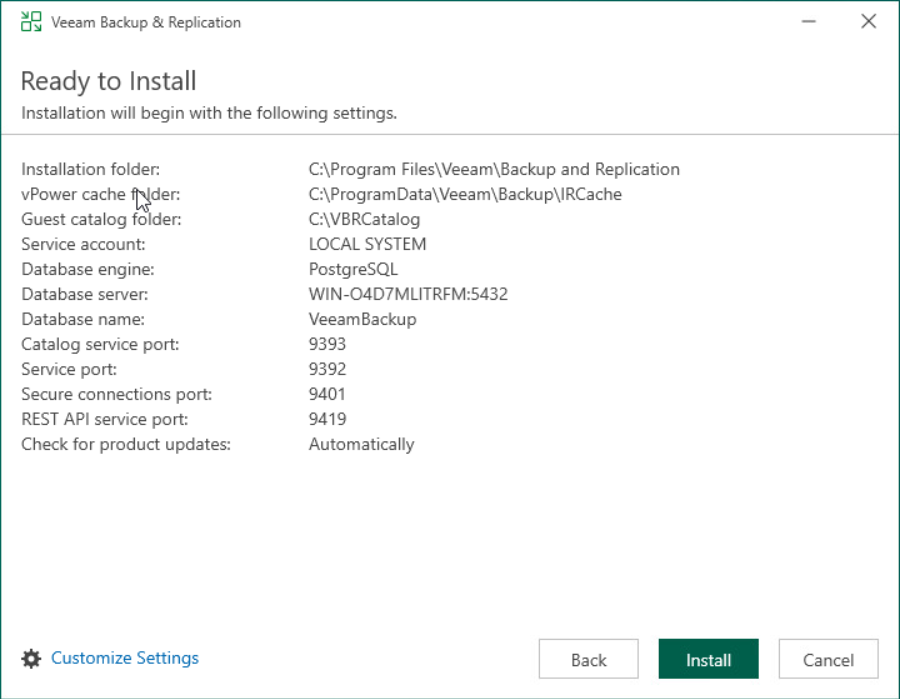
Fig 4: Executing InstallationHình 4: Tiến trình cài đặt
Login Đăng nhập
- Select “Localhost” & Trust PC localChọn “Localhost” & Trust PC local
- Select “Sign in as current user” to proceedChọn “Sign in as current user” để tiếp tục
- Successfully access the main interfaceHoàn tất truy cập vào giao diện chính
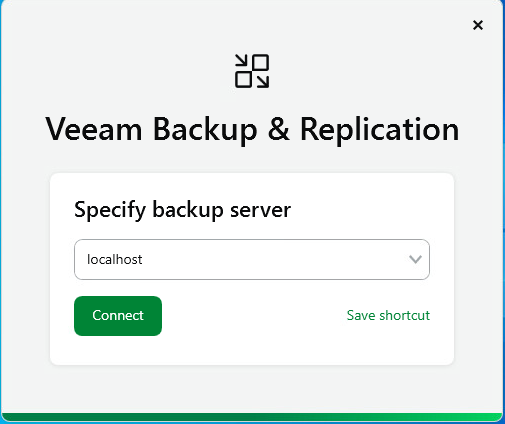
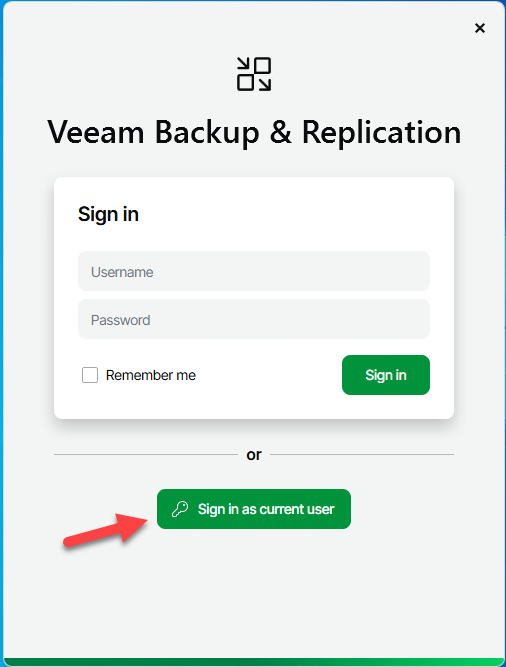
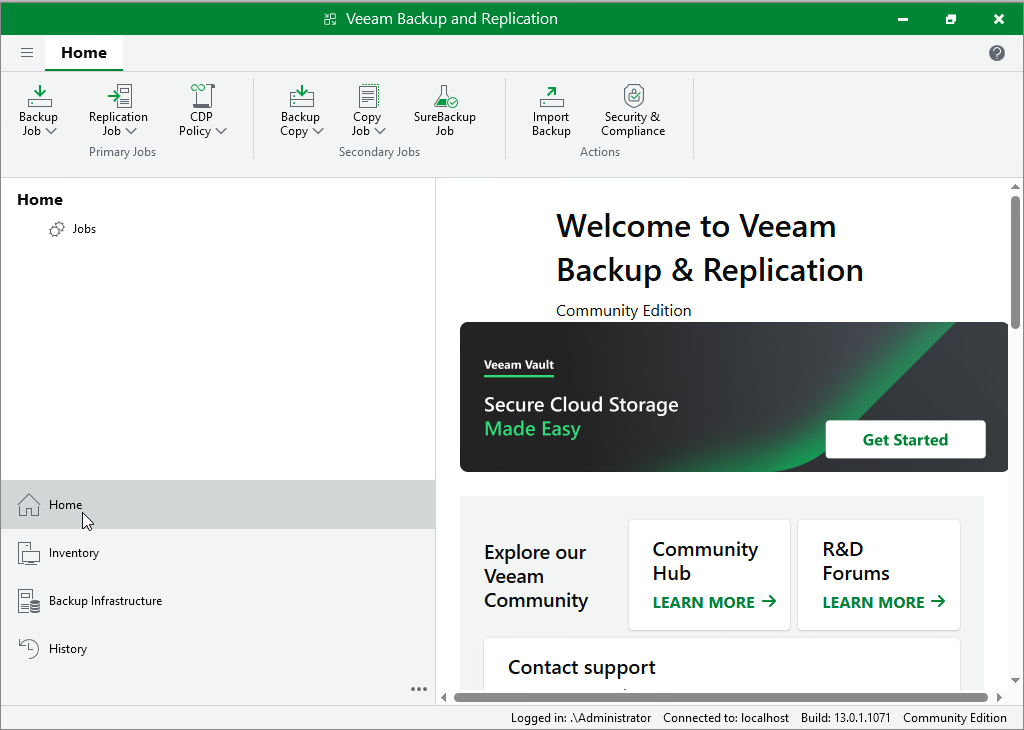
Fig 5: Main Veeam InterfaceHình 5: Giao diện chính Veeam sau khi đăng nhập
System Architecture Sơ đồ hệ thống
Mindmap Mindmap
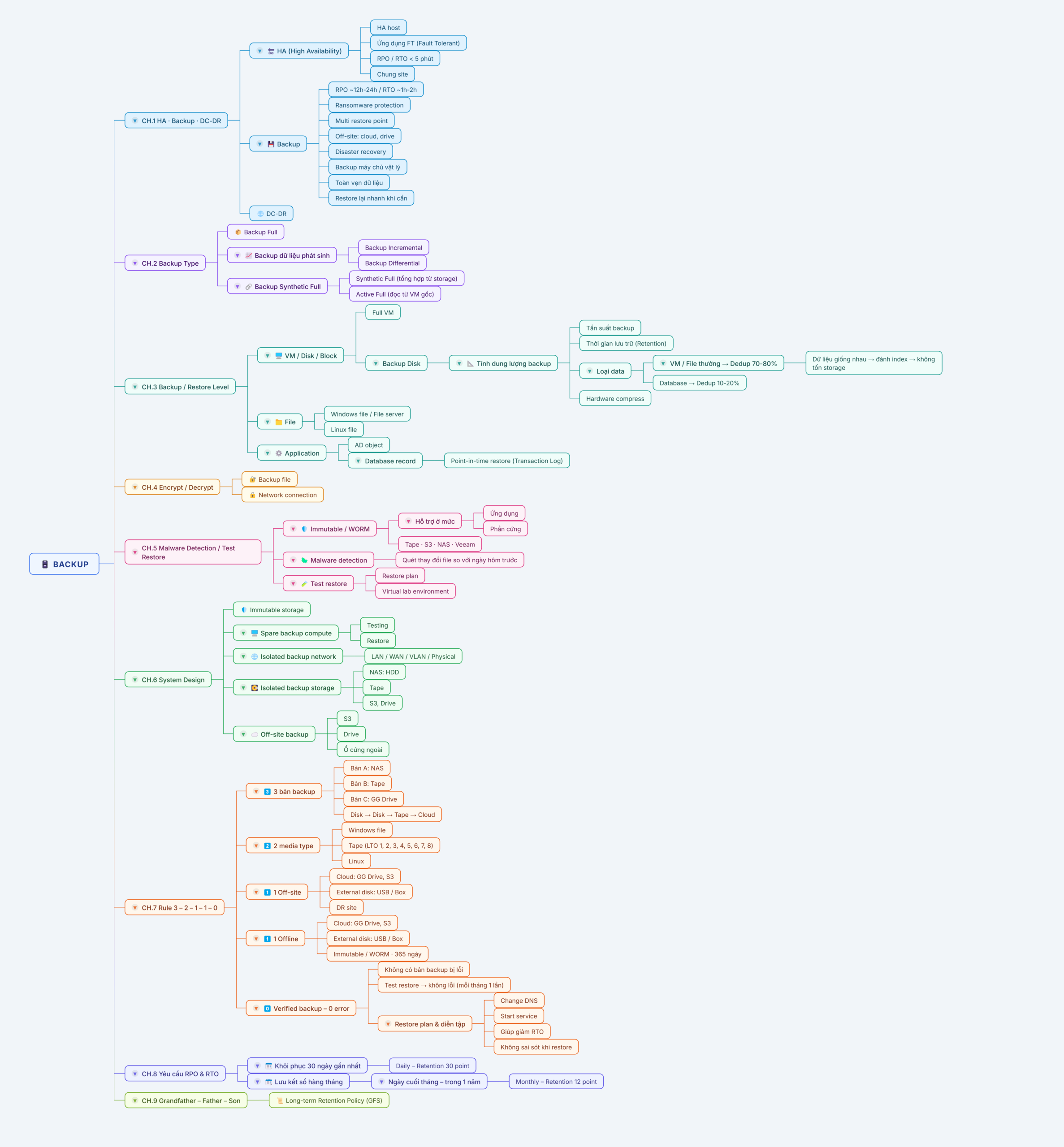
System Architecture MindmapSơ đồ tư duy kiến trúc hệ thống
Infrastructure Preparation Hạ tầng chuẩn bị
| Server NameTên máy | RoleVai trò | OSHệ điều hành | IP AddressĐịa chỉ IP |
|---|---|---|---|
| Veeam-Server | Veeam Backup & Replication ServerVeeam Backup & Replication Server | Windows Server 2022 | 10.10.93.222 |
| AD-Server | Active Directory (Domain Controller)Máy chủ Active Directory (Domain Controller) | Windows Server 2022 | 10.10.93.223 |
| SQL-Server | MSSQL Database ServerMáy chủ MSSQL Database | Windows Server 2022 | 10.10.93.224 |
| Linux-FS | File Server (Data > 2 TB)Máy chủ File Server (Dữ liệu > 2 TB) | Debian 12 (Bookworm) | 10.10.93.225 |
| Synology NAS | Primary Backup Storage (Physical)Lưu trữ backup chính (Vật lý) | Synology DSM 7.x | 10.10.93.190 |
| ESXi Host | HypervisorMáy chủ ảo hóa (Hypervisor) | VMware ESXi 7.x/8.x | 10.10.93.201 |
Install VMware tools for all VMs Cài đặt VMware tools cho toàn bộ máy ảo
Add required Servers and hosts Add các Server và host cần thiết
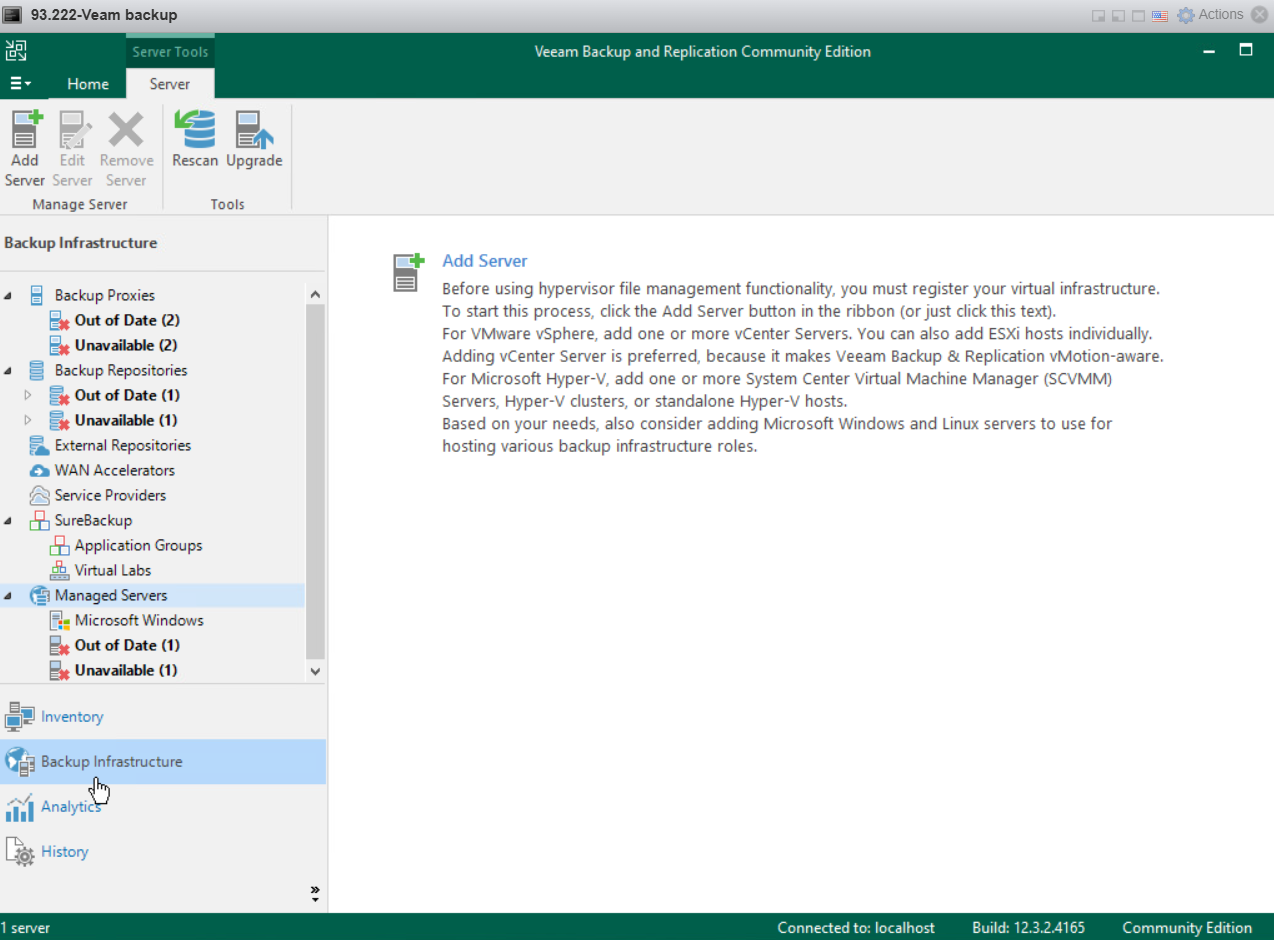
Step 1Bước 1
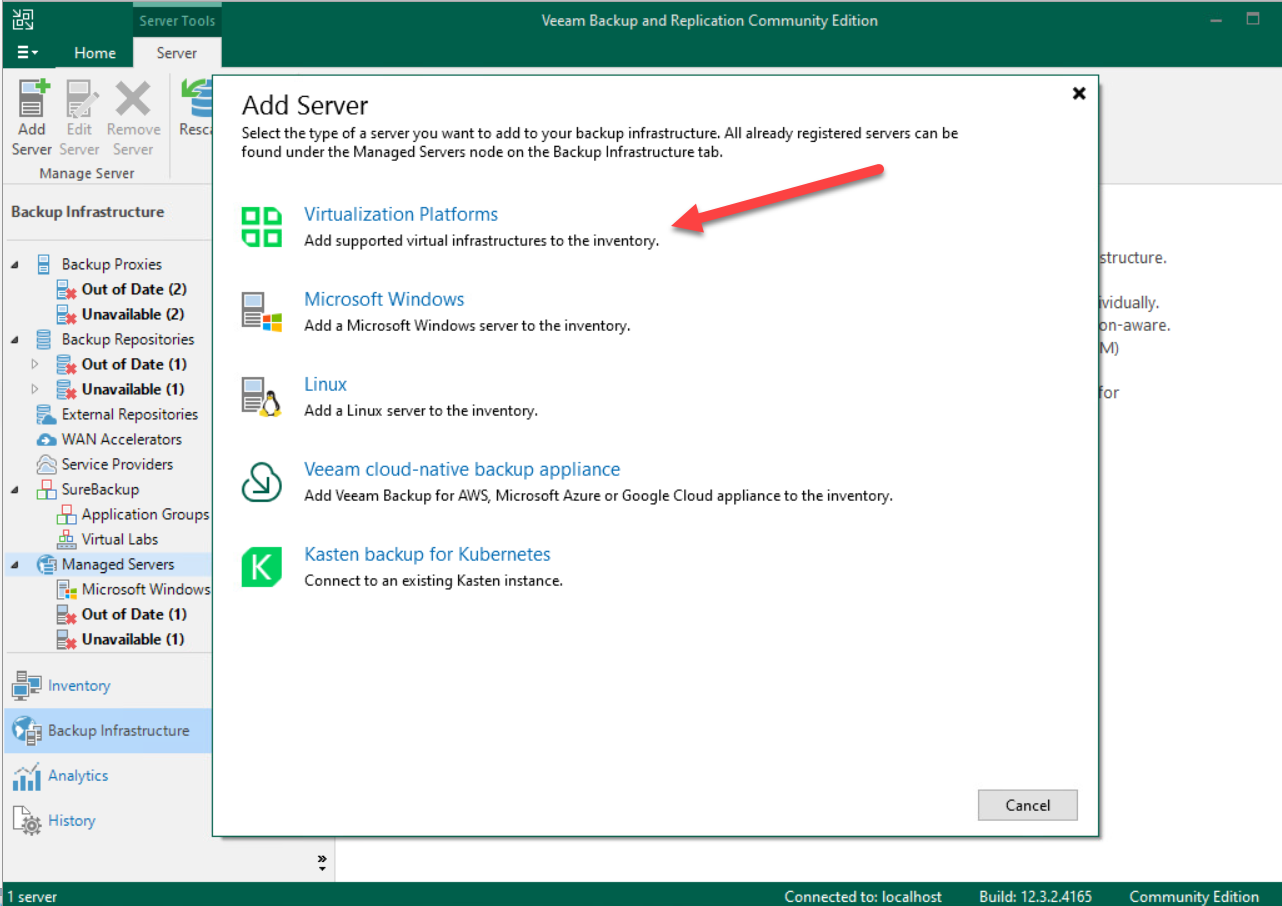
Step 2Bước 2
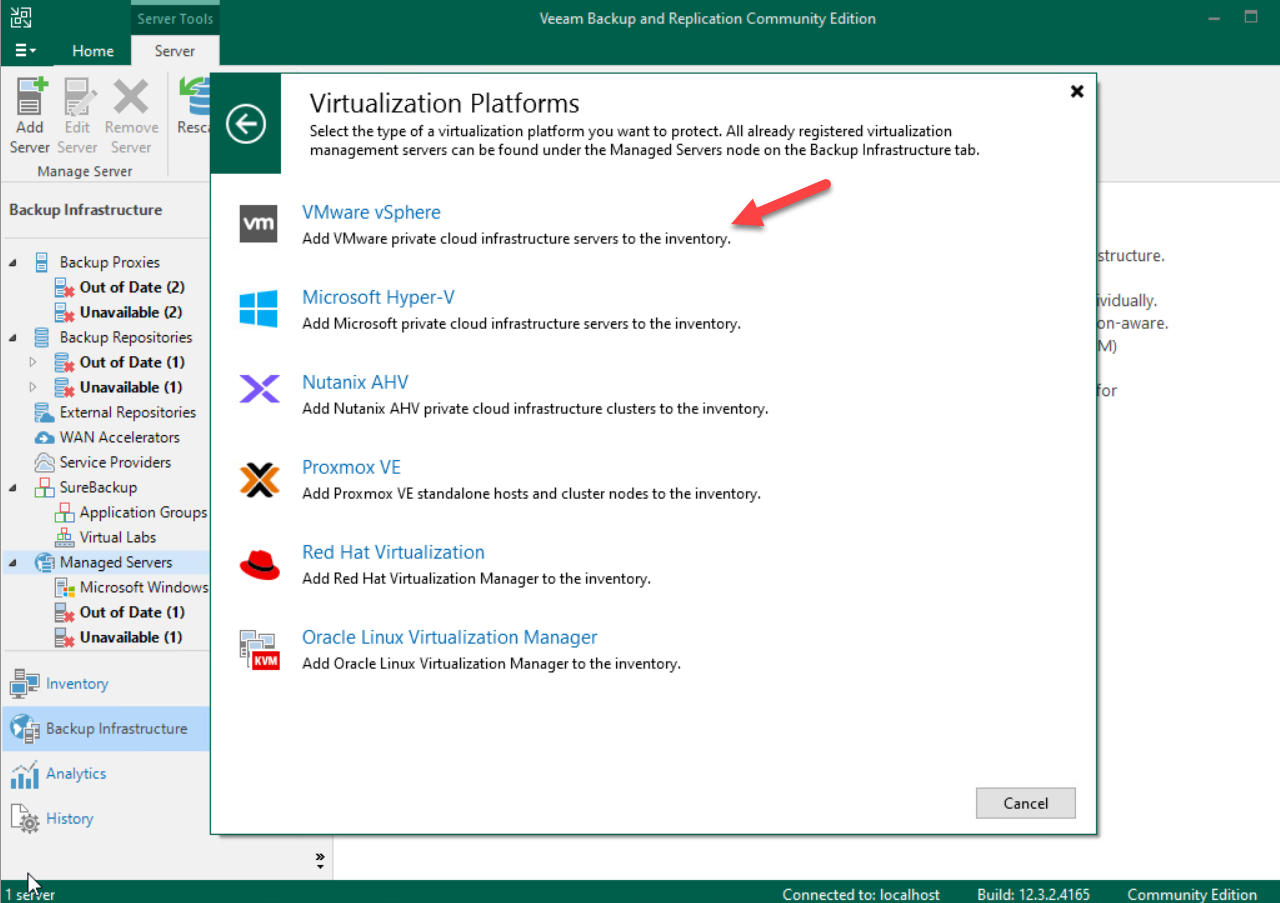
Step 3Bước 3
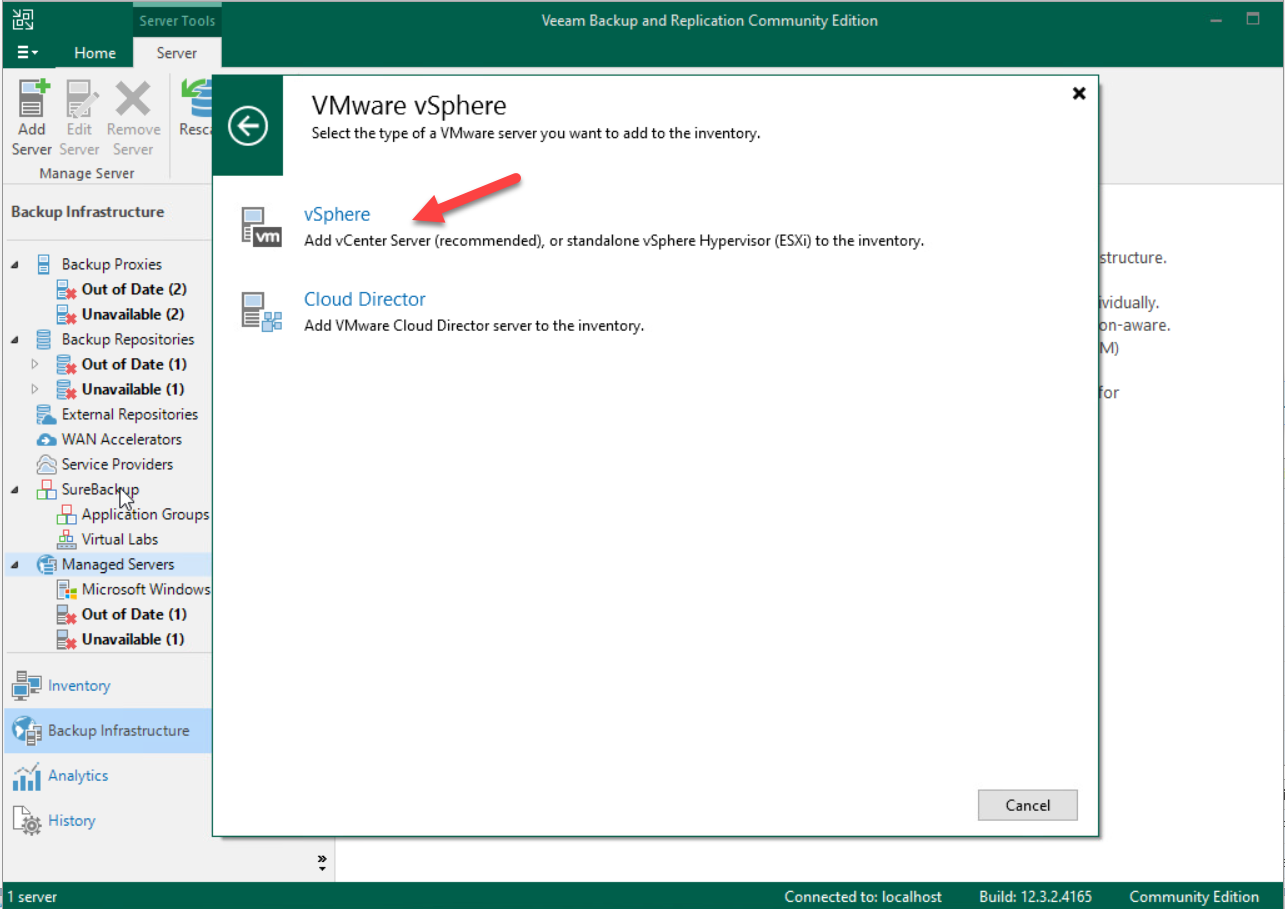
Step 4Bước 4
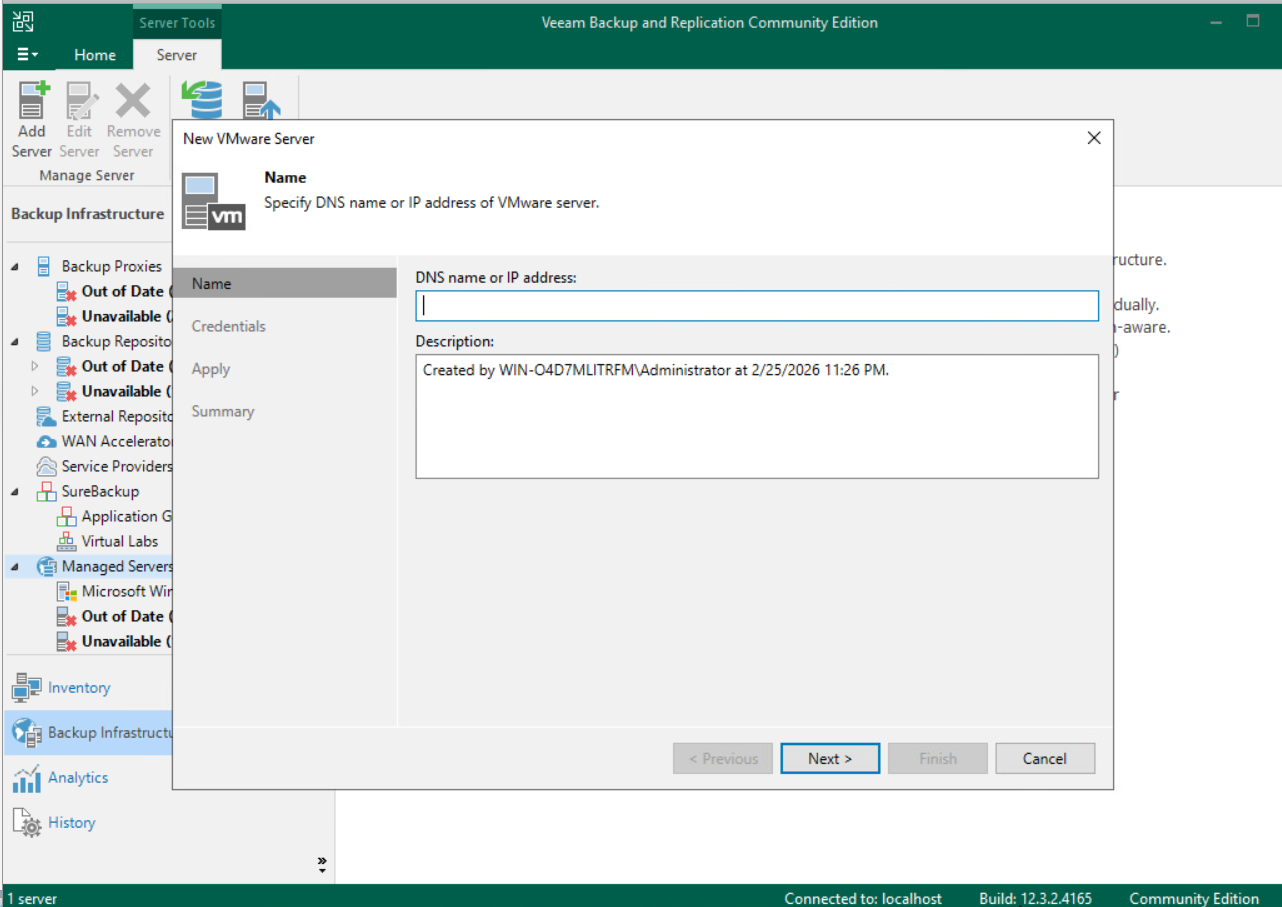
Step 5Bước 5
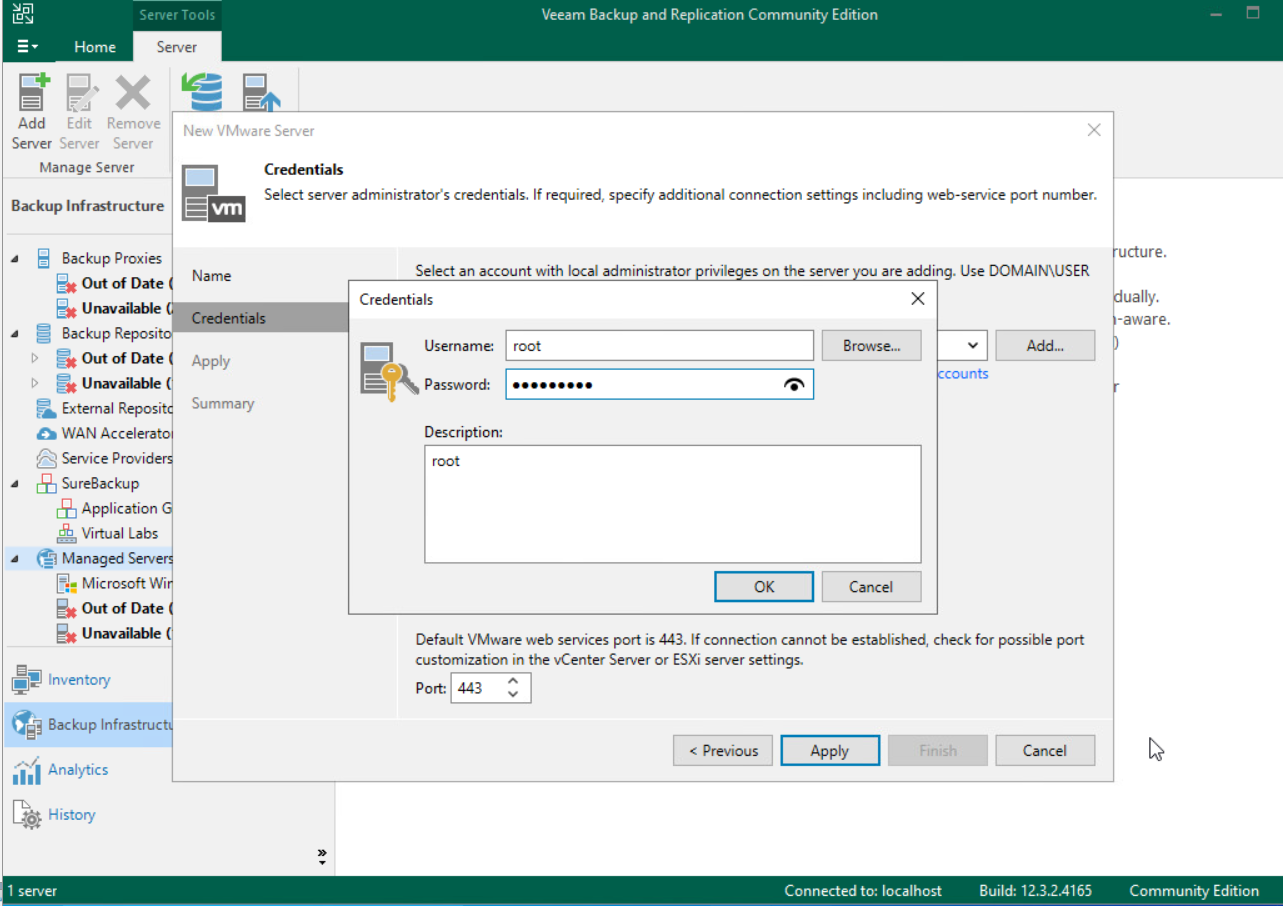
Step 6Bước 6
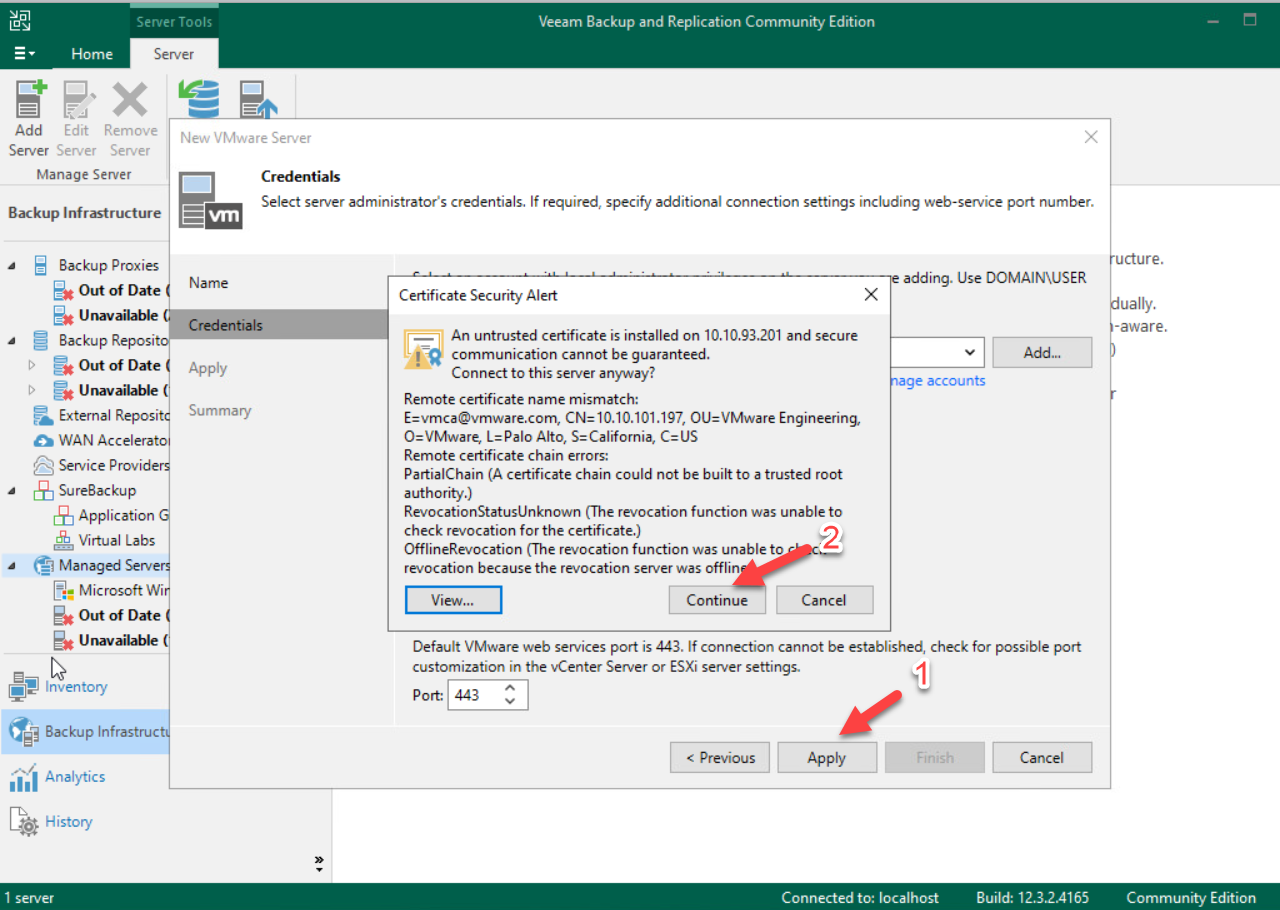
Step 7Bước 7
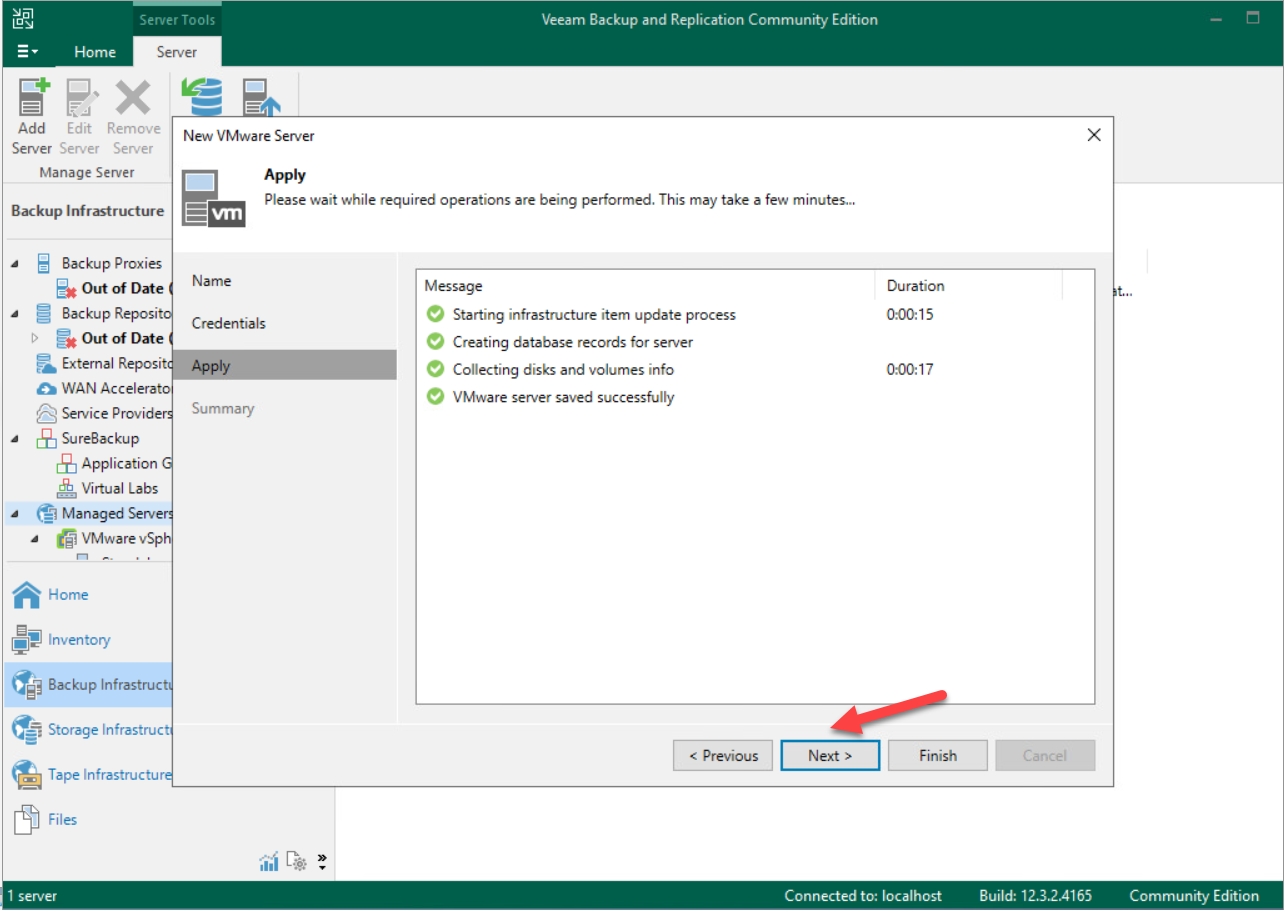
Step 8Bước 8
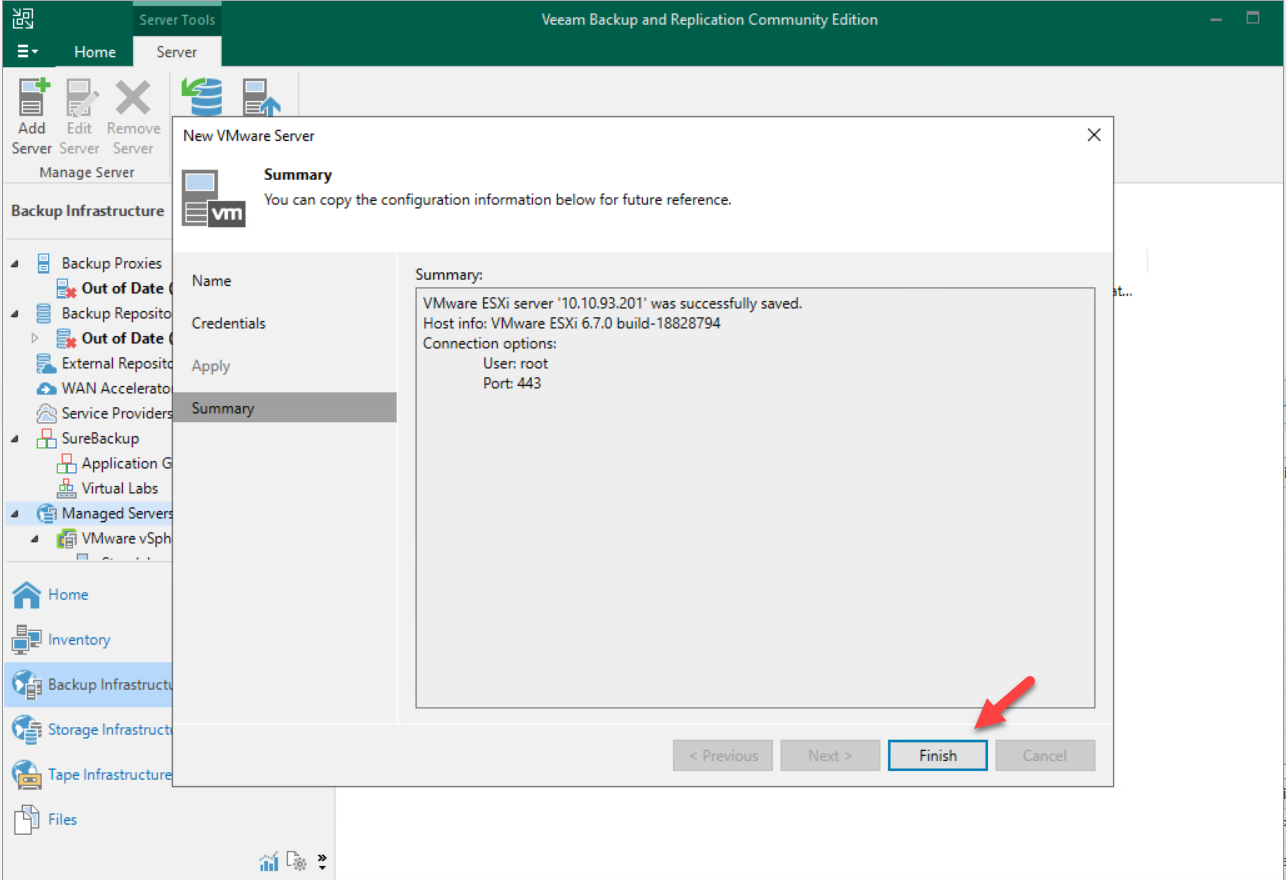
Step 9Bước 9
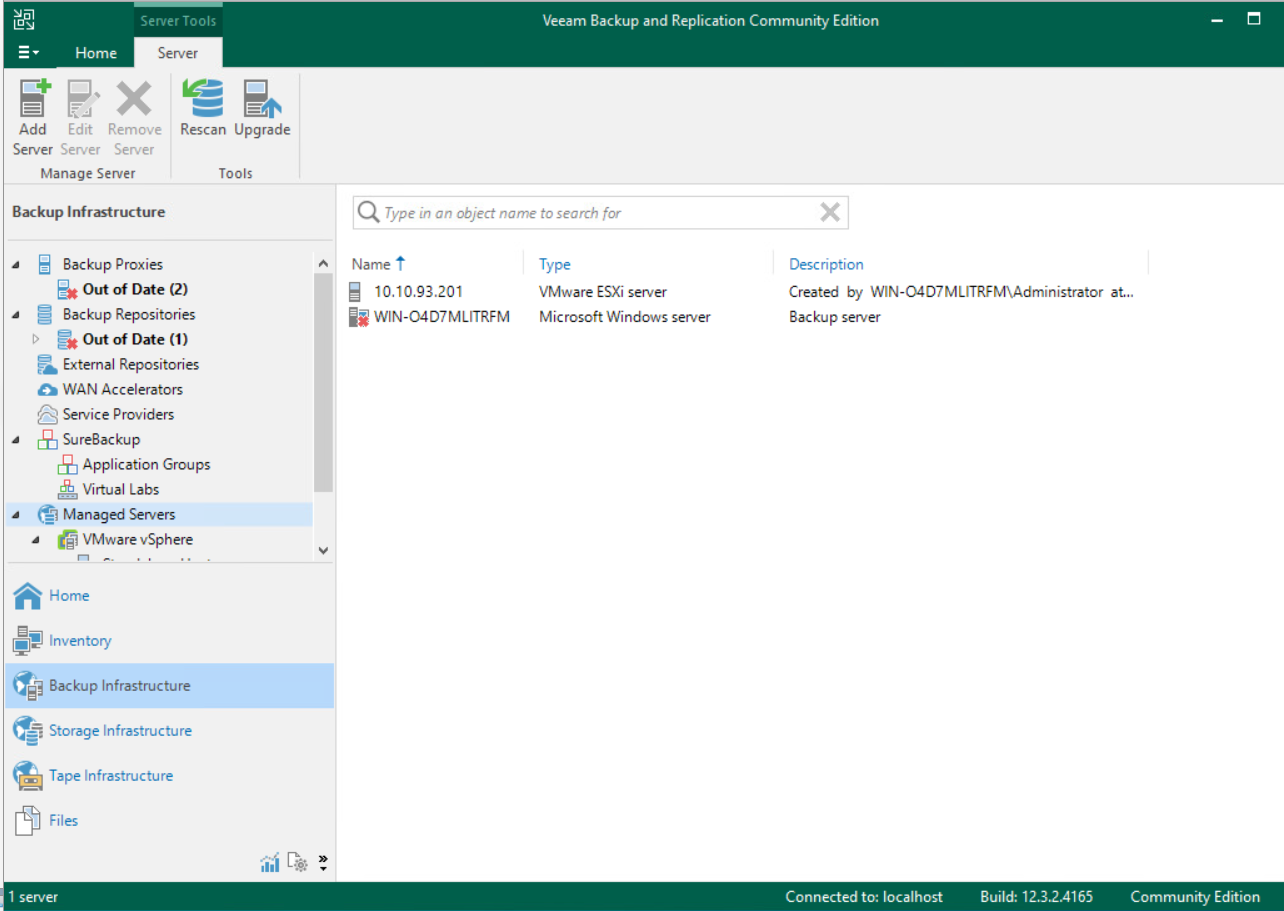
Step 10Bước 10
Add NAS as Backup Repository (if applicable) Add NAS làm Backup Repository (nếu có)
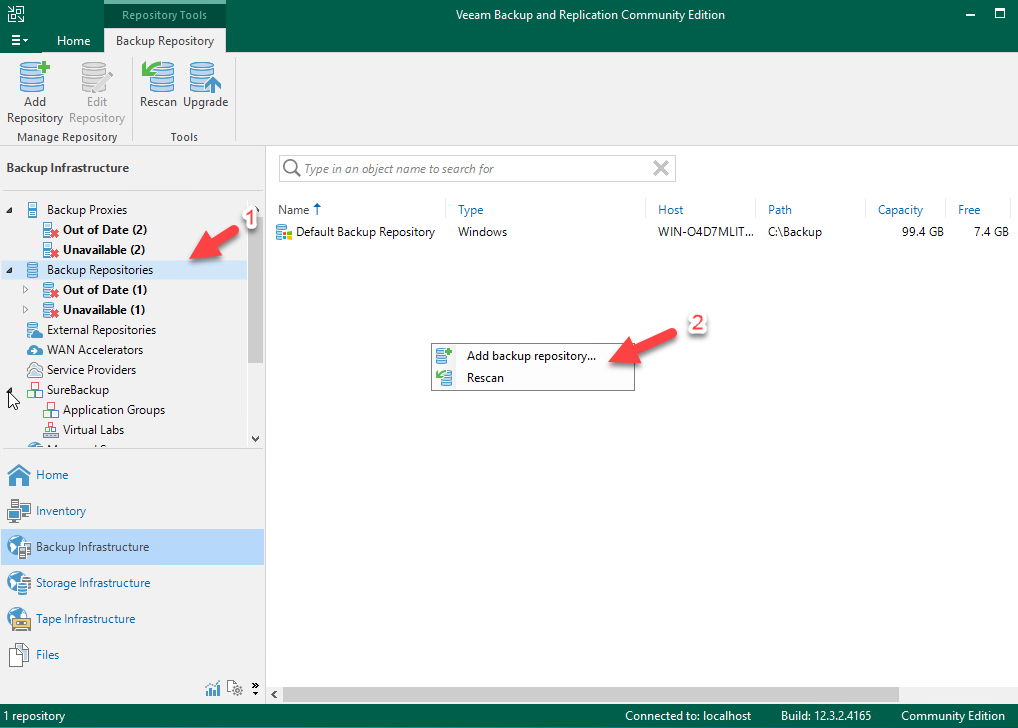
Step 1Bước 1
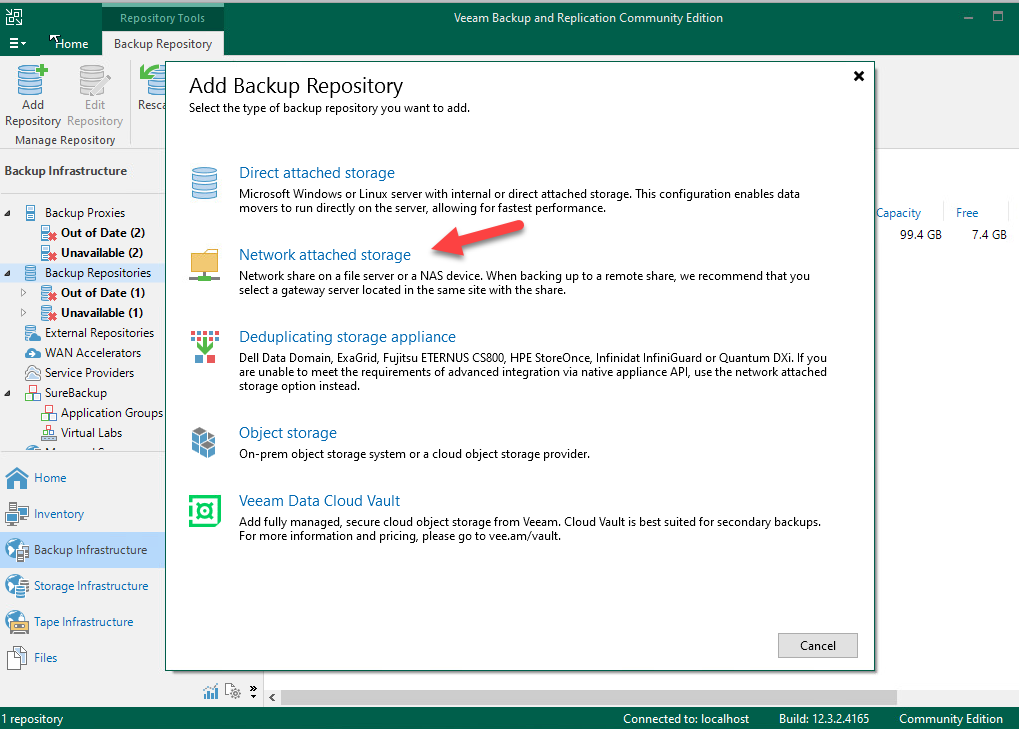
Step 2Bước 2
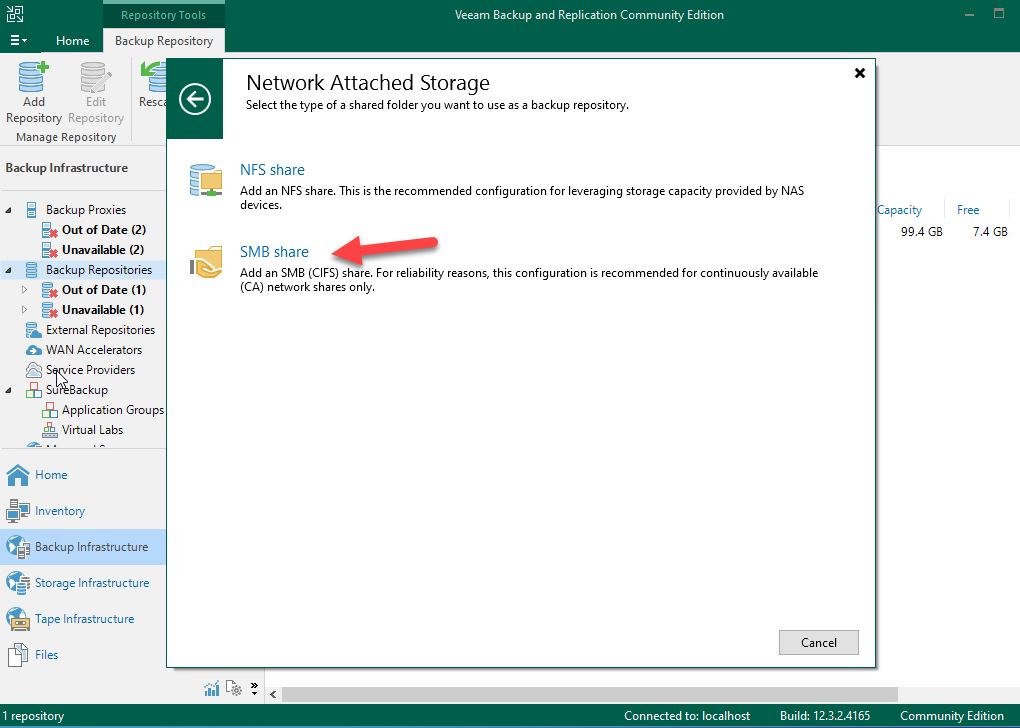
Step 3Bước 3
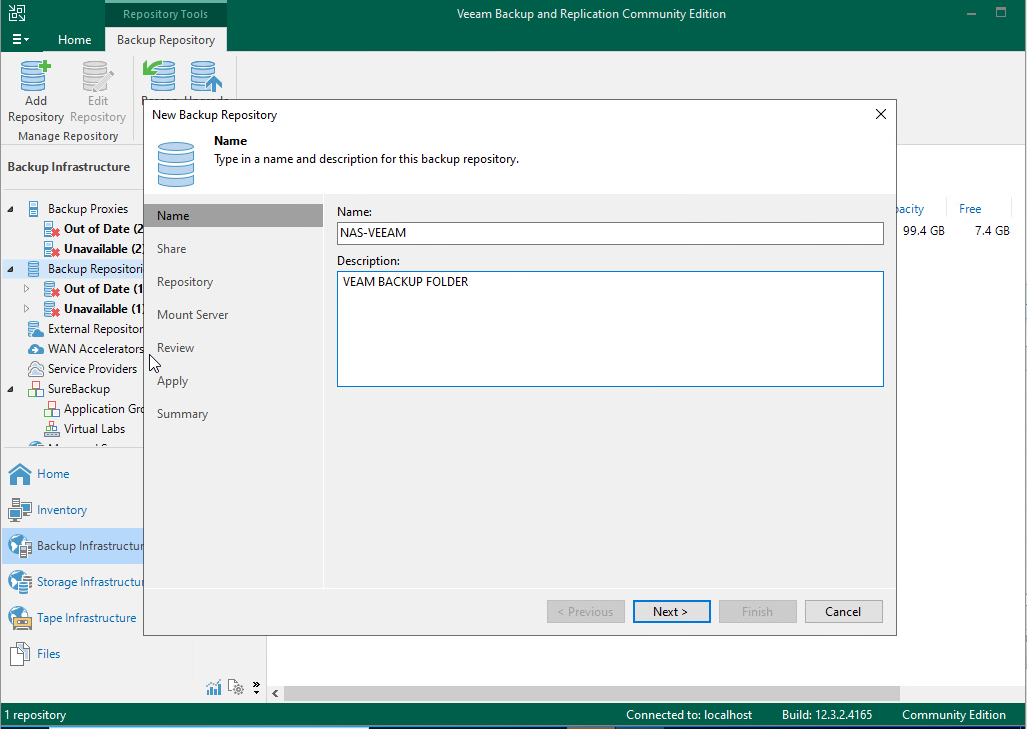
Step 4Bước 4
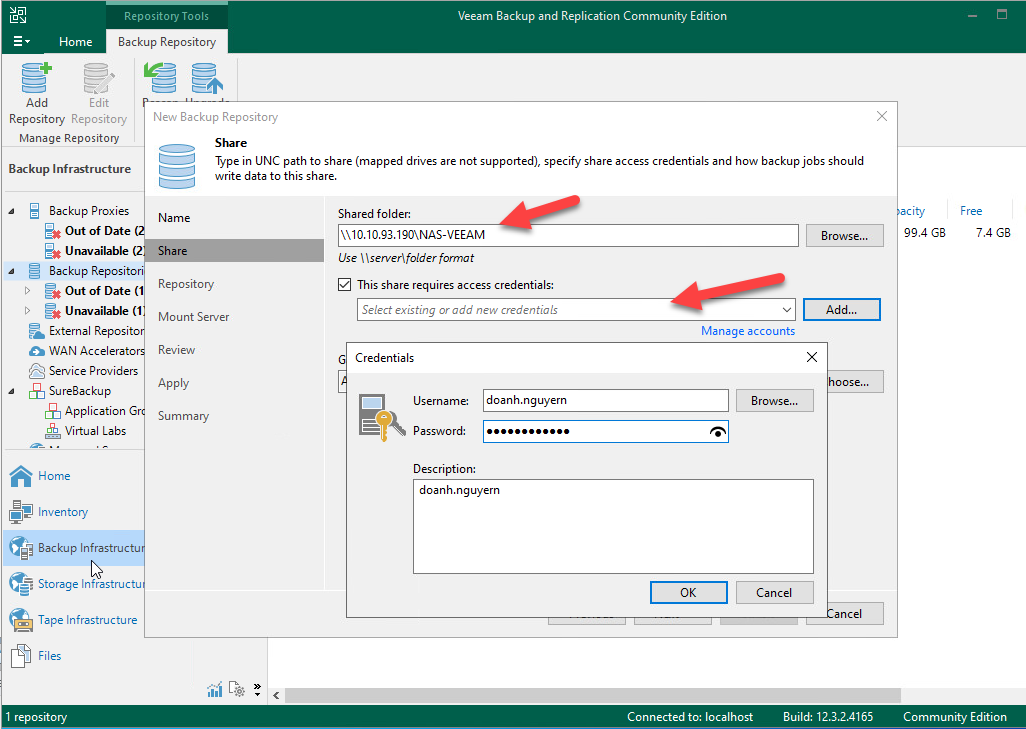
Step 5Bước 5
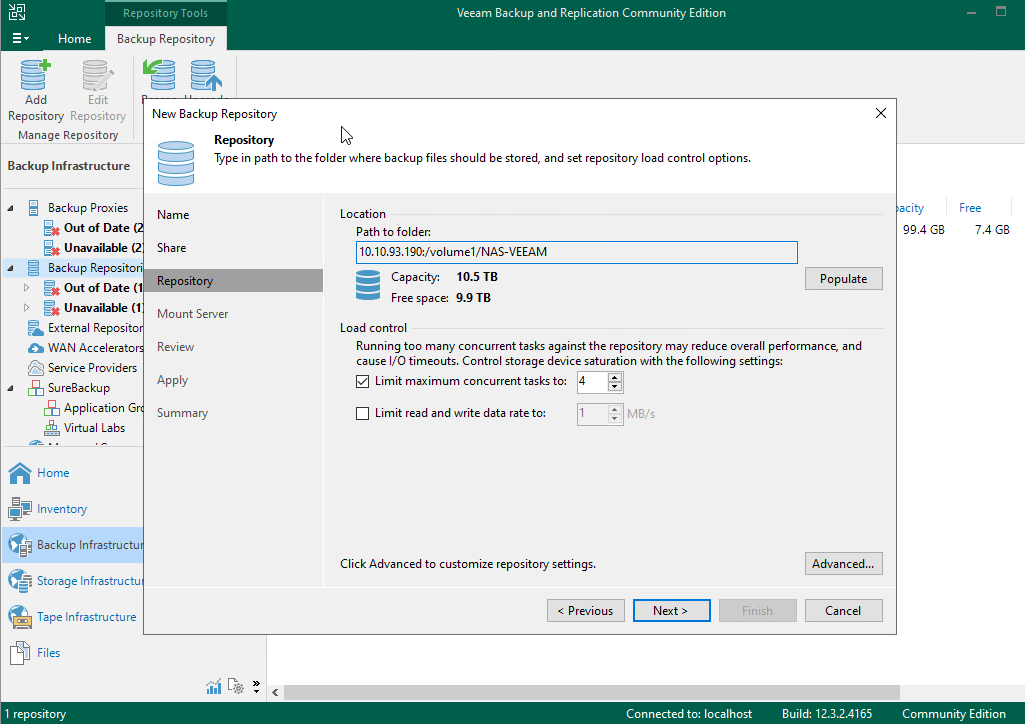
Step 6Bước 6
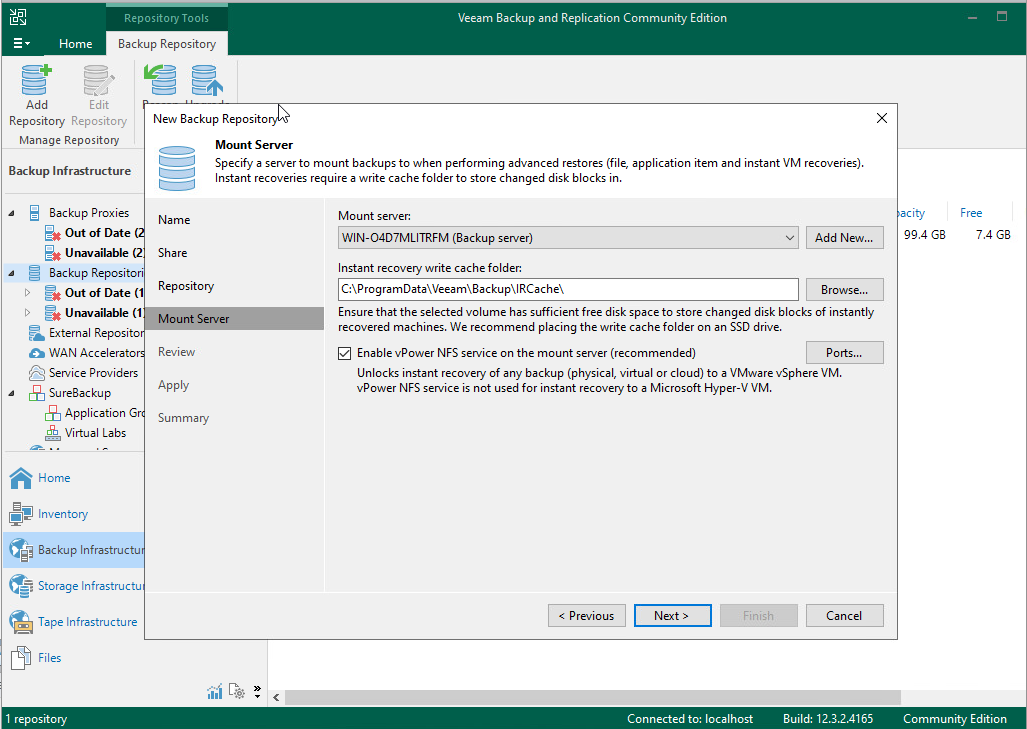
Step 7Bước 7
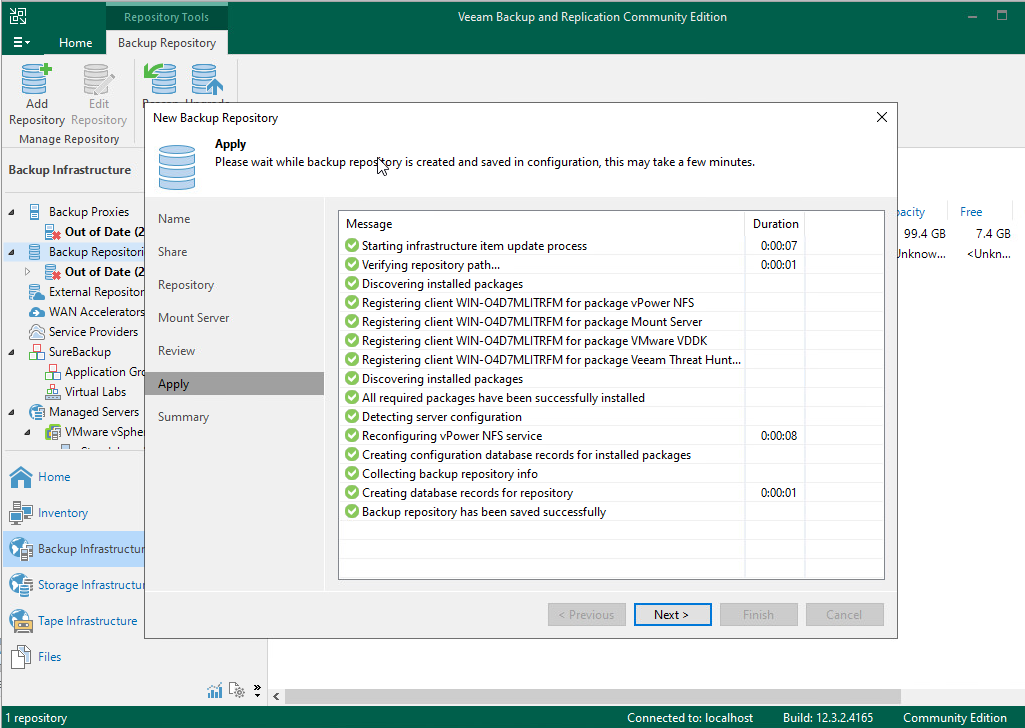
Step 8Bước 8
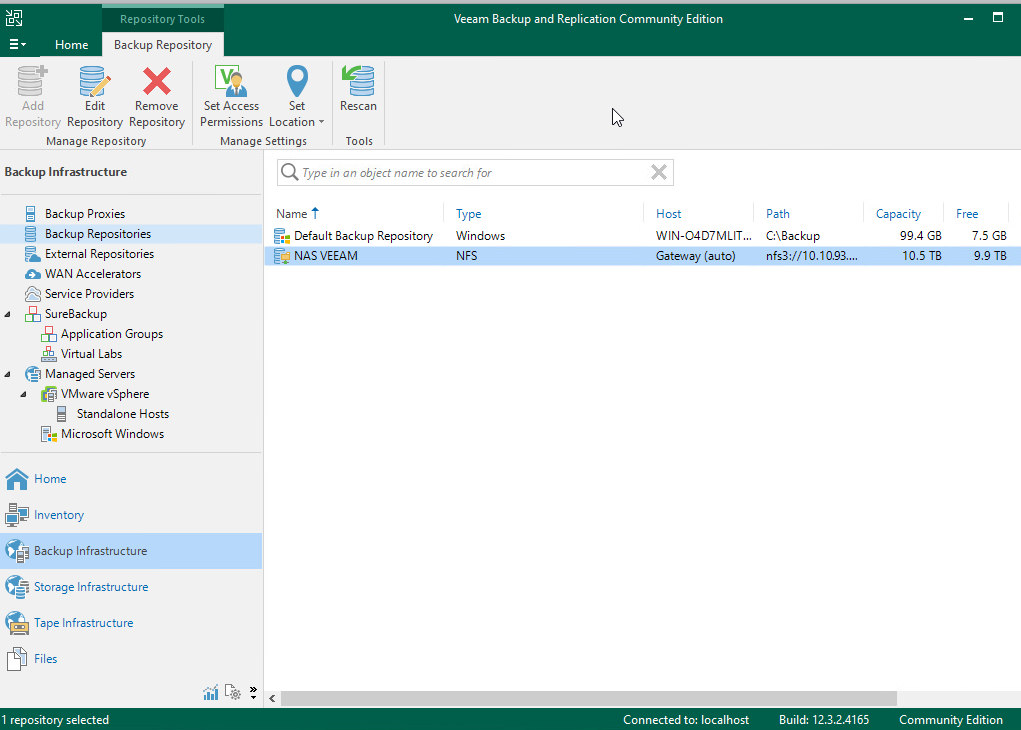
Step 9Bước 9
CHAPTER 01: HA-Backup-DR-DC Site CHƯƠNG 01: HA-Backup-DR-DC Site
Overview Tổng quan
| CriteriaTiêu chí | HA (High Availability) | Backup | DR (Disaster Recovery) |
|---|---|---|---|
| PurposeMục đích | Avoid downtimeTránh downtime | Avoid data lossTránh mất dữ liệu | Disaster recoveryKhôi phục khi thảm họa |
| Operation MechanismCách hoạt động | Auto failover between hostsFailover tự động giữa host | Periodic data copiesLưu bản sao dữ liệu định kỳ | Has secondary site (DR Site)Có site dự phòng (DR Site) |
| DowntimeThời gian gián đoạn | Almost 0Gần như 0 | Downtime during restoreCó downtime khi restore | Depends on DR planPhụ thuộc DR plan |
| Data ProtectionBảo vệ dữ liệu | Does not protect against accidental deletionKhông bảo vệ xóa nhầm | YesCó | YesCó |
| Anti-RansomwareChống ransomware | NoKhông | YesCó | YesCó |
| When to useKhi nào dùng | Host error, VM crashLỗi host, crash VM | Accidental deletion, DB error, virusXóa nhầm, lỗi DB, virus | DC fire, full site power outageCháy DC, mất điện toàn site |
| RPO | RPO ≈ 0 (HA & FT) | Depends on backup schedulePhụ thuộc lịch backup | Per replicationTheo replication |
| RTO | Few seconds – minutesVài giây – vài phút | ~1h-2h (depends on restore)~1h-2h (phụ thuộc restore) | Depends on DR designPhụ thuộc DR design |
| CostChi phí | High (multiple hosts)Cao (nhiều host) | MediumTrung bình | Very High (2 sites)Rất cao (2 site) |
| ScopePhạm vi | Same siteCùng site | Same or cross siteCùng hoặc khác site | Must be cross siteBắt buộc khác site |
Notes:Ghi chú:
- RPO (Recovery Point Objective): Maximum acceptable data loss, measured in time.Lượng dữ liệu tối đa có thể chấp nhận mất, tính theo thời gian.
- RTO (Recovery Time Objective): Maximum allowable downtime, calculated from the moment of failure to system recovery.Thời gian tối đa cho phép hệ thống ngừng hoạt động, tính từ lúc xảy ra sự cố đến lúc hệ thống chạy lại.
HA — High Availability
- Goal:Mục tiêu: Ensure system Uptime.Đảm bảo hệ thống luôn hoạt động (Uptime).
- Protection causes:Nguyên nhân sự cố bảo vệ:
- Host failure
- Hardware failure
- VM crash
- Operation Mechanism:Cơ chế hoạt động:
- Cluster multiple physical hosts.Cluster nhiều physical host.
- When 1 host fails → VM auto restarts on another host.Khi 1 host lỗi → VM tự động restart trên host khác.
- If using FT (Fault Tolerance) → VM mirror real-time.Nếu dùng FT (Fault Tolerance) → VM mirror real-time.
- Technical Metrics:Chỉ số kỹ thuật:
- RPO ≈ 0
- RTO: few minutes (Normal HA)vài phút (HA thường)
- FT: RPO = 0, RTO ≈ 0
- Limitations:Hạn chế:
- Does not protect against ransomware.Không chống ransomware.
- Does not protect against accidental data deletion.Không chống xóa nhầm dữ liệu.
- No protection during full site fire/power outage.Không bảo vệ khi cháy/mất điện toàn site.
Backup
- Goal:Mục tiêu: Ensure Recoverability.Đảm bảo khả năng khôi phục dữ liệu (Recoverability).
- Protection causes:Nguyên nhân sự cố bảo vệ:
- Ransomware
- Human error (accidental deletion)Human error (xóa nhầm)
- Data corruption
- Logical failure (DB error)Logical failure (DB lỗi)
- Operation Mechanism:Cơ chế hoạt động:
- Create point-in-time copies.Tạo bản sao point-in-time.
- Store multiple restore points.Lưu nhiều restore point.
- Can store local + offsite + cloud.Có thể lưu local + offsite + cloud.
- Technical Metrics:Chỉ số kỹ thuật:
- RPO = depends on backup schedulephụ thuộc lịch backup
- RTO = depends on restore timephụ thuộc thời gian restore
- Limitations:Hạn chế:
- Does not guarantee uptime.Không đảm bảo uptime.
- Must restore to run again.Phải restore mới chạy lại được.
DC-DR – Data Center Disaster Recovery Site
- Goal:Mục tiêu: Maintain operation during full site disaster.Duy trì hoạt động khi thảm họa toàn site.
- Protection causes:Nguyên nhân sự cố bảo vệ:
- Data Center FireCháy Data Center
- FloodsLũ lụt
- Wide-area power outageMất điện diện rộng
- Full site physical disasterSự cố vật lý toàn site
- Operation Mechanism:Cơ chế hoạt động:
- Has Secondary Site (DC-DR Site).Có Secondary Site (DC-DR Site).
- Near real-time replication or restore from backup.Replication gần real-time hoặc restore từ backup.
- Has DR Plan (Runbook).Có DR Plan (Runbook).
- Technical Metrics:Chỉ số kỹ thuật:
- RPO: low if using replicationthấp nếu dùng replication
- RTO: depends on DR designphụ thuộc thiết kế DR
- Limitations:Hạn chế:
- Very high cost (maintaining 2 sites).Chi phí rất cao (duy trì 2 site).
- Complex operations.Phức tạp trong vận hành.
- Requires DR Plan and periodic testing.Cần DR Plan và diễn tập định kỳ.
CHAPTER 02: BACKUP TYPE CHƯƠNG 02: BACKUP TYPE
Overview Tổng quan
| Backup TypeLoại Backup | Compared toSo sánh với | CapacityDung lượng | Backup SpeedTốc độ backup | Restore SpeedTốc độ restore |
|---|---|---|---|---|
| Full | IndependentKhông phụ thuộc | LargestLớn nhất | SlowestChậm nhất | FastestNhanh nhất |
| Incremental | Previous backupBản backup trước | SmallestNhỏ nhất | FastestNhanh nhất | SlowestChậm nhất |
| Differential | Last Full backupFull gần nhất | MediumTrung bình | MediumTrung bình | MediumTrung bình |
| Synthetic Full | Aggregated from storageTổng hợp từ storage | LargeLớn | FastNhanh | FastestNhanh nhất |
Full Backup Backup Full
- Goal:Mục tiêu: Create a full copy of all data at the job runtime.Tạo bản sao toàn bộ dữ liệu tại thời điểm chạy job.
- Mechanism:Cơ chế hoạt động:
- Reads all data from source VM.Đọc toàn bộ dữ liệu từ VM gốc.
- Independent of any previous backups.Không phụ thuộc bất kỳ bản backup nào trước đó.
- Mandatory foundation for any backup chain.Là nền tảng bắt buộc cho mọi chuỗi backup.
- Metrics:Chỉ số kỹ thuật:
- Capacity: LargestDung lượng: lớn nhất
- Backup speed: SlowestTốc độ backup: chậm nhất
- Restore speed: Fastest (needs only 1 file)Tốc độ restore: nhanh nhất (chỉ cần 1 file)
- Limitations:Hạn chế:
- Consumes heavy storage.Tốn dung lượng storage.
- Creates heavy load on production system.Tạo tải lớn lên hệ thống production.
- Usually runs periodically (weekly/monthly).Thường chỉ chạy định kỳ (hàng tuần hoặc hàng tháng).
Incremental vs Differential Backup Backup dữ liệu phát sinh
Backup Incremental
- Goal:Mục tiêu: Only backup data changed since the LAST backup (Full or Inc).Chỉ backup dữ liệu thay đổi kể từ lần backup gần nhất (Full hoặc Incremental trước).
- Mechanism:Cơ chế hoạt động:
- Uses CBT (Changed Block Tracking) to identify blocks.Dùng CBT (Changed Block Tracking) để xác định block thay đổi.
- Chain: Full → Inc → Inc → Inc…Chuỗi: Full → Inc → Inc → Inc → …
- Limitations:Hạn chế: If 1 file in the chain breaks, the whole restore chain is lost.Nếu 1 bản trong chuỗi bị hỏng → mất toàn bộ chuỗi restore.
Monday: Full (100 GB)
Tuesday: Inc (+5 GB changed from Mon)
Wednesday: Inc (+3 GB changed from Tue)
Thursday: Inc (+4 GB changed from Wed)
→ Restore Thursday = Full + Inc Tue + Inc Wed + Inc ThuThứ 2: Full (100 GB)
Thứ 3: Inc (+5 GB thay đổi từ T2)
Thứ 4: Inc (+3 GB thay đổi từ T3)
Thứ 5: Inc (+4 GB thay đổi từ T4)
→ Restore T5 = Full + Inc T3 + Inc T4 + Inc T5
Backup Differential
- Goal:Mục tiêu: Only backup data changed since the LAST FULL backup.Chỉ backup dữ liệu thay đổi kể từ lần Full backup gần nhất.
- Mechanism:Cơ chế hoạt động:
- Always compares to nearest Full, ignores previous Diffs.Luôn so sánh với Full gần nhất, không quan tâm Differential trước.
- Chain: Full → Diff → Diff → Diff…Chuỗi: Full → Diff → Diff → Diff → …
Monday: Full (100 GB)
Tuesday: Diff (+5 GB compared to Full Mon)
Wednesday: Diff (+8 GB compared to Full Mon)
Thursday: Diff (+12 GB compared to Full Mon)
→ Restore Thursday = Full + Diff Thu (Only 2 files)Thứ 2: Full (100 GB)
Thứ 3: Diff (+5 GB so với Full T2)
Thứ 4: Diff (+8 GB so với Full T2)
Thứ 5: Diff (+12 GB so với Full T2)
→ Restore T5 = Full + Diff T5 (chỉ 2 bản)
Synthetic Full Backup Backup Synthetic Full
Synthetic Full (Storage Aggregation)Synthetic Full (tổng hợp từ storage)
- Goal:Mục tiêu: Create new Full without reading from source VM.Tạo bản Full mới mà không đọc dữ liệu từ VM gốc.
- Mechanism:Cơ chế hoạt động: Veeam reads old Full + all Incrementals on storage to merge into a new Full.Veeam đọc Full cũ + tất cả Incremental trên storage, tổng hợp thành Full mới hoàn chỉnh.
- Pros:Ưu điểm: Zero load on production, fast restore like normal Full.Không ảnh hưởng production (tải = 0), vẫn có bản Full đầy đủ để restore nhanh.
Active Full (Source VM Reading)Active Full (đọc từ VM gốc)
- Goal:Mục tiêu: Create new Full by reading all data from source VM.Tạo bản Full mới bằng cách đọc toàn bộ dữ liệu từ VM gốc.
- When to use:Dùng khi nào: Incremental chain is too long, need to reset clean.Chuỗi Incremental quá dài cần reset, hoặc nghi ngờ chuỗi backup có vấn đề.
| CriteriaTiêu chí | Active Full | Synthetic Full |
|---|---|---|
| Data SourceNguồn dữ liệu | Reads from source VMĐọc từ VM gốc | Aggregated from storageTổng hợp từ storage |
| Production LoadTải lên production | HighCao | NoneKhông có |
| Time takenThời gian | LongLâu | FasterNhanh hơn |
| When to useDùng khi nào | Reset clean chainReset chuỗi sạch | Weekly backupsBackup hàng tuần |
CHAPTER 03: BACKUP/RESTORE LEVEL CHƯƠNG 03: BACKUP/RESTORE LEVEL
Overview Tổng quan
| LevelCấp độ | ScopePhạm vi | Restore SpeedTốc độ restore | Typical Use CaseUse case điển hình |
|---|---|---|---|
| VM / Disk / Block | Entire VM or diskToàn bộ VM hoặc disk | FastestNhanh nhất | Server crash, ransomwareServer crash, ransomware |
| File | Folders, single filesThư mục, file đơn lẻ | MediumTrung bình | Accidental file deletionXóa nhầm file |
| Application | AD Objects, SQL recordsObject AD, record SQL | Most GranularChi tiết nhất | Deleted user, wrong DB editXóa nhầm user, sửa sai DB |
VM / Disk / Block Level VM / Disk / Block Level
Full VM
- Goal:Mục tiêu: Restore entire VM to a past point-in-time.Khôi phục toàn bộ VM về một thời điểm trong quá khứ.
- Mechanism:Cơ chế hoạt động: Restores VMDK, config, OS, app, data. Supports Instant VM Recovery.Restore toàn bộ VMDK, cấu hình VM, OS, application, data. Hỗ trợ Instant VM Recovery.
Backup Disk
- Goal:Mục tiêu: Backup/restore individual virtual disks (VMDK/VHD).Backup/restore từng virtual disk (VMDK/VHD) riêng lẻ.
Capacity Planning Tính toán dung lượng backup (Capacity Planning)
Affected by 4 factors: Backup Frequency, Retention, Deduplication, and Hardware Compression. Có 4 yếu tố ảnh hưởng: Tần suất backup, Thời gian lưu trữ (Retention), Loại data (Deduplication), và Hardware Compress.
| Data TypeLoại data | Dedup ratio | ExamplesVí dụ |
|---|---|---|
| Normal VM / FilesVM / File thường | 70 – 80% | OS, template, Office filesOS, template, file Office |
| Database | 10 – 20% | SQL, Oracle, MongoDB |
Storage Formula:
Storage = Raw_Data x (1 – Dedup_Ratio) x (1 – Compress_Ratio) x Retention
Example (SQL Server 500GB, Retention 14, Dedup 15%):
Storage = 500 x (1 – 0.15) x 14 = 500 x 0.85 x 14 ≈ 5,950 GB ≈ 5.8 TBCông thức tính:
Storage = Data_gốc x (1 – Dedup_ratio) x (1 – Compress_ratio) x Retention
Ví dụ (SQL Server 500GB, Retention 14 bản, Dedup 15%):
Storage = 500 x (1 – 0.15) x 14 = 500 x 0.85 x 14 ≈ 5,950 GB ≈ 5.8 TB
File Level Restore File Level Restore
- Goal:Mục tiêu: Restore individual files or folders without restoring the entire VM.Phục hồi từng file hoặc thư mục mà không cần restore toàn bộ VM.
- Mechanism:Cơ chế hoạt động:
- Mount VMDK from backup.Mount VMDK từ bản backup.
- Browse file system, copy individual files out.Duyệt file system, copy từng file ra ngoài.
- No need to shut down production VM.Không cần tắt VM production.
- Includes:Bao gồm: Windows File / File Server & Linux File.Windows File / File Server & Linux File.
| CriteriaTiêu chí | Windows File Level Restore | Linux File Level Restore |
|---|---|---|
| GoalMục tiêu | Restore individual files/foldersRestore từng file/thư mục | Restore individual files/foldersRestore từng file/thư mục |
| Requires full VM restore?Cần restore full VM? | NoKhông | NoKhông |
| Prod VM ImpactẢnh hưởng VM production | No need to shut down VMKhông cần tắt VM | No need to shut down VMKhông cần tắt VM |
| Mount mechanismCơ chế mount | Mount VMDK directly from backupMount VMDK trực tiếp từ backup | Uses Linux Helper Appliance to mount VMDKDùng Linux Helper Appliance để mount VMDK |
| Filesystem SupportFilesystem hỗ trợ | NTFS, ReFS | ext4, XFS, Btrfs |
| Extra ConfigCấu hình thêm | None requiredKhông cần cấu hình thêm | Automatic, none requiredTự động, không cần cấu hình |
| Restore to original locationRestore về original location | YesCó | YesCó |
| Restore to different locationRestore về location khác | YesCó | YesCó |
| Typical Use CaseUse case điển hình |
|
|
Application Level Restore Application Level Restore
- Goal:Mục tiêu: Backup/restore at the object level inside the application — not raw files.Backup/restore ở mức object bên trong ứng dụng — không phải file thô.
- Mandatory Requirements:Yêu cầu bắt buộc:
- Enable Application-Aware Processing in Veeam.Bật Application-Aware Processing trong Veeam.
- Provide application credentials to Veeam.Cung cấp credentials của ứng dụng cho Veeam.
- Windows: interact with VSS (Volume Shadow Copy Service).Windows: tương tác với VSS (Volume Shadow Copy Service).
- Linux: freeze/thaw scripts before snapshot.Linux: freeze/thaw scripts trước khi snapshot.
- Categories:Phân loại: Divided into 2 main types: AD Object & Database Record.Được chia làm 2 loại là AD Object & Database Record.
| CriteriaTiêu chí | AD Object Restore | Database Record Restore |
|---|---|---|
| General Req.Yêu cầu chung | Enable App-Aware Processing + credentialsBật Application-Aware Processing + cung cấp credentials | Enable App-Aware Processing + credentialsBật Application-Aware Processing + cung cấp credentials |
| GoalMục tiêu | Granular restore: user / OU / GPORestore granular: user / OU / GPO | Restore record by point-in-timeRestore record theo point-in-time |
| Tool UsedCông cụ sử dụng | Veeam AD Explorer | Veeam + SSMS |
| MechanismCơ chế hoạt động | Mount backup → open via AD Explorer → restore directlyMount backup → mở bằng AD Explorer → restore object trực tiếp | VM backup + transaction logs → temp DB → extract recordDùng VM backup + transaction logs → restore DB tạm → extract record |
| Execution TimeThời gian thực hiện | Few minutesVài phút | 15–30 minutes15–30 phút |
| Prod. ImpactẢnh hưởng production | No DC reboot requiredKhông cần reboot DC | Restores to temp DB, no impact on prod DBRestore ra DB tạm, không ảnh hưởng DB production |
| RPO | Based on backup scheduleTheo lịch backup | < 15 mins (log backup every 15 mins)< 15 phút (log backup mỗi 15 phút) |
| Typical Use CaseUse case điển hình | Accidental deletion of user, OU, GPOXóa nhầm user, OU, GPO | Accidental deletion of SQL Database recordXóa nhầm record trong SQL Database |
End of Part 01 Hết Phần 01
Stay tuned for the next part where we dive deeper into advanced configurations and practical DR Site setups! Hãy theo dõi phần tiếp theo để đi sâu hơn vào các cấu hình nâng cao và thực hành thiết lập DR Site!
Continue to Part 02 ➔ Xem tiếp Phần 02 ➔