Part 2: Proxmox VE Advanced Guide
Clustering, High Availability (HA) & Live Migration
Phần 2: Hướng dẫn nâng cao Proxmox VE
Cấu hình Cluster, HA & Di chuyển máy ảo (Migration) chuyên sâu
I. Comparison: Proxmox vs VMware I. So sánh Proxmox và VMware
1. Core Concepts
1. Khái niệm
| Item | VMware vSphere | Proxmox VE | Real-world Notes |
|---|---|---|---|
| Central Mgmt | vCenter Server | Proxmox Cluster | Proxmox: No separate server needed; manage from any node. |
| Hypervisor | ESXi Host | Proxmox Node | 1-to-1 Equivalent. |
| Grouping | Cluster (vCenter) | Cluster (Datacenter) | Formed when nodes join. |
| Admin UI | vSphere Client | Web UI (Any Node) | Single pane of glass. |
| Live Migration | vMotion | Live Migration | Move running VMs (needs shared storage usually). |
| Storage Move | Storage vMotion | Move Disk | Move disk while VM runs. |
| HA | vSphere HA | Proxmox HA | Both need quorum/heartbeat. |
| Load Balance | DRS | No native DRS | Proxmox has HA, but no auto-balancing logic. |
| Networking | vSwitch/vDS | Linux Bridge/OVS | Bridge = vSwitch. |
| Guest Tools | VMware Tools | QEMU Guest Agent | For IP, shutdown, fs-freeze. |
| Shared Store | VMFS/NFS/vSAN | NFS/Ceph/ZFS | Critical for live migration. |
| CPU Compat | EVC Mode | CPU Type (Baseline) | Must match for migration. |
| Access | RBAC | Users/ACL | Similar mechanism. |
| Hạng mục | VMware vSphere | Proxmox VE | Ghi chú thực tế |
|---|---|---|---|
| Trung tâm quản lý | vCenter Server | Proxmox Cluster | Proxmox không cần server riêng; quản trị từ node bất kỳ. |
| Máy chủ ảo hóa | ESXi Host | Proxmox Node | Tương đương 1–1. |
| Tập hợp máy chủ | Cluster (trong vCenter) | Cluster (mức Datacenter) | Tổ chức thành cluster khi node join. |
| Quản trị tập trung | vCenter Server | Proxmox Web UI | Một điểm quản lý chung. |
| Di chuyển nóng | vMotion | Live Migration | Chuyển VM đang chạy giữa các host. |
| Di chuyển lưu trữ | Storage vMotion | Move Disk | Chuyển ổ đĩa khi máy đang chạy. |
| Tính năng HA | vSphere HA | Proxmox HA | Cả hai đều cần quorum/heartbeat đúng. |
| Cân bằng tải | DRS | Không có DRS native | Proxmox có HA, không tự load-balance. |
| Mạng ảo hóa | vSwitch / vDS | Linux Bridge / OVS | Bridge ≈ vSwitch. |
| Công cụ trong guest | VMware Tools | QEMU Guest Agent | Lấy IP, shutdown, backup consistent. |
| Shared datastore | VMFS / NFS / vSAN | NFS / Ceph / ZFS | Cần cho live migration ổn định. |
| Tương thích CPU | EVC Mode | CPU Type baseline | Tránh mismatch CPU flags khi migrate. |
| Phân quyền | vCenter RBAC | Proxmox Users / ACL | Tương đương về cơ chế. |
2. VM Migration Conditions
2. Điều kiện di chuyển VMs
| Requirement | VMware | Proxmox | Notes |
|---|---|---|---|
| Management | vCenter | Cluster | Cluster required. |
| Network | VMkernel vMotion | Migration Network | Separate subnet recommended. |
| CPU | EVC | Type Match | Flags match. |
| Storage | Shared | Shared | NFS/Ceph/iSCSI. |
| L2 Net | Port Group | Bridge/VLAN | Match bridges. |
| License | Edition | Sub | Repo/Support only. |
| Yêu cầu | VMware (vMotion) | Proxmox (Live Migration) | Ghi chú |
|---|---|---|---|
| Trung tâm quản lý | Thực tế cần vCenter | Cần Proxmox Cluster | Không cluster thì không migrate chuẩn bài. |
| Mạng Migration | VMkernel vMotion NIC | Migration Network (CIDR) | Proxmox tự chọn IP trong CIDR. |
| Tương thích CPU | EVC / CPU tương thích | CPU Type khớp | Lệch cờ CPU -> migrate fail. |
| Shared storage | Shared datastore | Shared (NFS/Ceph…) | Dễ nhất để live migrate ổn định. |
| Network L2 | Port Group | Bridge/VLAN khớp | Sai Bridge -> VM mất mạng. |
| License | Phụ thuộc edition | Subscription | Proxmox sub chủ yếu cho repo/support. |
3. Snapshot & Backup
3. Snapshot & Backup
| Tính năng | VMware vSphere | Proxmox VE | Ghi chú |
|---|---|---|---|
| Snapshot VM | Native (theo datastore) | Snapshot (theo backend) | Snapshot không phải backup. |
| Backup VM | Veeam/Nakivo… | Proxmox Backup Server | PBS tích hợp rất sâu. |
| Incremental | CBT | PBS Incremental | Deduplication hiệu quả. |
| Replication | vSphere Replication | ZFS/Ceph Replication | Giải pháp khi không có shared storage. |
| Feature | VMware | Proxmox | Notes |
|---|---|---|---|
| Snapshot | Native | Backend dependent | Snapshot is not backup. |
| Backup | Veeam/Nakivo | PBS | Deep integration. |
| Incremental | CBT | PBS Incremental | Efficient dedup. |
| Replication | vSphere Rep | ZFS/Ceph Rep | For shared-nothing setup. |
4. Licensing & Operations
4. Licenses, chi phí và vận hành
| Tiêu chí | VMware vSphere | Proxmox VE | Nhận xét thực tế (DN hạn chế ngân sách) |
|---|---|---|---|
| Quản lý tập trung | Thường cần vCenter Server để quản lý tập trung, phân quyền, thao tác cluster | Chỉ cần tạo Proxmox Cluster là quản lý tập trung (không cần server quản lý riêng) | Proxmox giảm chi phí hạ tầng quản lý |
| Di chuyển VM khi đang chạy (Live Migration) | vMotion phụ thuộc edition/bundle và kiến trúc triển khai (thực tế thường triển khai qua vCenter) | Live Migration có sẵn khi đã có cluster + storage dùng chung | Proxmox thuận lợi nếu ưu tiên migrate với chi phí thấp |
| Tính sẵn sàng cao (HA) | vSphere HA phụ thuộc edition/bundle + cấu hình heartbeat/isolation đúng | Proxmox HA có sẵn nhưng cần thiết kế quorum (2 node nên có qdevice/3rd vote) | Cả hai đều triển khai HA được; Proxmox cần chú ý quorum để tránh split-brain |
| Tự cân bằng tải | DRS (nếu gói có) tự phân bổ VM theo tải | Không có DRS native | VMware lợi thế nếu DN cần tự động cân bằng tài nguyên |
| Chi phí bản quyền | Chi phí có thể cao tuỳ gói/edition (host + vCenter) | Có thể dùng miễn phí; trả phí chủ yếu cho enterprise repository + support | Proxmox phù hợp khi mục tiêu là giảm chi phí bản quyền |
| Hỗ trợ kỹ thuật chính hãng | Thường theo hợp đồng/gói đi kèm license | Subscription theo node (có thể mua khi cần) | Proxmox linh hoạt hơn về thời điểm mua hỗ trợ |
| Cập nhật/patch khi không có support | Theo entitlement/portal của VMware; quy trình cập nhật thường gắn với licensing | Có enterprise repo (trả phí) và no-subscription repo (miễn phí) | Nếu dùng no-subscription cho production: cần quy trình update chặt (staging/backup/maintenance window) |
| Mức độ phức tạp khi triển khai ban đầu | Nhiều bước (vCenter + cluster + network vMotion/HA…) nhưng phù hợp mô hình enterprise chuẩn hoá | Ít bước hơn (create cluster + join node + add storage + set migration network) | Proxmox thường triển khai nhanh hơn khi đã có thiết kế network/storage rõ |
| Hệ sinh thái công cụ quản trị | Hệ sinh thái lớn: backup/monitoring/automation/SDN… (tuỳ giải pháp/bundle đi kèm) | Có PBS tích hợp tốt; automation thường dựa script/Ansible và công cụ Linux | VMware mạnh khi DN cần “bộ công cụ enterprise” đầy đủ; Proxmox phù hợp mô hình tối ưu chi phí và tự vận hành |
| Giao diện quản trị | vSphere Client nhiều chức năng quản trị chi tiết | Proxmox Web UI đơn giản, tập trung vào vận hành thực tế; có CLI mạnh | VMware cung cấp nhiều tính năng quản trị nâng cao; Proxmox tối giản và dễ thao tác hàng ngày |
| Criteria | VMware vSphere | Proxmox VE | Real-world Remarks (Budget-constrained) |
|---|---|---|---|
| Central Management | Usually requires vCenter Server for centralized mgmt, RBAC, cluster ops | Just create Proxmox Cluster for centralized mgmt (no separate server needed) | Proxmox reduces management infrastructure costs. |
| Live Migration | vMotion depends on edition/bundle and architecture (often requires vCenter) | Live Migration available once cluster + shared storage exists | Proxmox favorable if low-cost live migration is a priority. |
| High Availability (HA) | vSphere HA depends on edition/bundle + correct heartbeat/isolation config | Proxmox HA included but needs quorum design (2 nodes need qdevice/3rd vote) | Both can implement HA; Proxmox requires attention to quorum to avoid split-brain. |
| Auto Load Balancing | DRS (if bundled in package) auto-distributes VMs based on load | No native DRS | VMware advantageous if automated resource balancing is required. |
| Licensing Cost | Cost can be high depending on package/edition (host + vCenter) | Can be free; pay mainly for enterprise repository + support | Proxmox suitable when the goal is reducing licensing costs. |
| Official Support | Usually via contract/bundle associated with license | Subscription per node (can be purchased when needed) | Proxmox offers more flexibility on when to purchase support. |
| Updates/Patching (No Support) | Via entitlement/portal; updates often tied to licensing | Enterprise repo (paid) vs No-subscription repo (free) | If using no-subscription for production: strict update process (staging/backup) is needed. |
| Deployment Complexity | Many steps (vCenter + cluster + network vMotion/HA…) but standardized for enterprise | Fewer steps (create cluster + join node + add storage + set migration network) | Proxmox deployment is usually faster given a clear network/storage design. |
| Management Ecosystem | Huge ecosystem: backup/monitoring/automation/SDN… (depends on solution/bundle) | PBS integrates well; automation often relies on script/Ansible and Linux tools | VMware strong when full “enterprise toolset” is needed; Proxmox fits cost-optimization & self-ops models. |
| Management UI | vSphere Client offers deep granular management features | Proxmox Web UI is simple, focused on practical ops; strong CLI | VMware offers advanced admin features; Proxmox is minimalist and easy for daily operations. |
II. Triển khai Cluster Proxmox
1. Create Cluster on node 93.203
1. Tạo Cluster trên node 93.203
1.1: Initialize New Cluster
1.1: Tạo mới Cluster
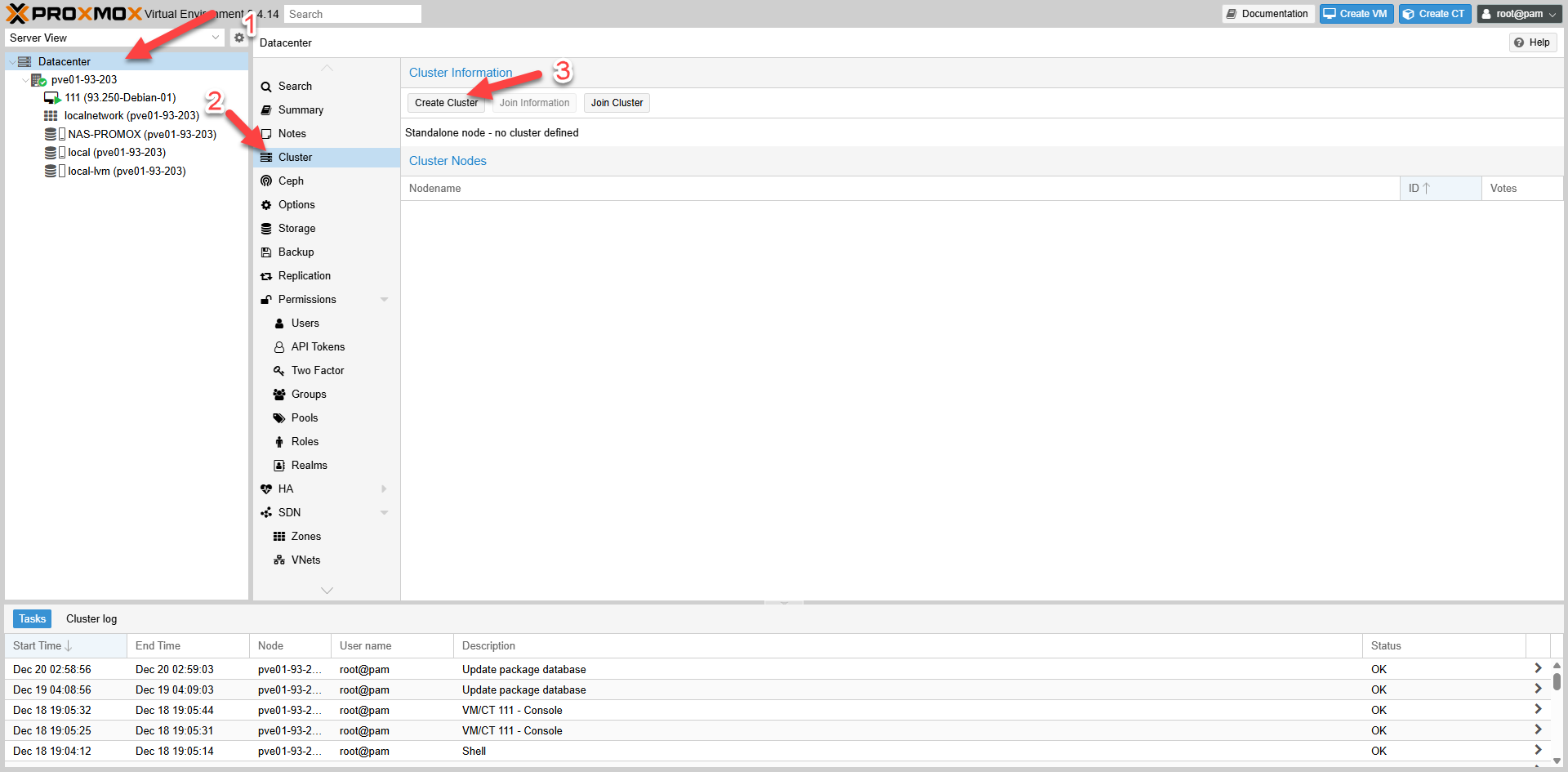 Fig II.1.1: Create Cluster Button
1.2: Cluster Settings
1.2: Đặt Cluster name và chọn Network
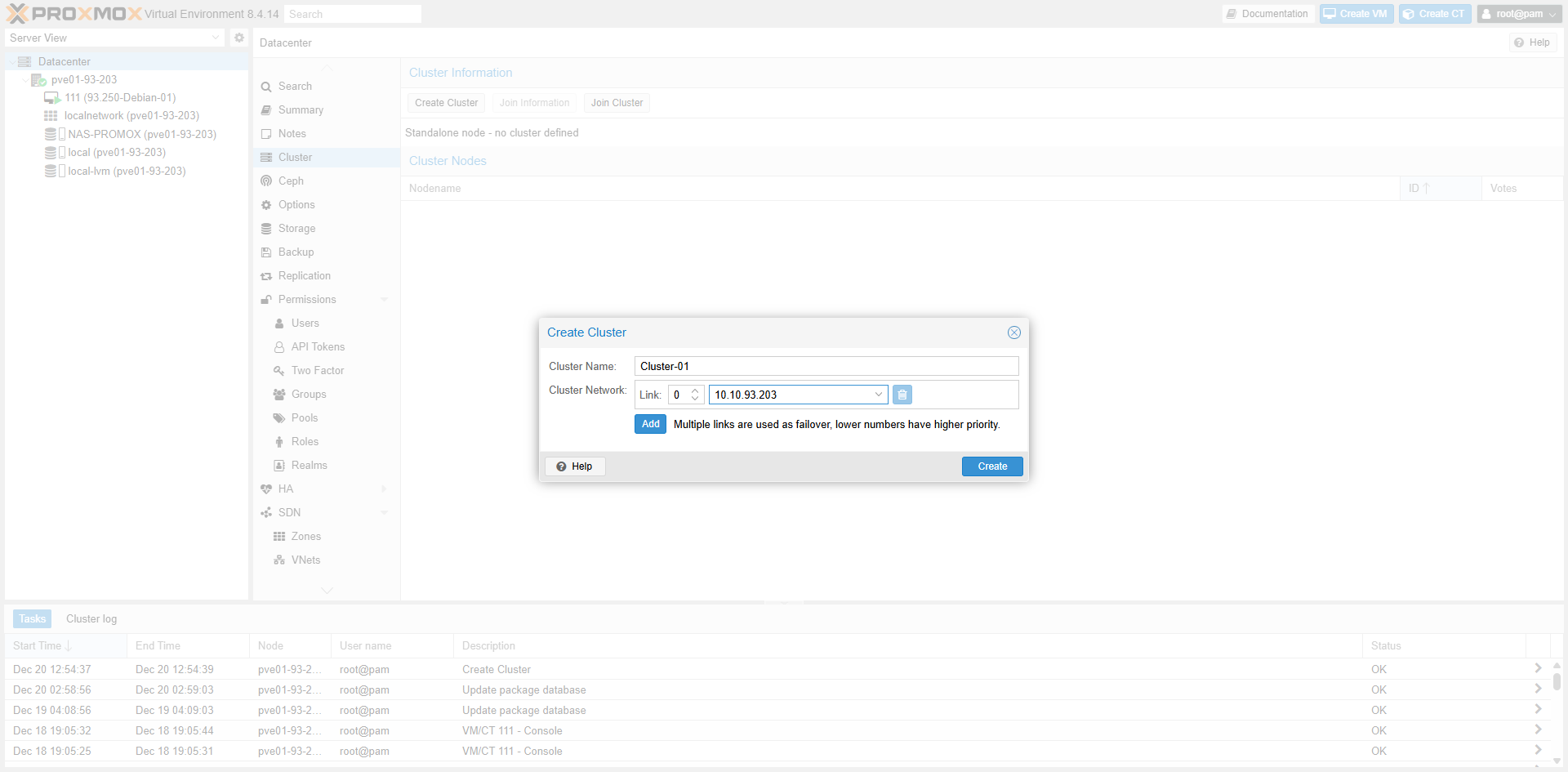 Fig II.1.2: Cluster Name & Network
1.3: Complete and Verify
1.3: Hoàn tất và kiểm tra thông tin
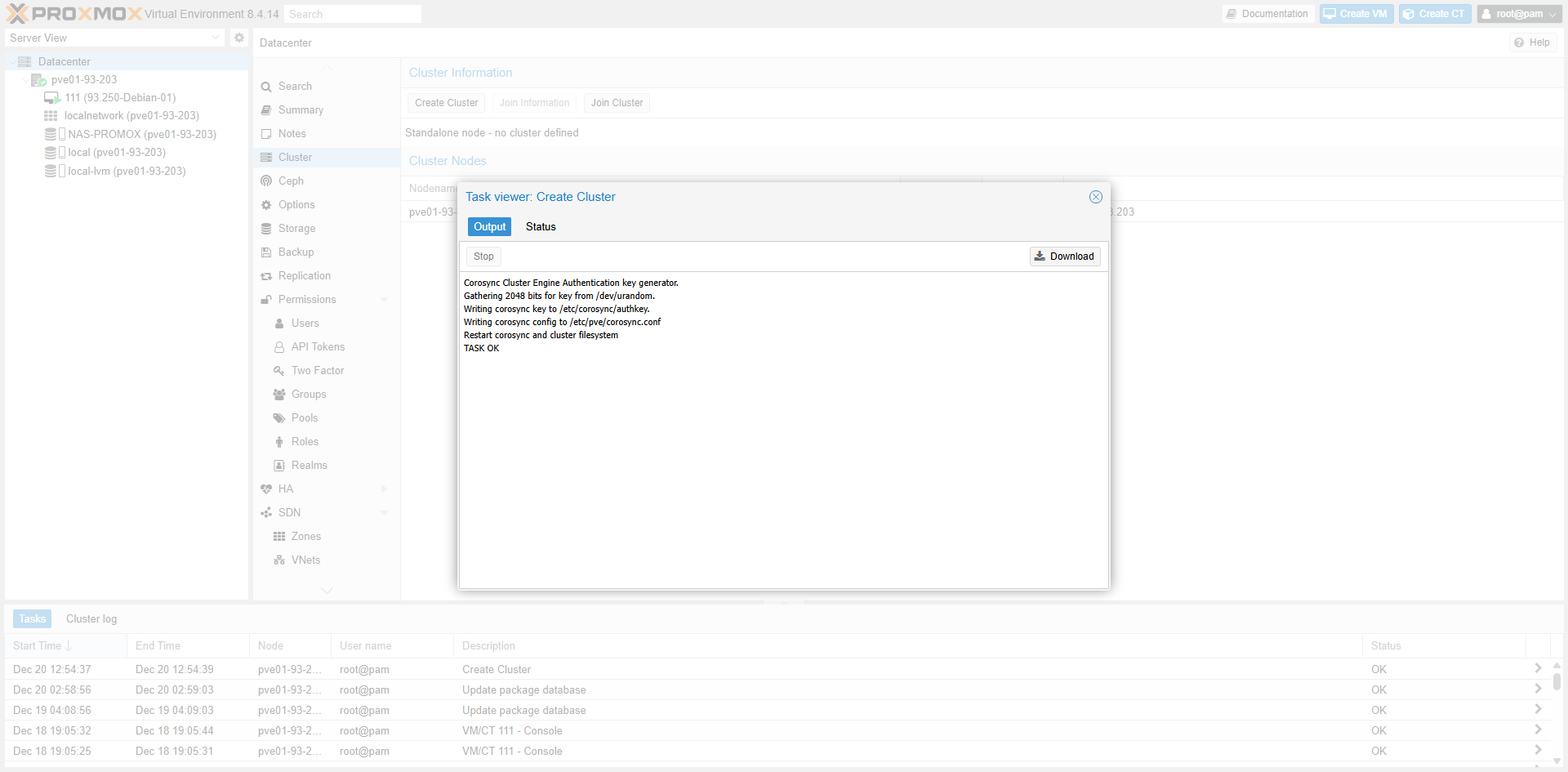
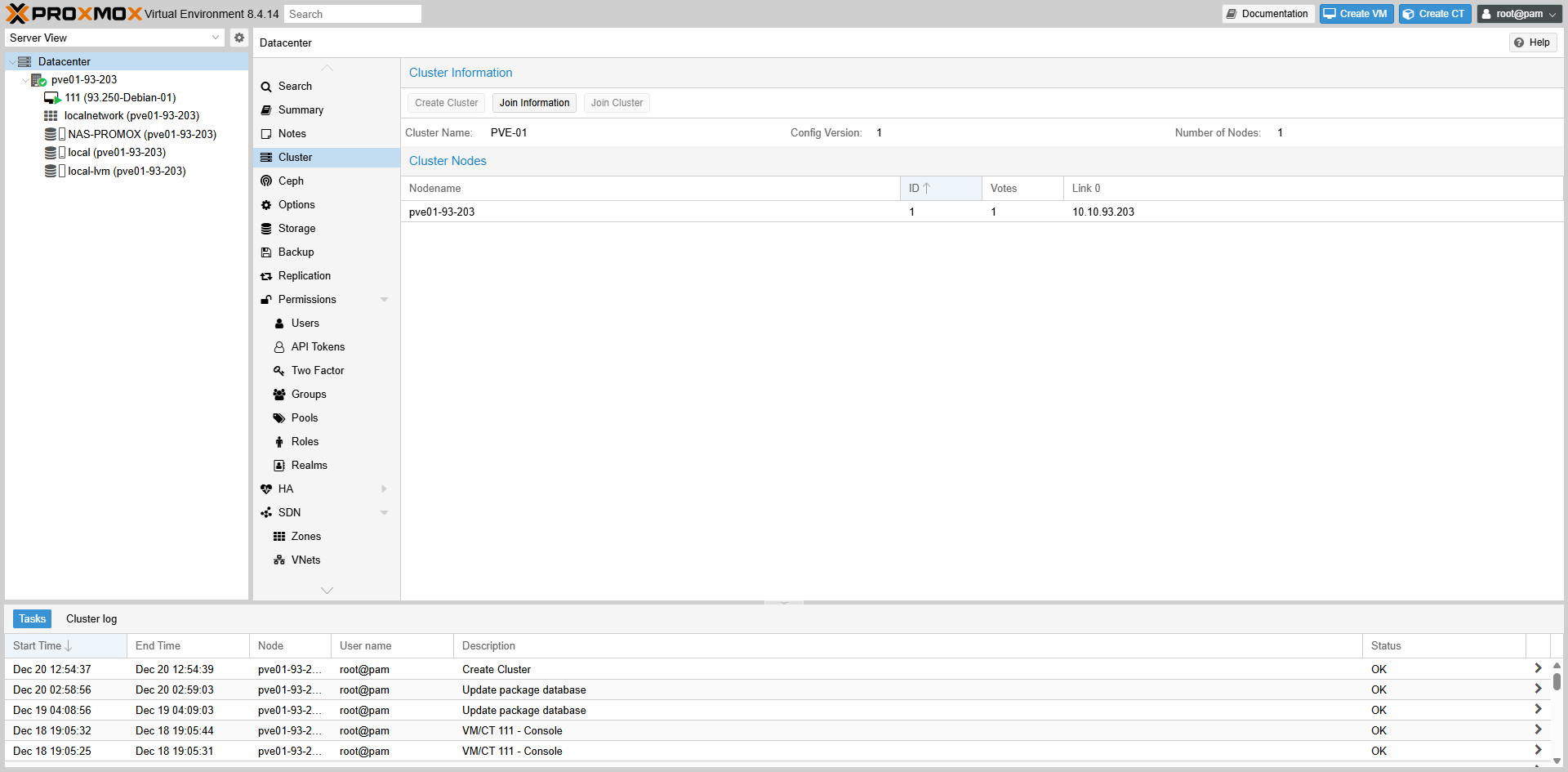 Fig II.1.3: Cluster Information
2. Get Join Information
2. Lấy thông tin “Join Information” của node 93.203
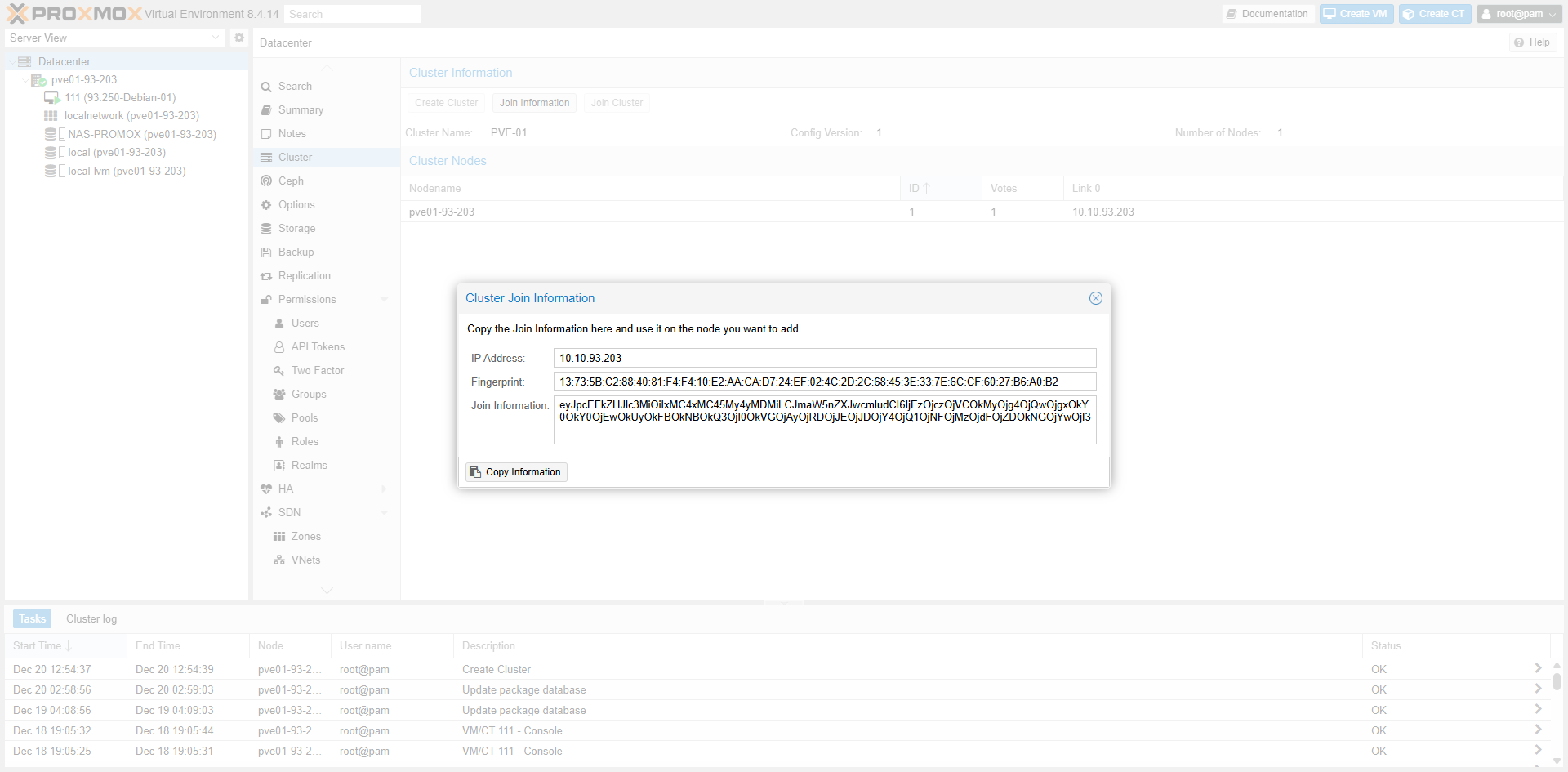 Fig II.2: Copy Join Info string
3. Join node 93.204
3. Join từ node 93.204
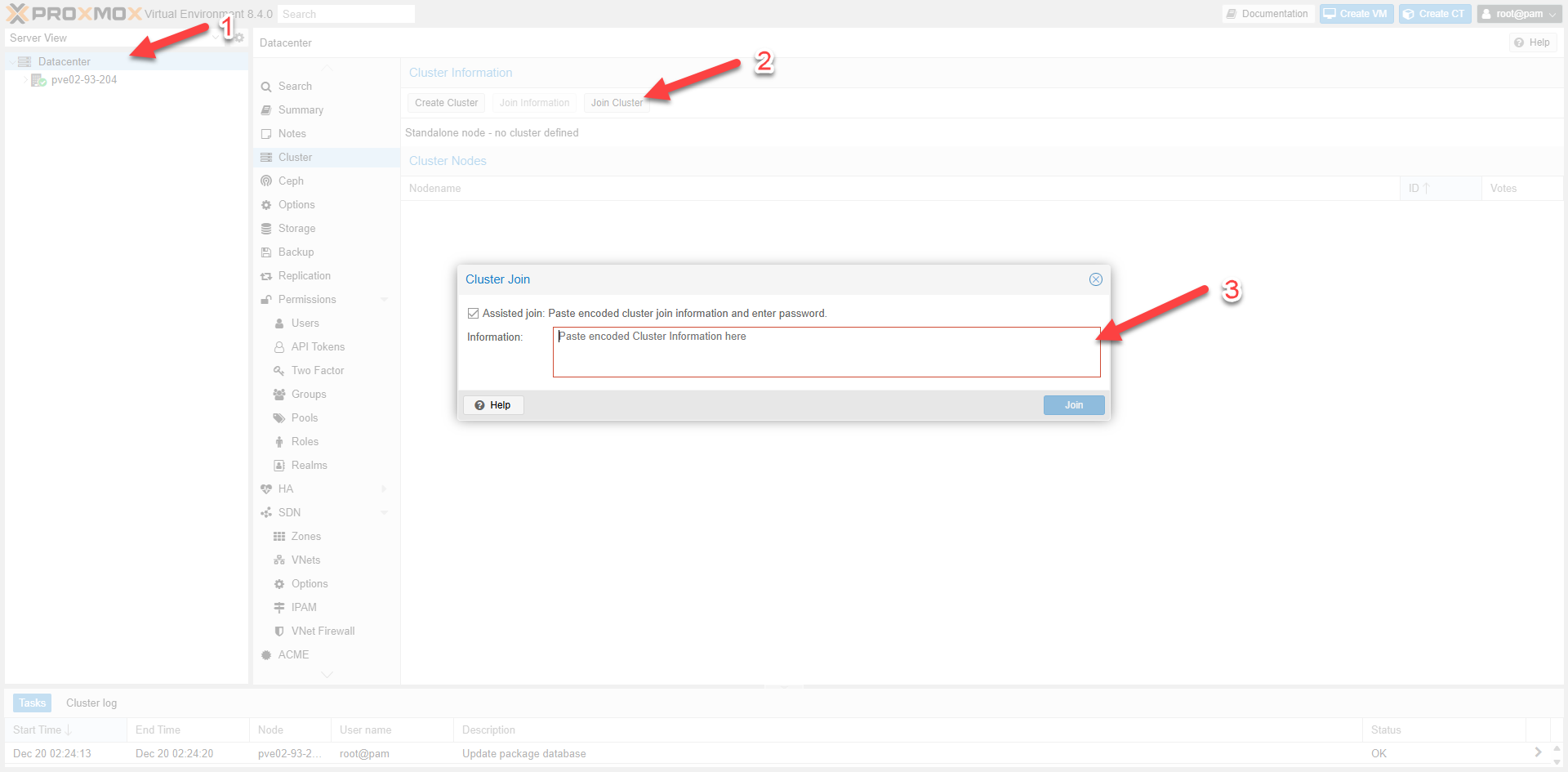 Fig II.3: Join Cluster Interface
4. Provide credentials
4. Khai báo thông tin
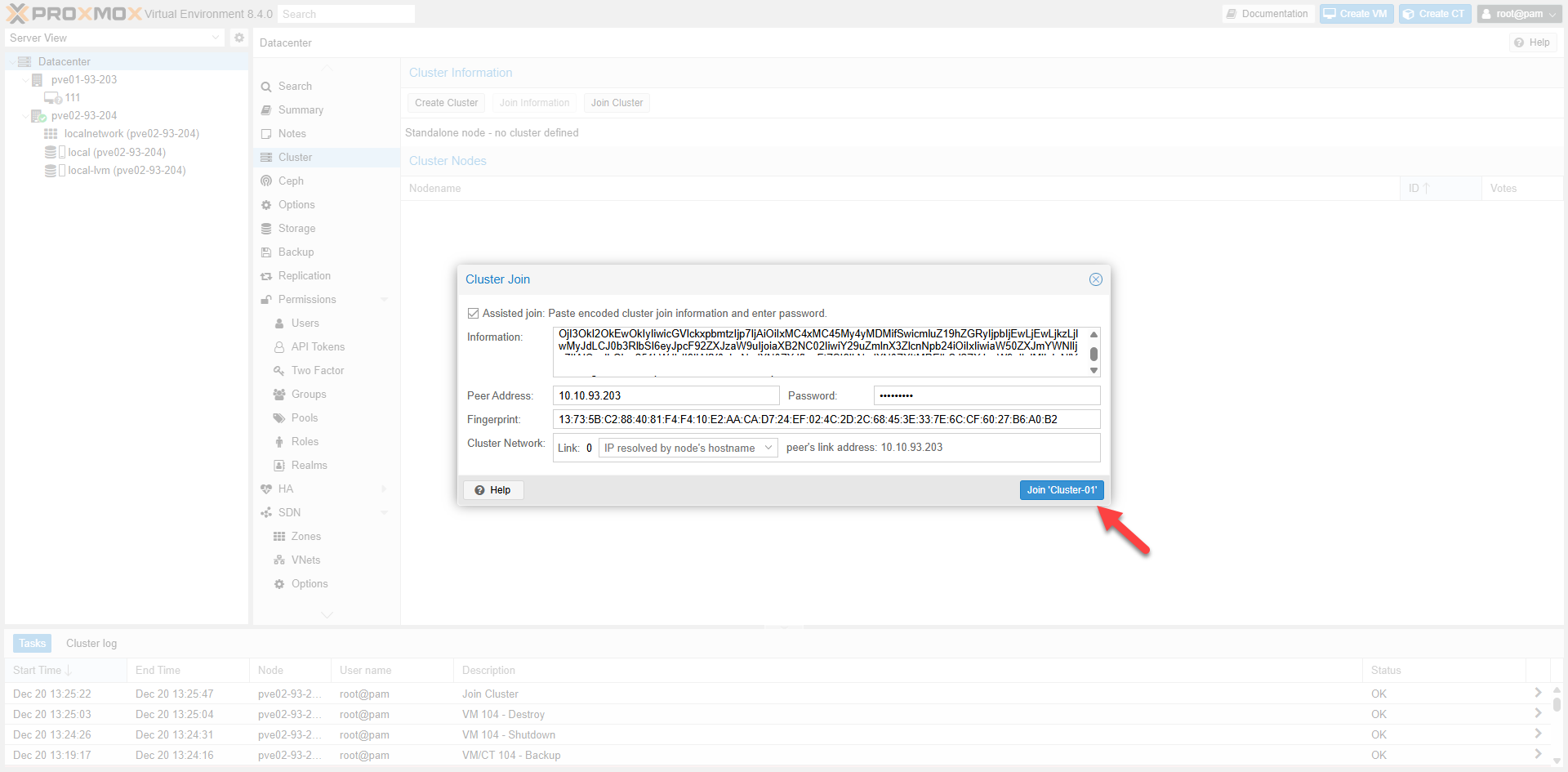 Fig II.4: Enter Root Password
5. Join Successful
5. Hoàn tất Join Cluster
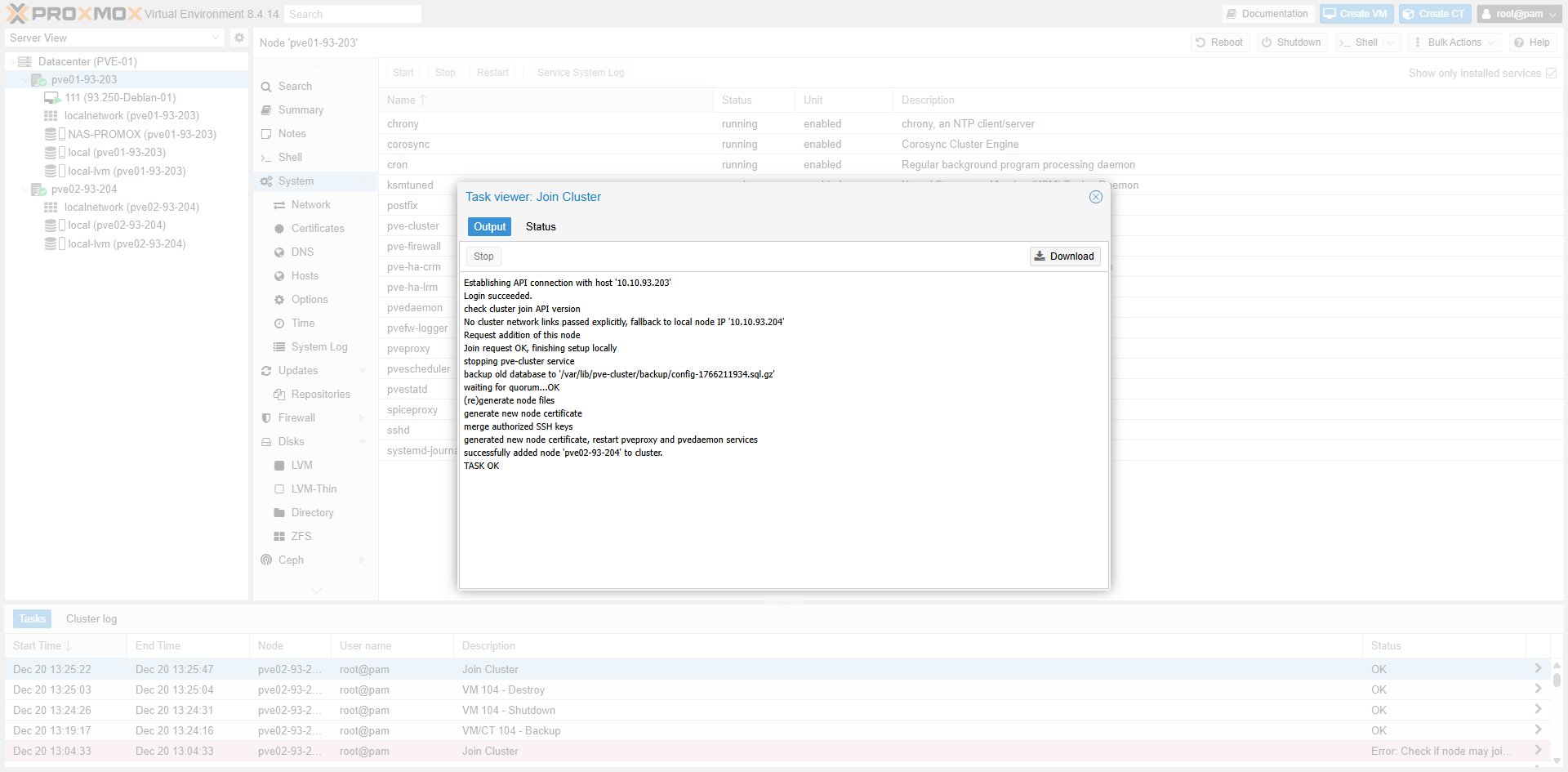 Fig II.5-a: Task Log
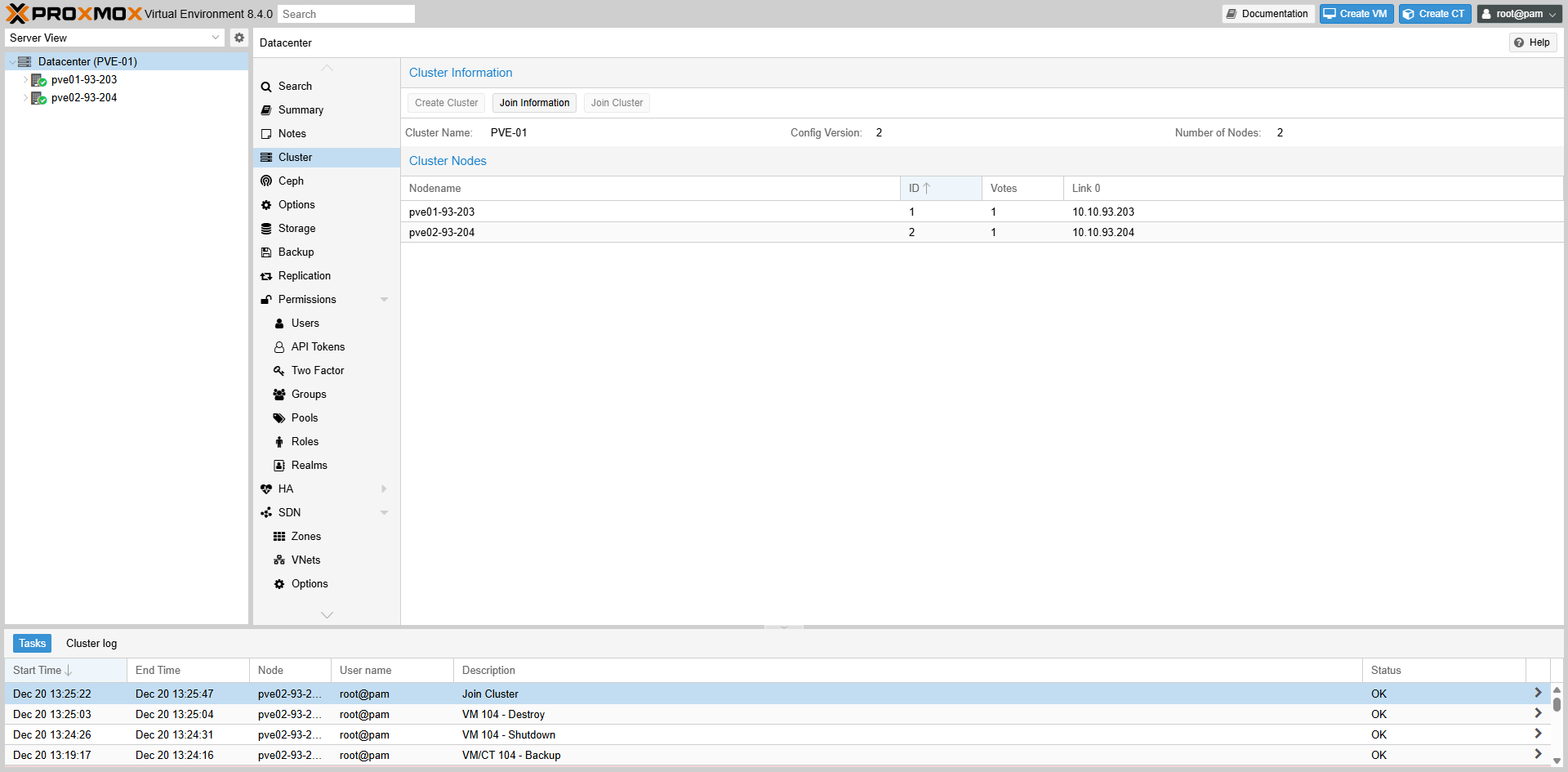 Fig II.5-b: Cluster Status
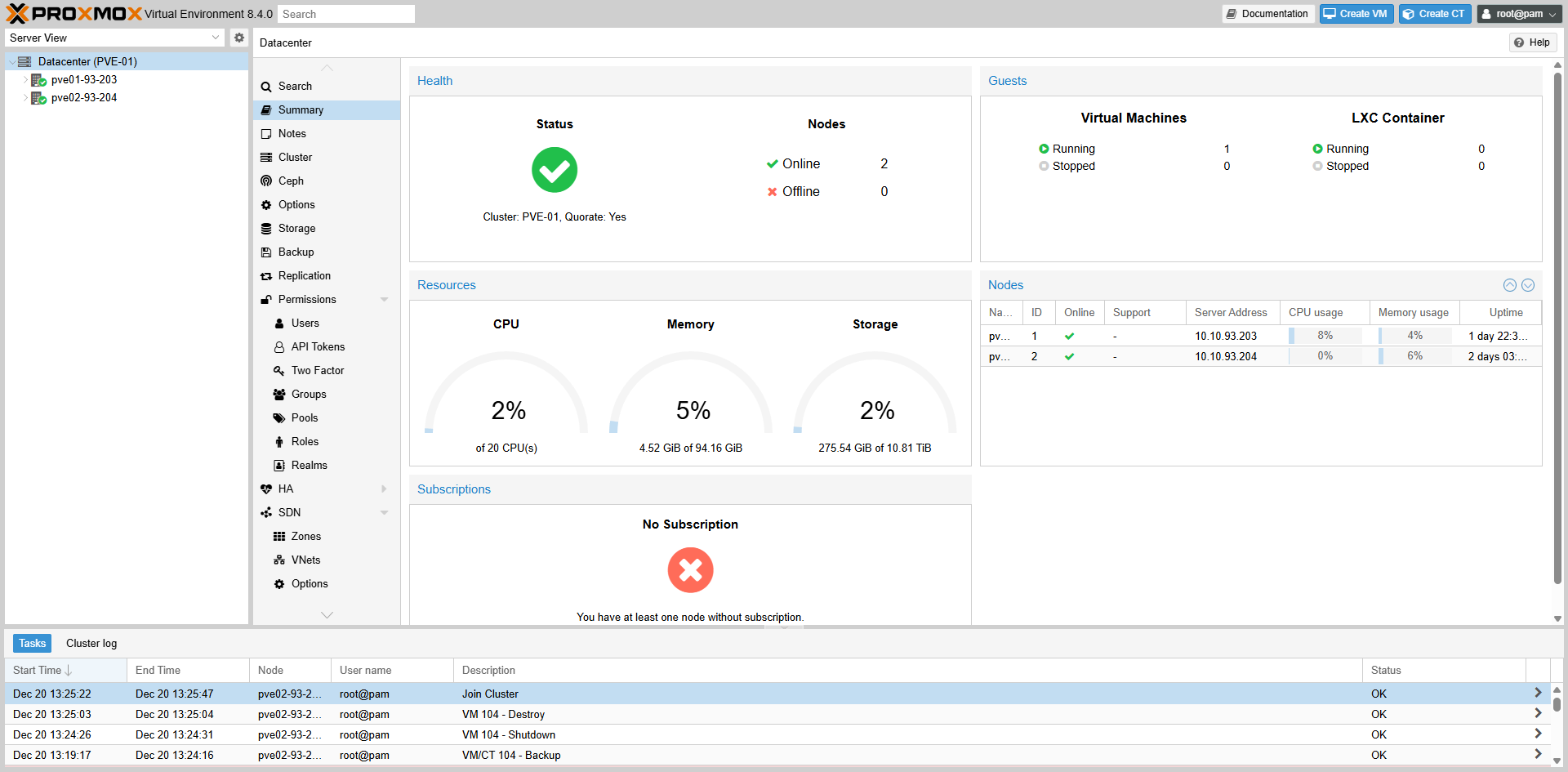 Fig II.5-c: Node View
6. Remove Cluster (Terminal)
6. Remove Cluster (Terminal)
root@pve01-93-203:~# systemctl stop pve-ha-lrm pve-ha-crm corosync
root@pve01-93-203:~# systemctl stop pve-cluster
root@pve01-93-203:~# pmxcfs -l
root@pve01-93-203:~# rm -f /etc/pve/corosync.conf
root@pve01-93-203:~# rm -f /etc/corosync/corosync.conf /etc/corosync/authkey
root@pve01-93-203:~# rm -f /etc/pve/priv/authorized_keys
root@pve01-93-203:~# killall pmxcfs
root@pve01-93-203:~# systemctl start pve-cluster
root@pve01-93-203:~# pvecm nodes
III. Live Migration
1. Kiểm tra lớp mạng
1. Check Network
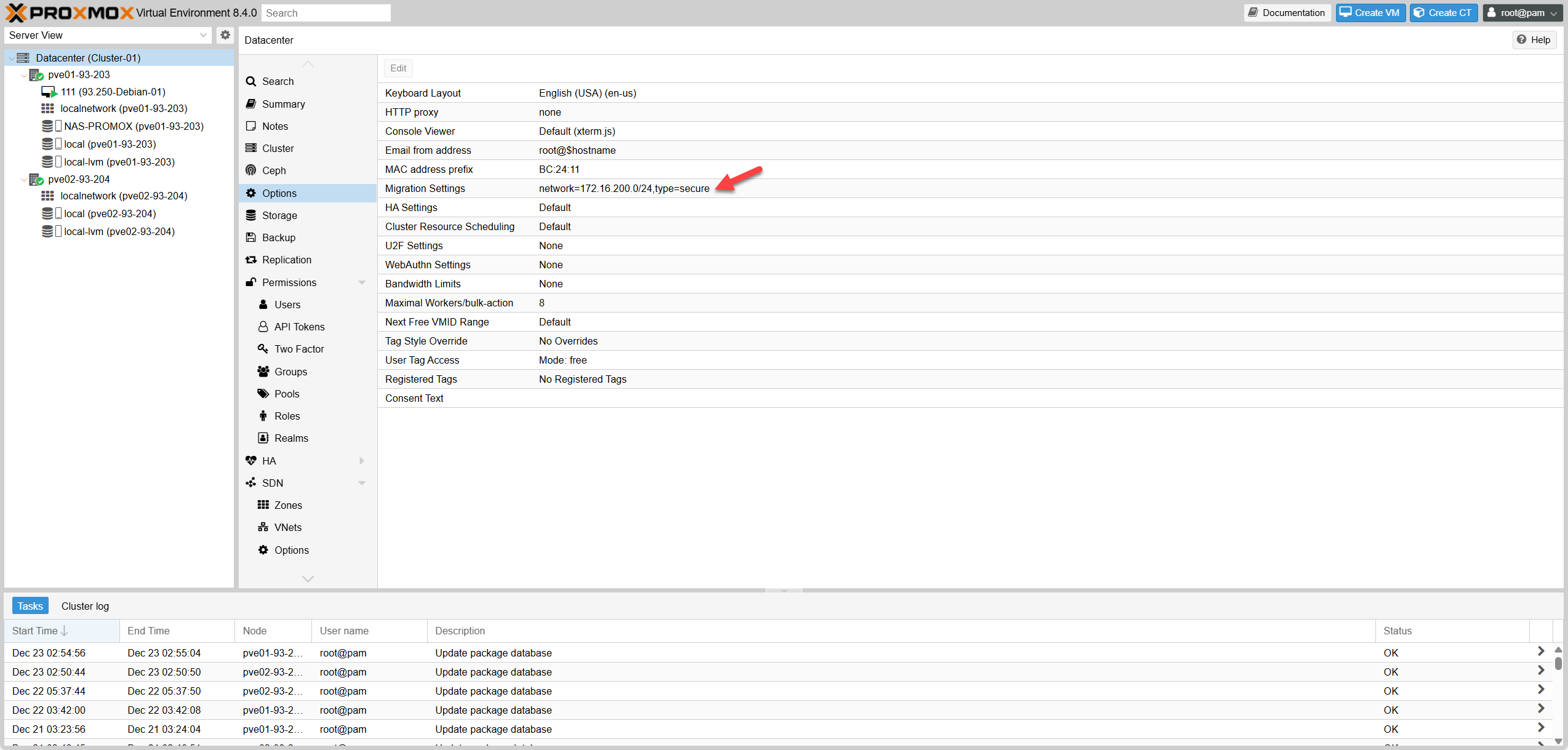 Fig III.1: Network Setup
2. Xác nhận Shared Storage
2. Check Shared Storage
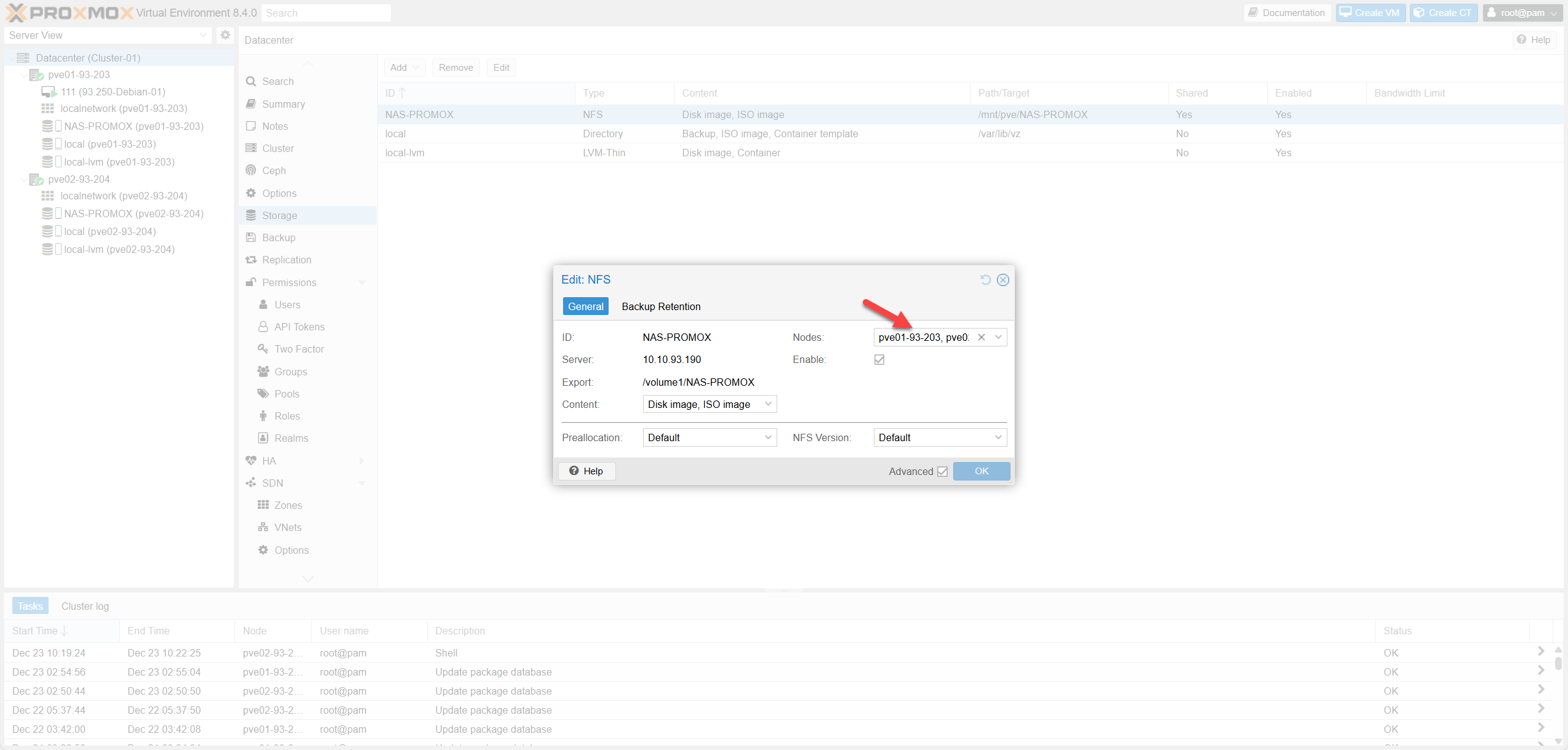 Fig III.2: Storage Verification
3. Thực hiện Live Migrate
3. Execute Live Migrate
 Fig III.3-a: Select Target Node
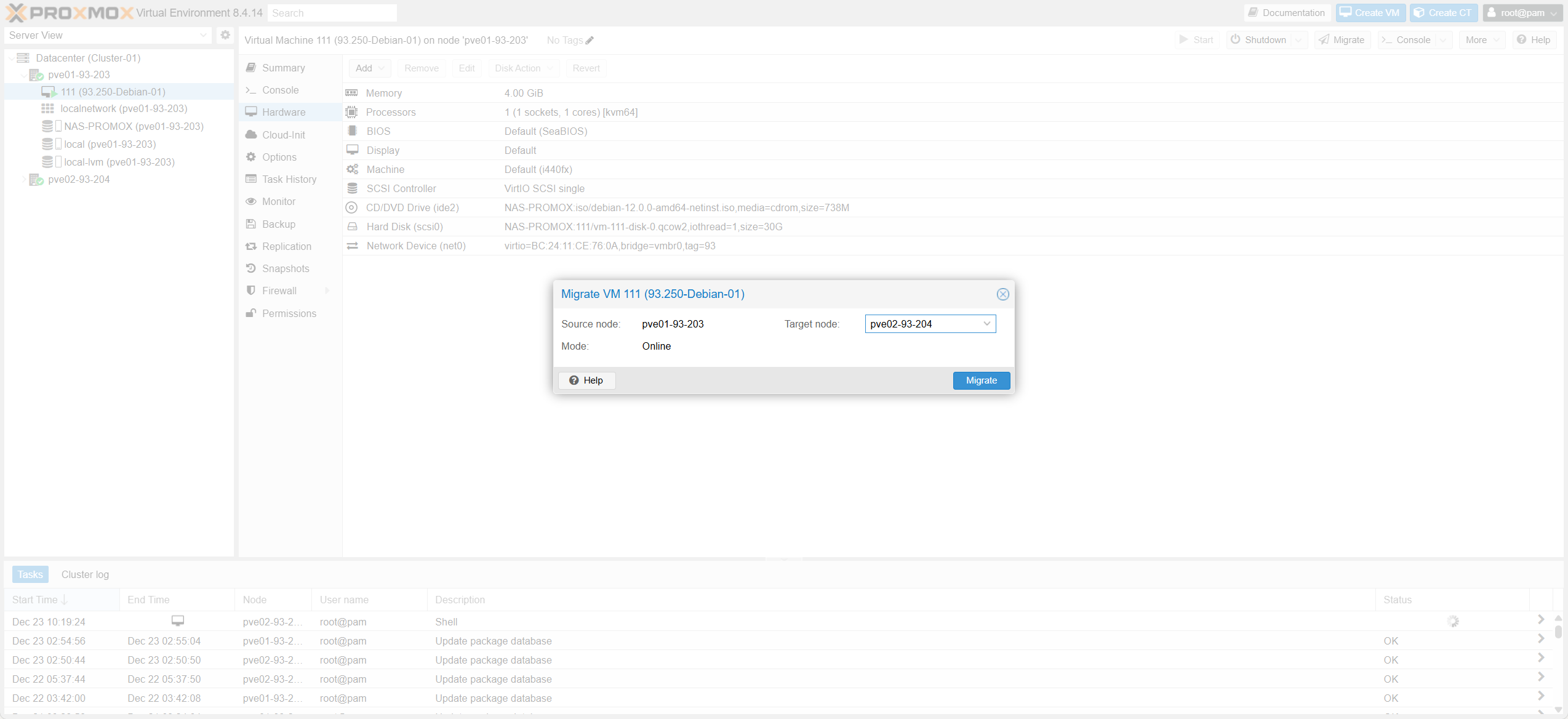 Fig III.3-b: Network & Options
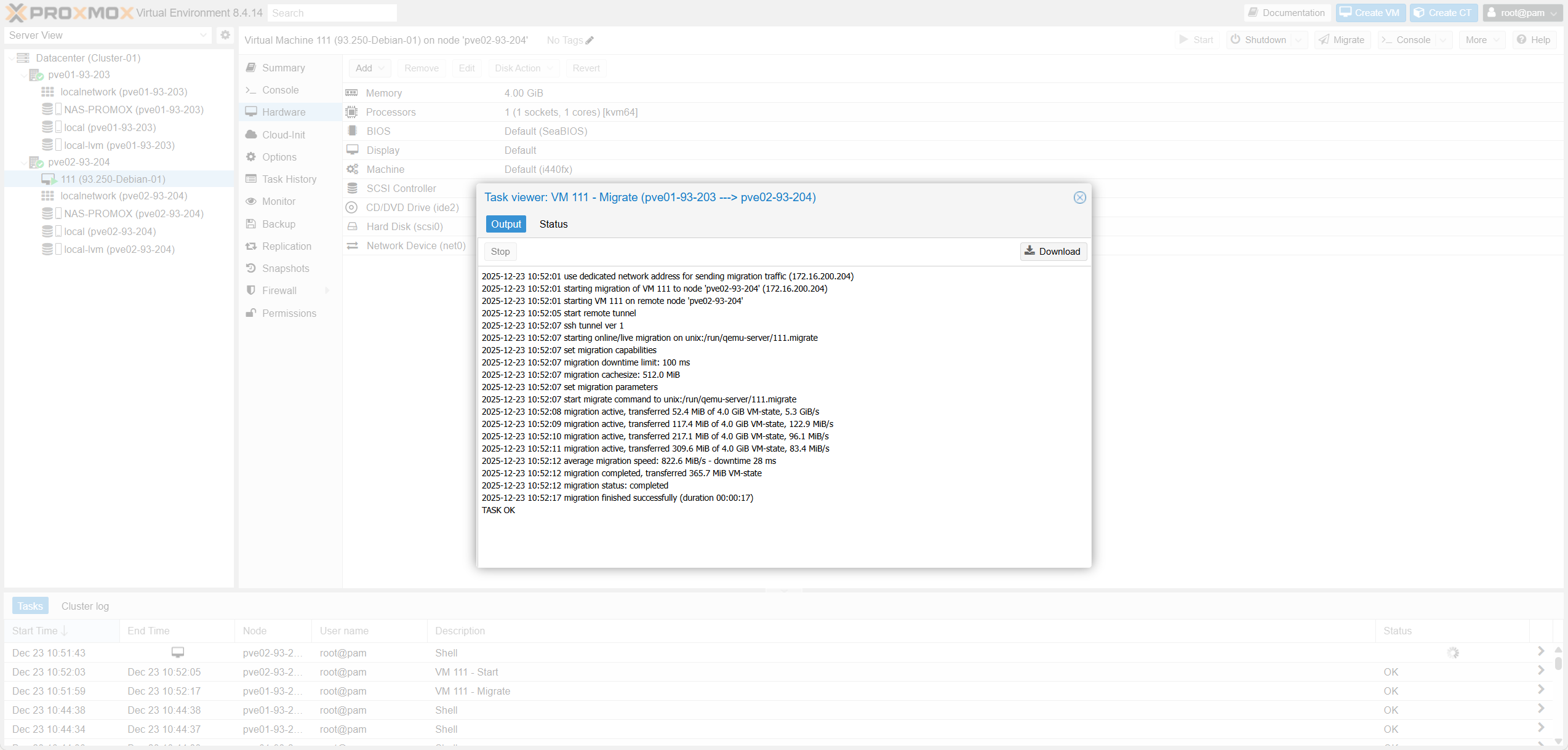 Fig III.3-c: Task Progress
4. Kiểm tra Traffic
4. Verify Traffic
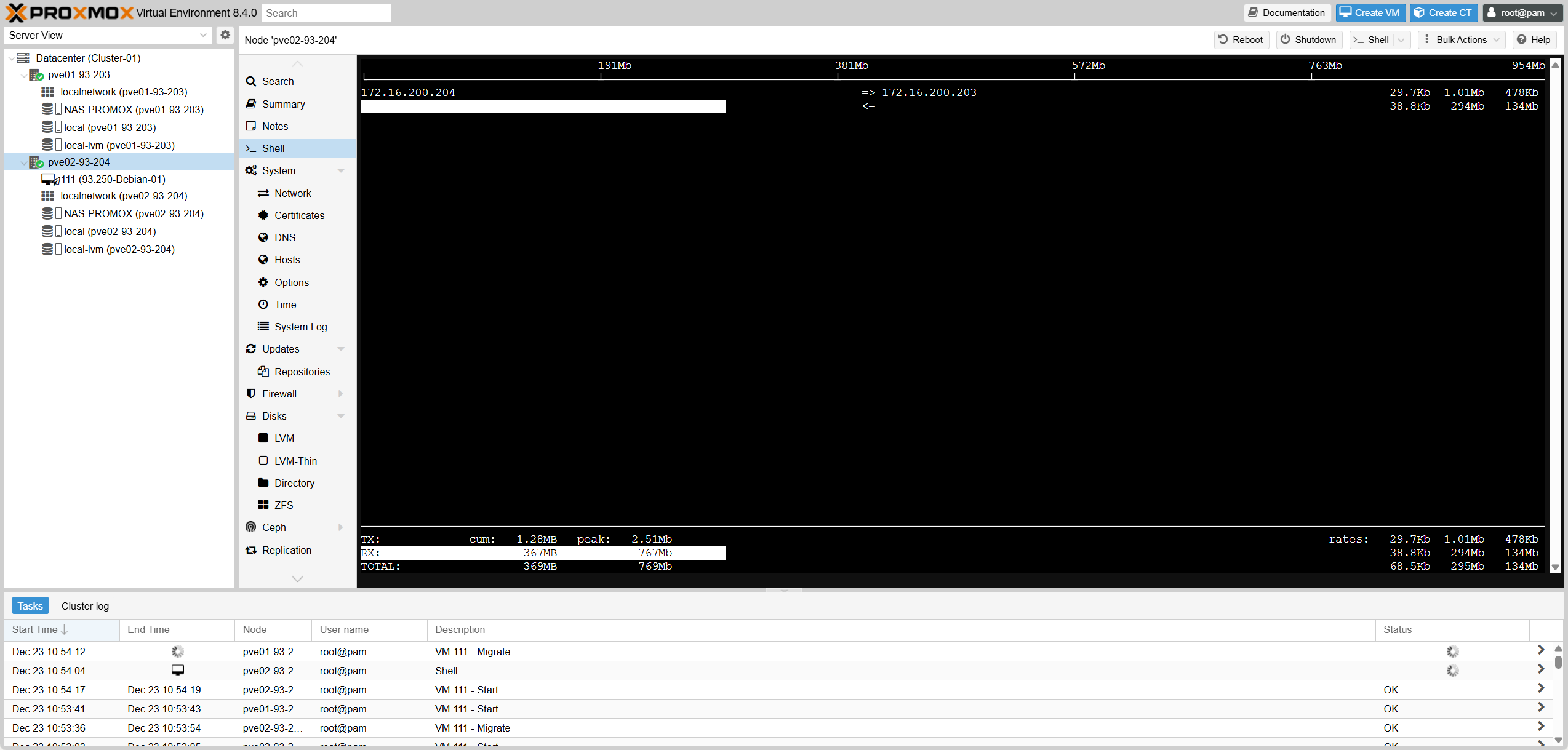 Fig III.4: Traffic Analysis
root@pve02-93-204:~# iftop -i vmbr0.200IV. Proxmox HA / Auto Failover
1. Tạo Group HA
1. Create HA Group
| Proxmox HA Group | Ý nghĩa kỹ thuật | Khi dùng (production) | Tương đương VMware |
|---|---|---|---|
| restricted | Hard constraint: resource chỉ chạy trên node thuộc group. | Bật khi muốn VM chỉ chạy trong 1 nhóm node xác định. Nếu ko còn node hợp lệ → resource không start. | DRS VM-Host Affinity: Must run on group. |
| nofailback | Disable automatic failback: HA không tự relocate VM về node ưu tiên khi nó hồi phục. | Bật để ổn định sau sự cố, tránh relocate không cần thiết. Tắt nếu policy yêu cầu “return-to-primary”. | VMware HA không có toggle failback trực tiếp; thường đạt được bằng DRS rule. |
| Priority (per node) | Soft preference / ordering: HA ưu tiên chọn node có priority nhỏ hơn khi start/relocate resource (trong phạm vi group). | Đặt primary=1, secondary=2 (hoặc bằng nhau nếu không ưu tiên). Không phải cơ chế cân bằng tải. | Gần nhất: DRS “Should run on” (soft) + host group. |
| Option | Meaning | Usage | VMware |
|---|---|---|---|
| restricted | Run only in group. | Hard constraint. | Must run on. |
| nofailback | No auto return. | Anti-flap. | Disable failback. |
| Priority | Lower = Higher. | Pri/Sec setup. | Should run on. |
Use Cases
| Kịch bản | Proxmox HA Group config | VMware tương đương | Kết quả mong muốn |
|---|---|---|---|
| VM chỉ được chạy trên tier-1; tier-1 down hết thì VM không chạy | restricted=1, Nodes=tier-1 | DRS VM-Host **Must run on** tier-1 | Tôn trọng ràng buộc cứng (không “chạy lạc” sang tier-2). |
| VM ưu tiên pve01; pve01 down → failover pve02; pve01 lên lại → ở lại pve02 | restricted=1 (hoặc 0), nofailback=1, priority pve01=1 pve02=2 | “Disable failback” theo vận hành + DRS soft preference | Ổn định sau sự cố, tránh ping-pong relocation. |
| VM ưu tiên pve01; pve01 down → failover pve02; pve01 lên lại → tự quay về pve01 | nofailback=0, priority pve01=1 pve02=2 | DRS “preferred host” + automation/manual vMotion | Mô hình primary/secondary “return-to-primary”. |
| Không ưu tiên node nào (chỉ cần HA) | priority pve01=1 pve02=1, nofailback=1 | Không có tương đương HA thuần; thường để DRS tự cân | HA hoạt động, không ép “primary”. |
| Scenario | Proxmox Config | VMware Equiv | Desired Outcome |
|---|---|---|---|
| VM only runs on tier-1; if tier-1 is down, VM does not run | restricted=1, Nodes=tier-1 | DRS Must Run On | Respect hard constraint. |
| VM prefers pve01; pve01 down → failover pve02; pve01 up again → stays on pve02 | nofailback=1, pve01=1 pve02=2 | Disable Failback | Stability after incident, avoid ping-pong. |
| VM prefers pve01; pve01 down → failover pve02; pve01 up again → auto returns to pve01 | nofailback=0, pve01=1 pve02=2 | Preferred Host | Return-to-primary model. |
| No preference (just need HA) | priority pve01=1 pve02=1 | DRS Balanced | HA active, no forced “primary”. |
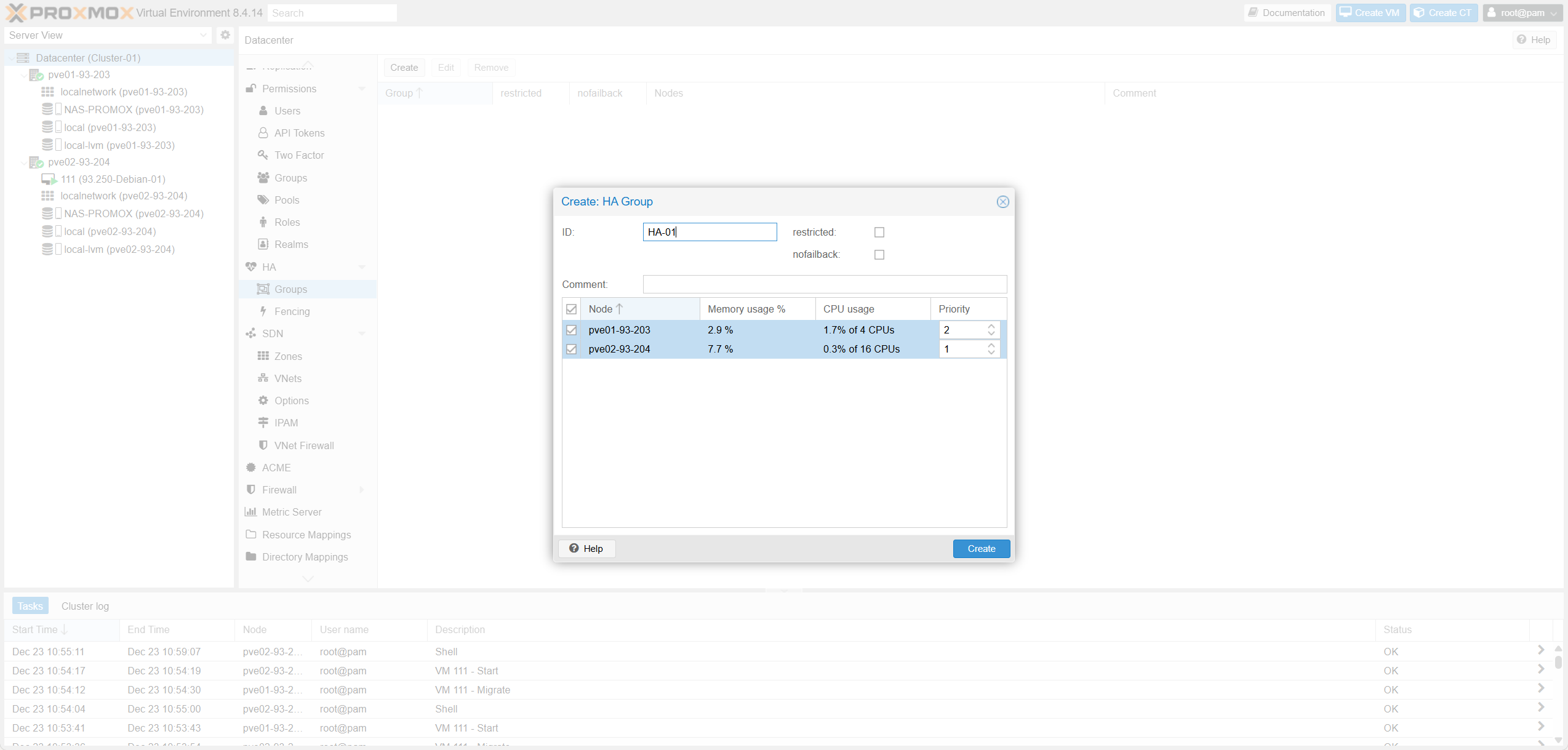 Fig IV.1: HA Group List
2. Add các VMs cần HA vào group
2. Add VMs to HA Group
Trong Proxmox VE, HA là cơ chế opt-in theo từng VM/CT. Bạn phải thêm VM vào Datacenter -> HA -> Resources.
| Trường (Proxmox HA Resource) | Ý nghĩa kỹ thuật | Khi nào cấu hình / chọn giá trị | Tương đương VMware vSphere/ESXi |
|---|---|---|---|
| VM / CT | Chọn VM (KVM) hoặc CT (LXC) sẽ được HA quản lý (restart/relocate theo policy). | Add đúng workload quan trọng cần HA. Không add → HA không quản lý. | VM thuộc phạm vi vSphere HA (VM được HA quản lý). |
| Group | Gán resource vào HA Group để áp chính sách placement (node priority / restricted / nofailback). | Chọn đúng group theo tier. Bỏ trống → không có placement policy (có thể chạy trên mọi node). Nếu group có restricted=1 → chỉ được chạy trên node thuộc group; không còn node phù hợp → resource về stopped. | Gần nhất: DRS Host Group + VM-Host Affinity Rule (must/should) + “preferred hosts”. |
| Max. Restart | Số lần tối đa HA thử restart trên cùng node khi service bị xem là failed / fail to start (start failure policy). | Prod thường 1–3. 0 = không retry restart trên node hiện tại (dễ down nếu lỗi tạm). | Không có field 1:1. Gần concept “restart attempts”, VMware không expose rõ per-VM theo kiểu này. |
| Max. Relocate | Số lần tối đa HA được relocate sang node khác (thường xảy ra sau khi vượt Max Restart trên node hiện tại). | 1 là phổ biến (anti-flap). >1 nếu cluster nhiều node và muốn “thử thêm node khác”. 0 = không relocate (failover gần như tắt). | Gần nhất: restart VM on other host (Host Failure Response), nhưng VMware không có “relocate count” rõ ràng như Proxmox. |
| Request State / State | Trạng thái mong muốn: started / stopped / disabled / ignored (và enabled là alias của started). | started: HA giữ chạy. stopped: HA giữ tắt. disabled: đưa về stopped và không relocate khi node failure (hay dùng để recovery). ignored: HA bỏ qua resource (bypass HA control). | VMware gần nhất: HA enable/disable theo VM + power state. |
| Comment | Ghi chú metadata/annotation, không ảnh hưởng hành vi. | Ghi owner/tier/SLA/ticket/ghi chú bảo trì. | Notes / Annotations của VM trong vCenter. |
| Cảnh báo quorum (“At least three quorum votes…”) | Cảnh báo về quorum vote (Corosync): cần đa số vote để tránh split-brain. Cụm 2 node “trần” dễ mất quorum khi 1 node down. | Nếu 2 node: thêm QDevice (vote thứ 3) hoặc thêm node thứ 3. | VMware dùng cơ chế khác (isolation/heartbeat), không gọi quorum votes nhưng cùng mục tiêu “chống split-brain”. |
In Proxmox VE, HA is an opt-in mechanism per VM/CT. You must add VMs to Datacenter -> HA -> Resources.
| Field (Proxmox HA Resource) | Technical Meaning | When to config / Best Practice | Equivalent on VMware vSphere/ESXi |
|---|---|---|---|
| VM / CT | Select VM (KVM) or CT (LXC) to be managed by HA (restart/relocate per policy). | Add critical workloads needing HA. Not added → not managed by HA. | VM in scope of vSphere HA. |
| Group | Assign resource to HA Group to apply placement policy (node priority / restricted / nofailback). | Choose group by tier. Empty → runs on any node. restricted=1 → strict group enforcement. | DRS Host Group + VM-Host Affinity Rule. |
| Max. Restart | Max retries to restart on the SAME node upon failure. | Prod: 1–3. 0 = no local retry (fast failover but sensitive to blips). | Similar to “restart attempts” logic. |
| Max. Relocate | Max retries to relocate to ANOTHER node after local restart fails. | Prod: 1 (common to prevent flapping). >1 for large clusters. | Host Failure Response (Restart on other host). |
| Request State | Desired state: started / stopped / disabled / ignored. | started: Keep running. stopped: Keep off. disabled: Stop managing (maintenance). | HA Enable/Disable per VM. |
| Quorum warning | Warning about lack of majority vote (split-brain risk). | For 2-node clusters, a QDevice (3rd vote) is mandatory for reliable HA. | Isolation Response / Heartbeat Datastores. |
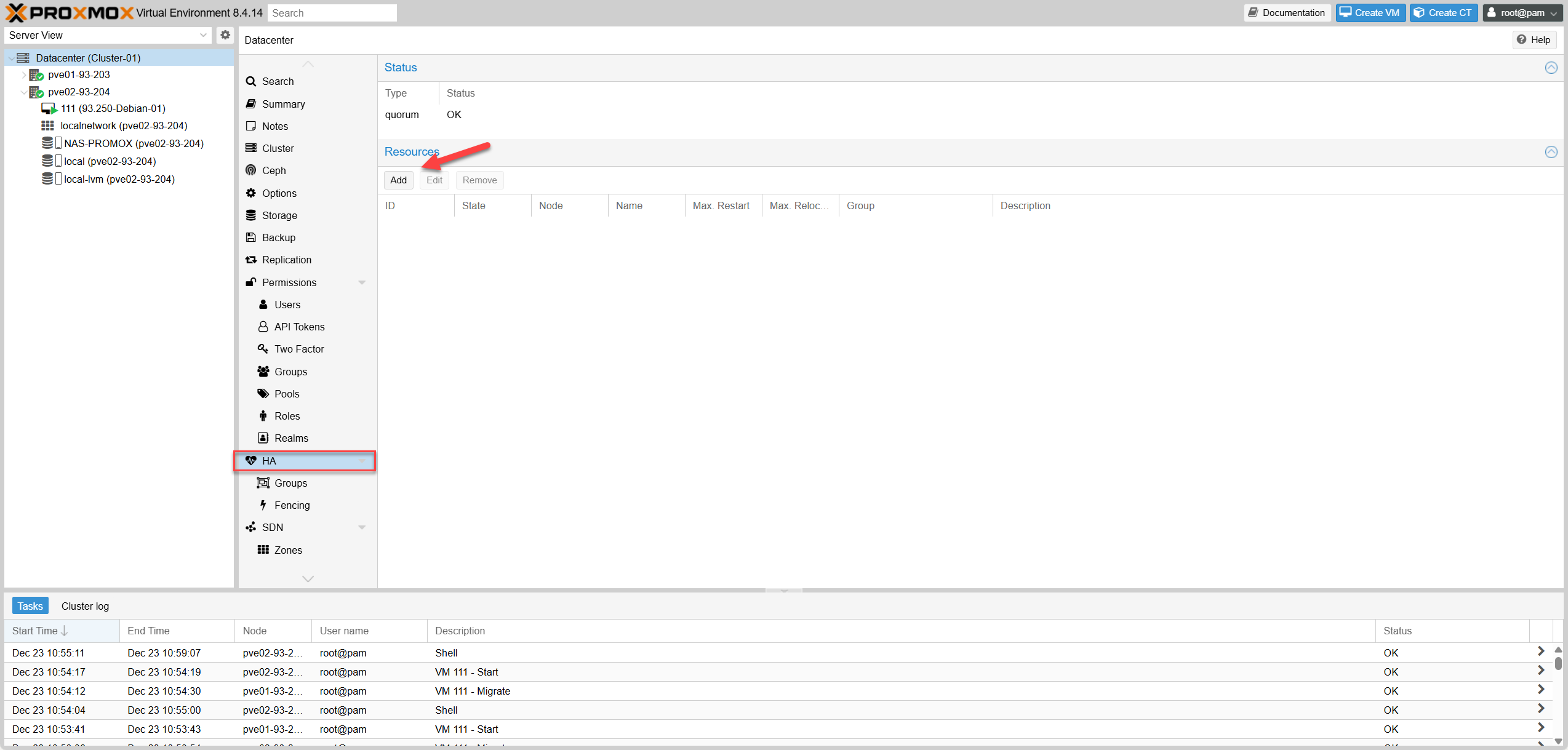 Fig IV.2-a: Add Dialog
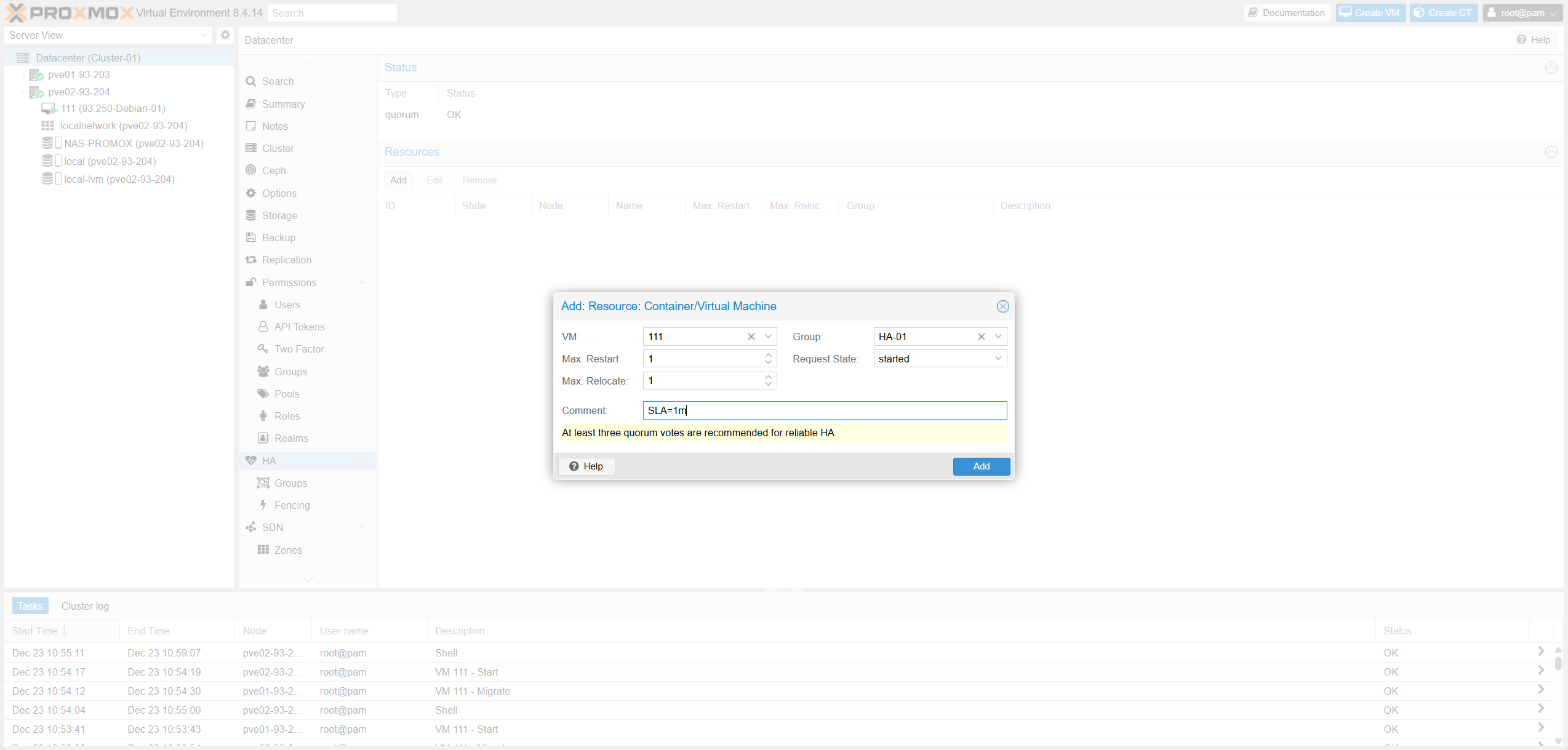 Fig IV.2-b: Settings
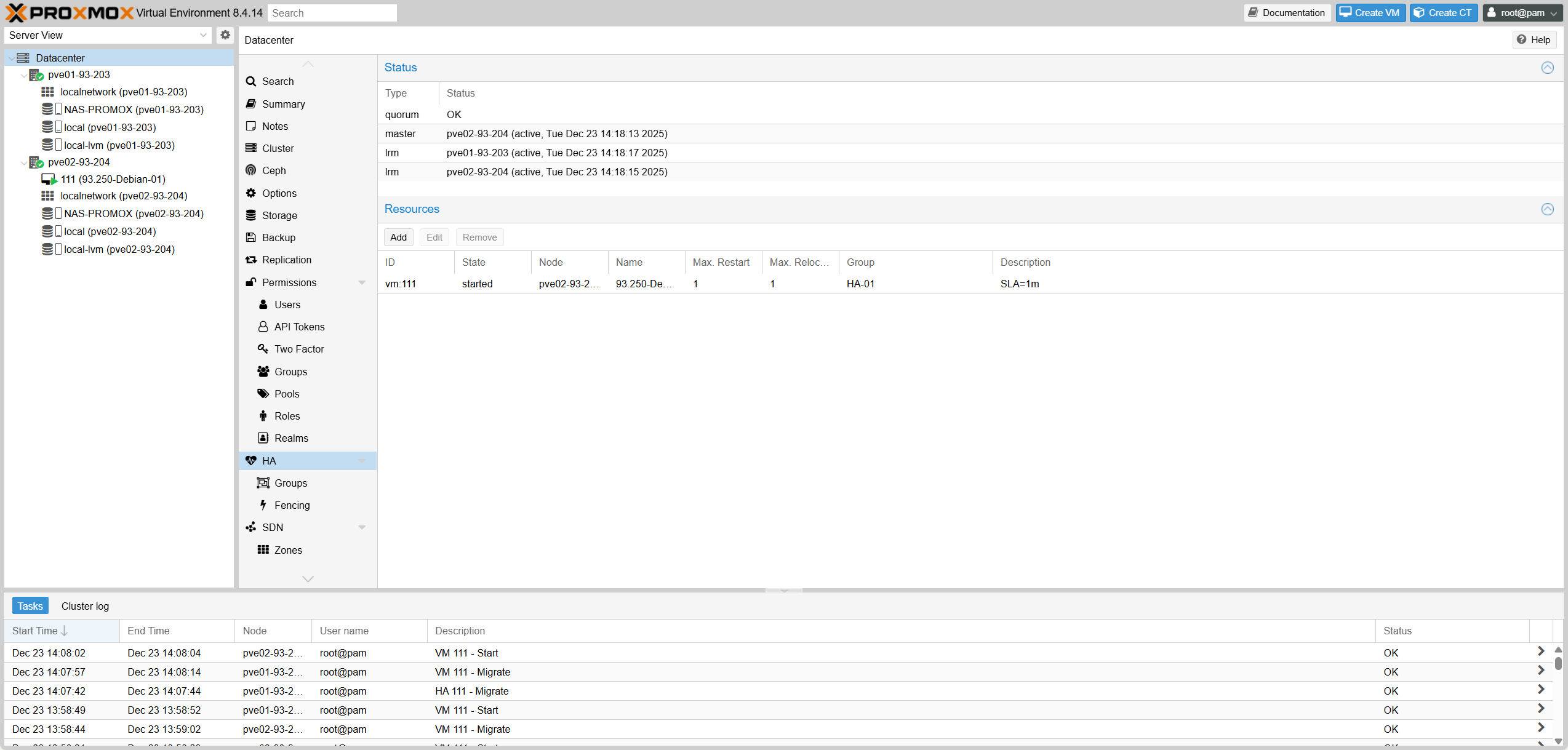 Fig IV.2-c: Active List
3. Test HA
3. Test HA
| Test ID | Mục tiêu | Điều kiện / Setup | Thao tác test | Expected Result |
|---|---|---|---|---|
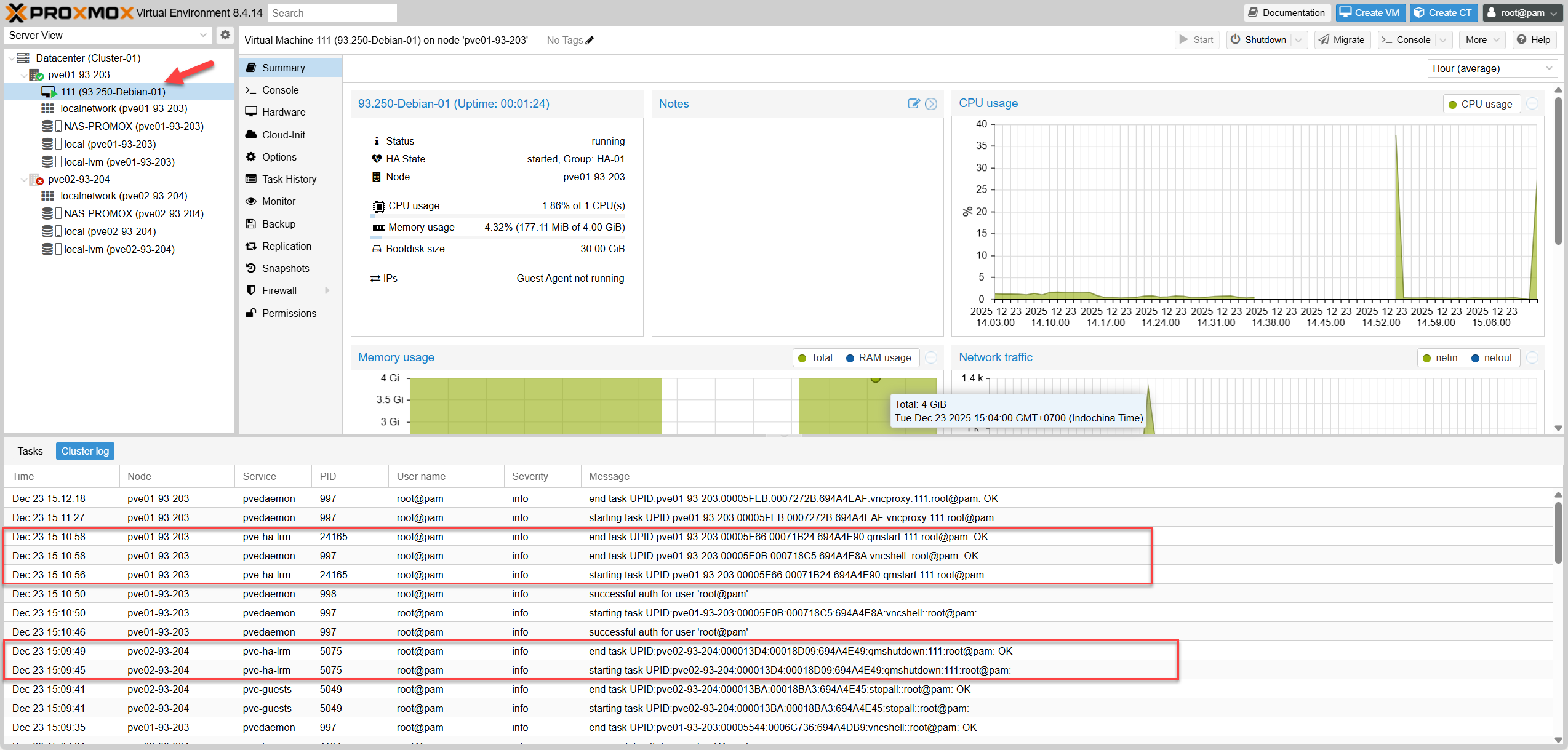
| TCs-01 | Baseline HA hoạt động | Cluster ổn định, vm:111 đã add vào HA Resources và state = started | Không làm gì | quorum: OK, master: active, LRM active; vm:111 state started và hiển thị node đang chạy |
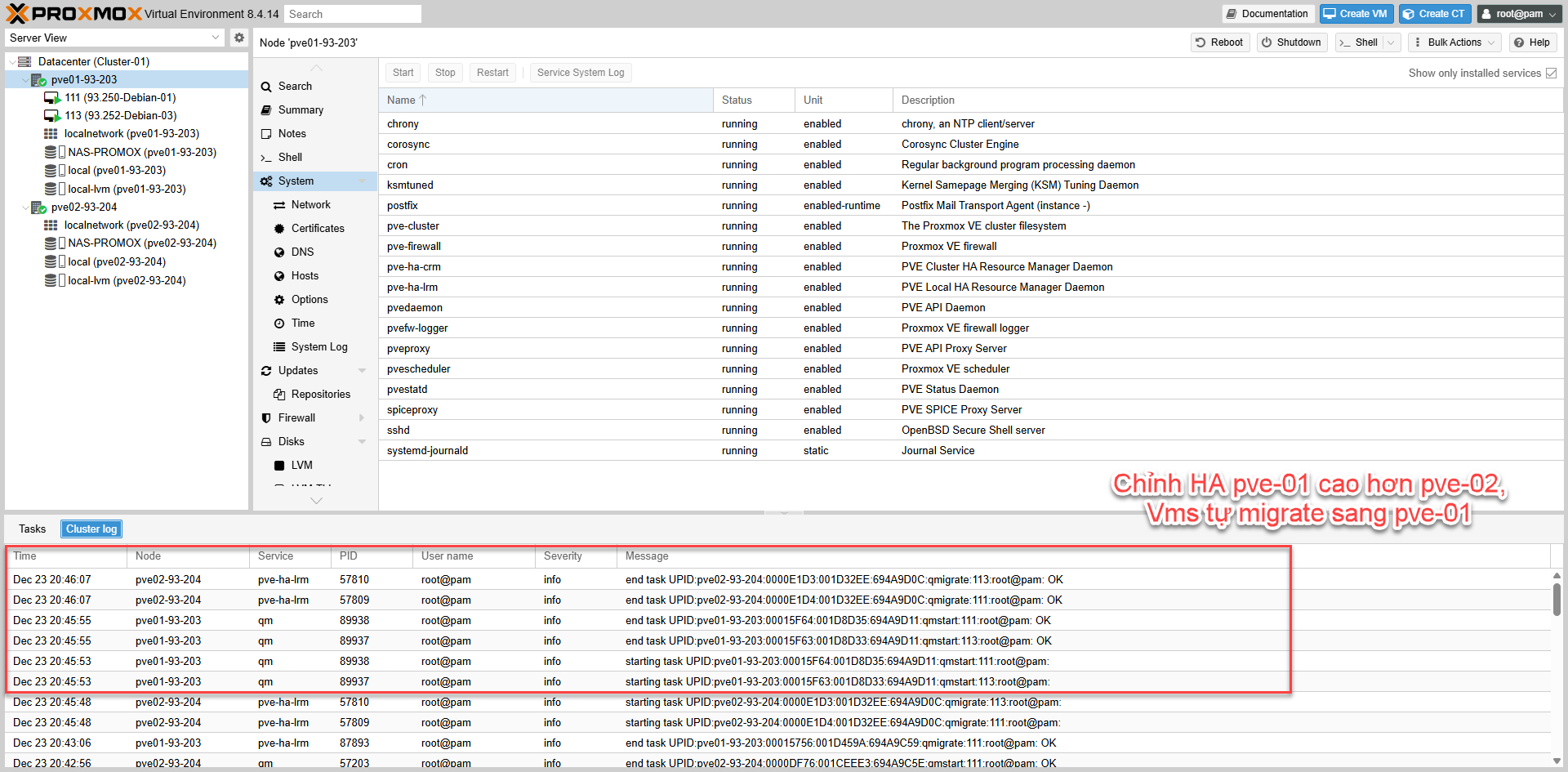
| TCs-02 | Failover khi node đang chạy VM bị down | vm:111 đang chạy trên 1 node | Shutdown/poweroff node đang chạy VM | vm:111 được relocate sang node còn lại và về started |
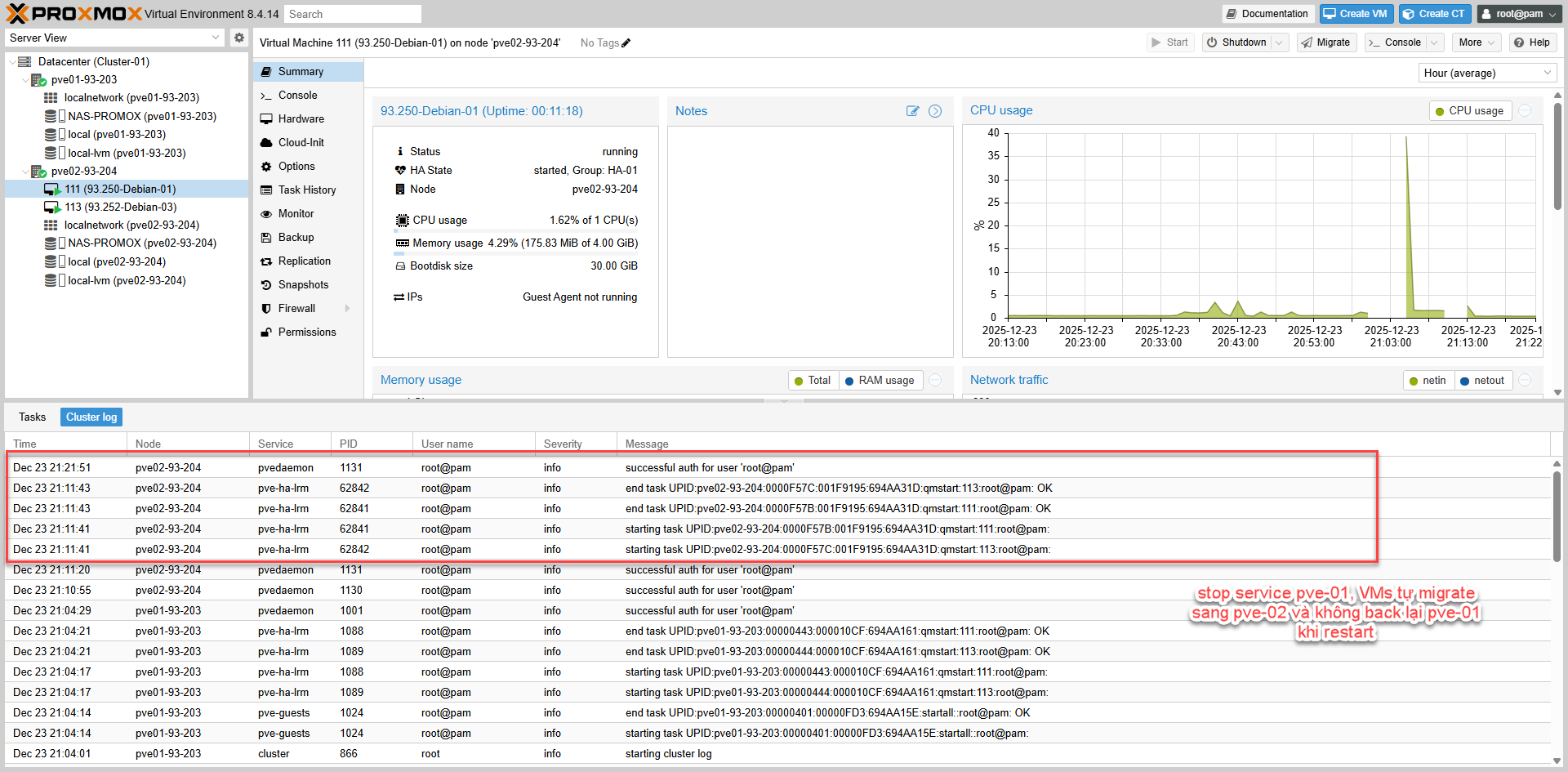
| TCs-03 | Failback “return-to-primary” | HA-01: priority pve01=1, pve02=2, nofailback=0 | Sau TCs-02: bật pve01 lên lại | Khi pve01 online & cluster ổn định, VM có thể tự relocate về pve01 (tuỳ phiên bản/điều kiện HA trigger) |
| TCs-04 | No-failback “stay-put” | HA-01: priority pve01=1, pve02=2, nofailback=1 | Sau TCs-02: bật node bị down lên lại | VM ở lại node hiện tại, không tự quay về node ưu tiên |
| TCs-05 | Restricted placement (hard rule) | HA-01: restricted=1, nodes = {pve01, pve02} | Tắt 1 node bất kỳ | VM chỉ chạy trên node còn lại (vì vẫn thuộc group) |
| TCs-06 | Restricted “không có node hợp lệ thì không chạy” | restricted=1 và group chỉ chứa 1 node (ví dụ chỉ pve01) | Tắt node pve01 | VM không start ở node khác; resource về stopped |
| TCs-07 | Manual migrate bị HA kéo về | priority pve01=1, pve02=2, nofailback=0, VM thuộc HA-01 | Manual migrate VM 111 sang pve02 | Migrate xong VM có thể bị HA failback về pve01 |
| TCs-08 | Manual migrate không bị kéo về | nofailback=1 hoặc priority pve01=1, pve02=1 | Manual migrate VM 111 sang node kia | VM ở lại node mới, HA không failback về node ưu tiên |
| TCs-09 | Max Restart | Set Max Restart=2, Max Relocate=1 | Tạo điều kiện start fail rồi start VM | HA retry restart trên cùng node tối đa 2 lần trước khi relocate |
| TCs-10 | Max Relocate | Set Max Restart=1, Max Relocate=1 | Tạo start fail lặp lại sau khi relocate | HA relocate tối đa 1 lần; vượt giới hạn thì resource có thể về stopped/give up |
| TCs-11 | Quorum lost behavior (2-node không QDevice) | 2-node, không QDevice | Tắt 1 node hoặc cắt corosync | Node còn lại: Quorate: No / Activity blocked. HA freeze, không tự relocate/start VM để tránh split-brain |
| Test ID | Goal | Condition / Setup | Test Action | Expected Result |
|---|---|---|---|---|
| TCs-01 | Baseline HA active | Stable Cluster, vm:111 added to HA Resources | Do nothing | quorum: OK, master: active, LRM active; vm:111 state started and shows running node |
| TCs-02 | Failover when running node goes down | vm:111 running on 1 node | Shutdown/poweroff running node | vm:111 relocated to remaining node and back to started |
| TCs-03 | Failback “return-to-primary” | HA-01: priority pve01=1, pve02=2, nofailback=0 | After TCs-02: turn pve01 back on | When pve01 online & cluster stable, VM may auto relocate back to pve01 when stable |
| TCs-04 | No-failback “stay-put” | HA-01: priority pve01=1, pve02=2, nofailback=1 | After TCs-02: turn down node back on | VM stays on current node, does not auto return to priority node |
| TCs-05 | Restricted placement (hard rule) | HA-01: restricted=1, nodes = {pve01, pve02} | Turn off any 1 node | VM only runs on remaining node (as it’s still in group) |
| TCs-06 | Restricted “no valid node then no run” | restricted=1 and group has 1 node (e.g. only pve01) | Turn off node pve01 | VM does not start elsewhere; resource goes to stopped |
| TCs-07 | Manual migrate failback | priority pve01=1, pve02=2, nofailback=0 | Manual migrate VM 111 to pve02 | HA may pull VM back to pve01 immediately |
| TCs-08 | Manual migrate stay | nofailback=1 or priority pve01=1, pve02=1 | Manual migrate VM 111 to other node | VM stays on new node, HA does not failback |
| TCs-09 | Max Restart | Set Max Restart=2, Max Relocate=1 | Force start failure | HA retries local restart max 2 times before relocate |
| TCs-10 | Max Relocate | Set Max Restart=1, Max Relocate=1 | Force start failure repeated | HA relocates max 1 time; exceeding limit resource may go to stopped/give up |
| TCs-11 | Quorum lost behavior (2-node no QDevice) | 2-node, no QDevice | Turn off 1 node | Remaining node: Quorate: No. HA freezes, NO failover (split-brain protection) |
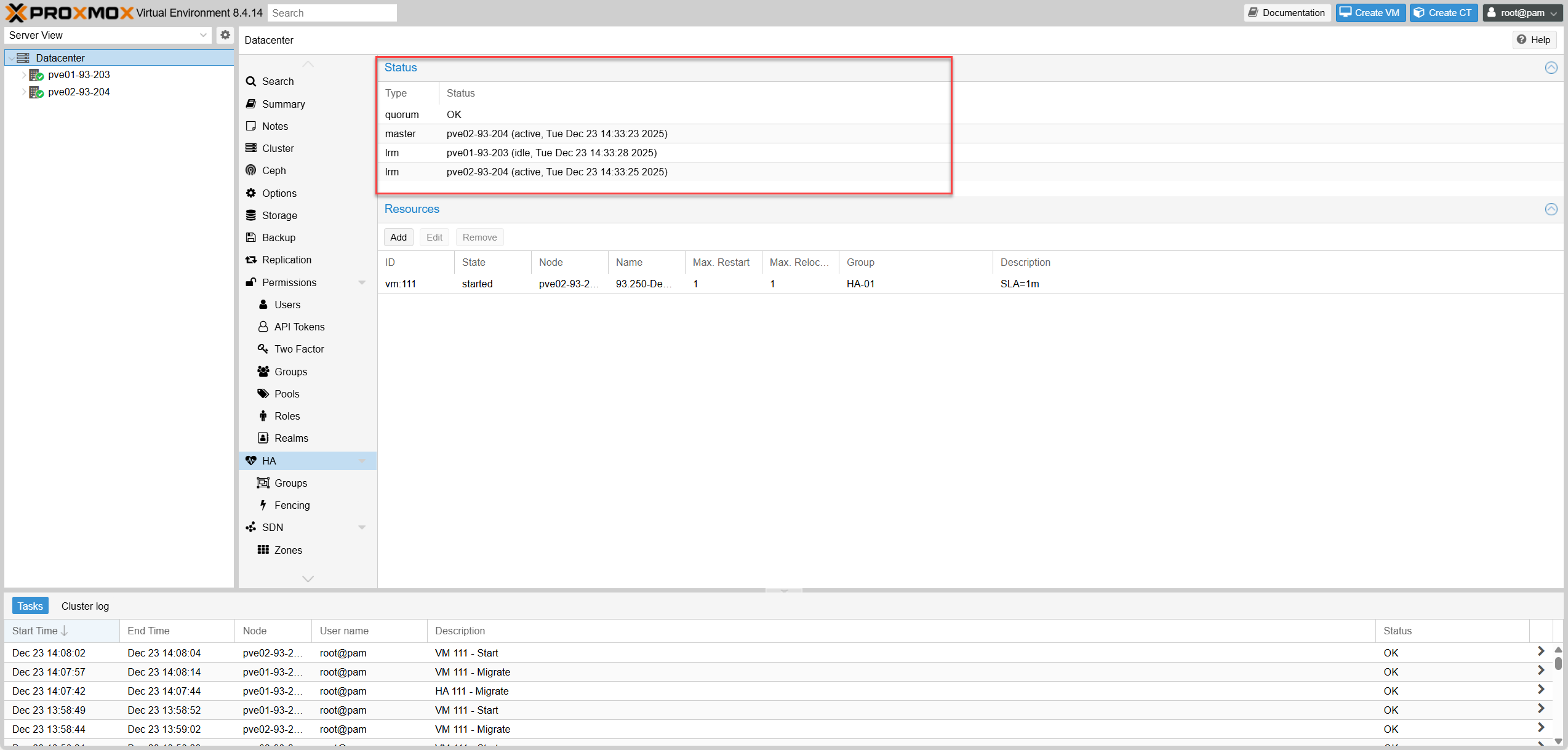 Testcase-01: Baseline Status
 Testcase-02: Failover (Node Down)
 Testcase-03: Failback
 Testcase-04: No Failback
V. Clone VMs V. Sao chép VM (Clone)
1. Initiate Clone
1. Thực hiện Clone
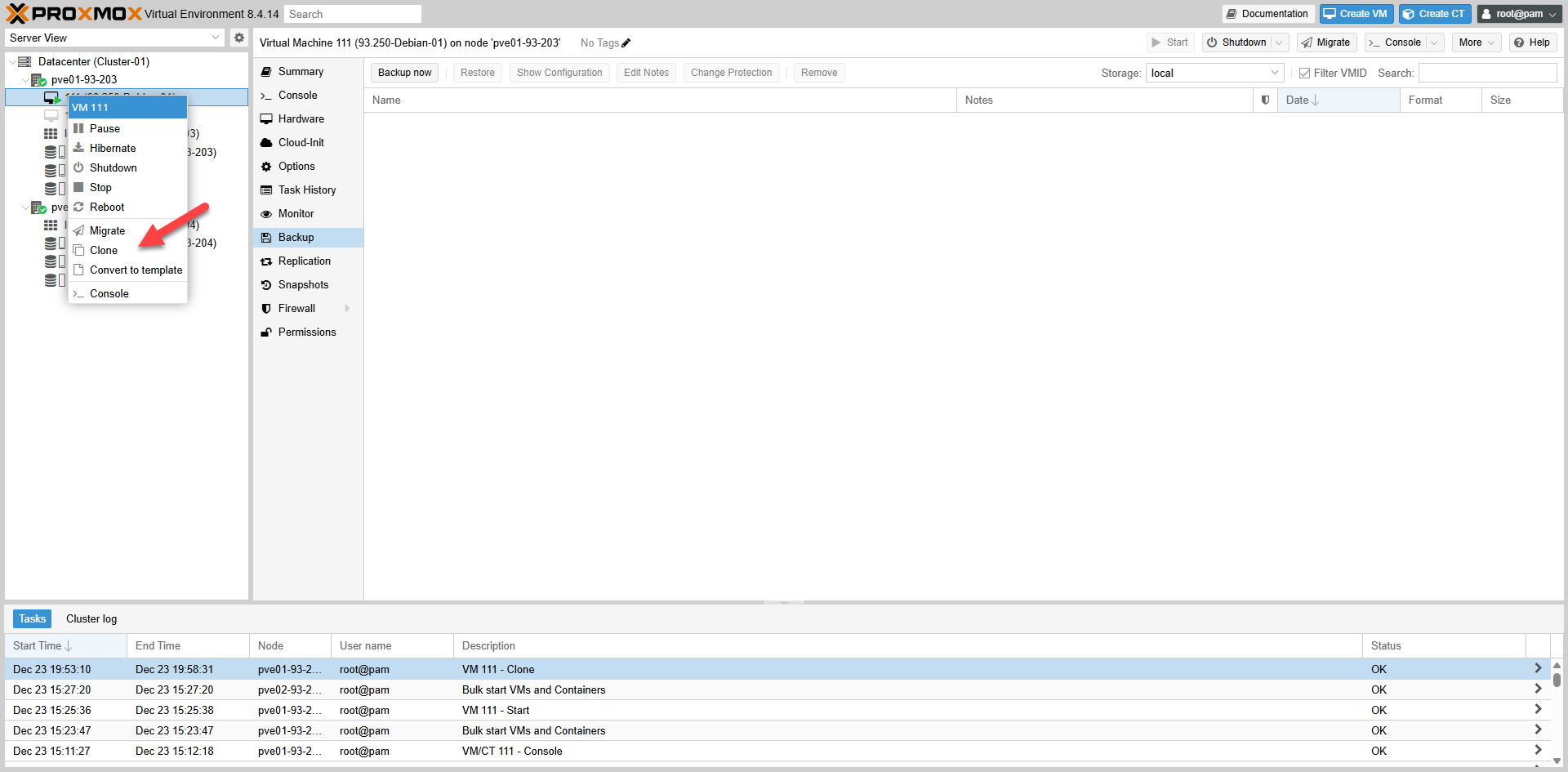 Fig V.1: Clone Wizard
2. Clone Options
2. Chế độ Clone
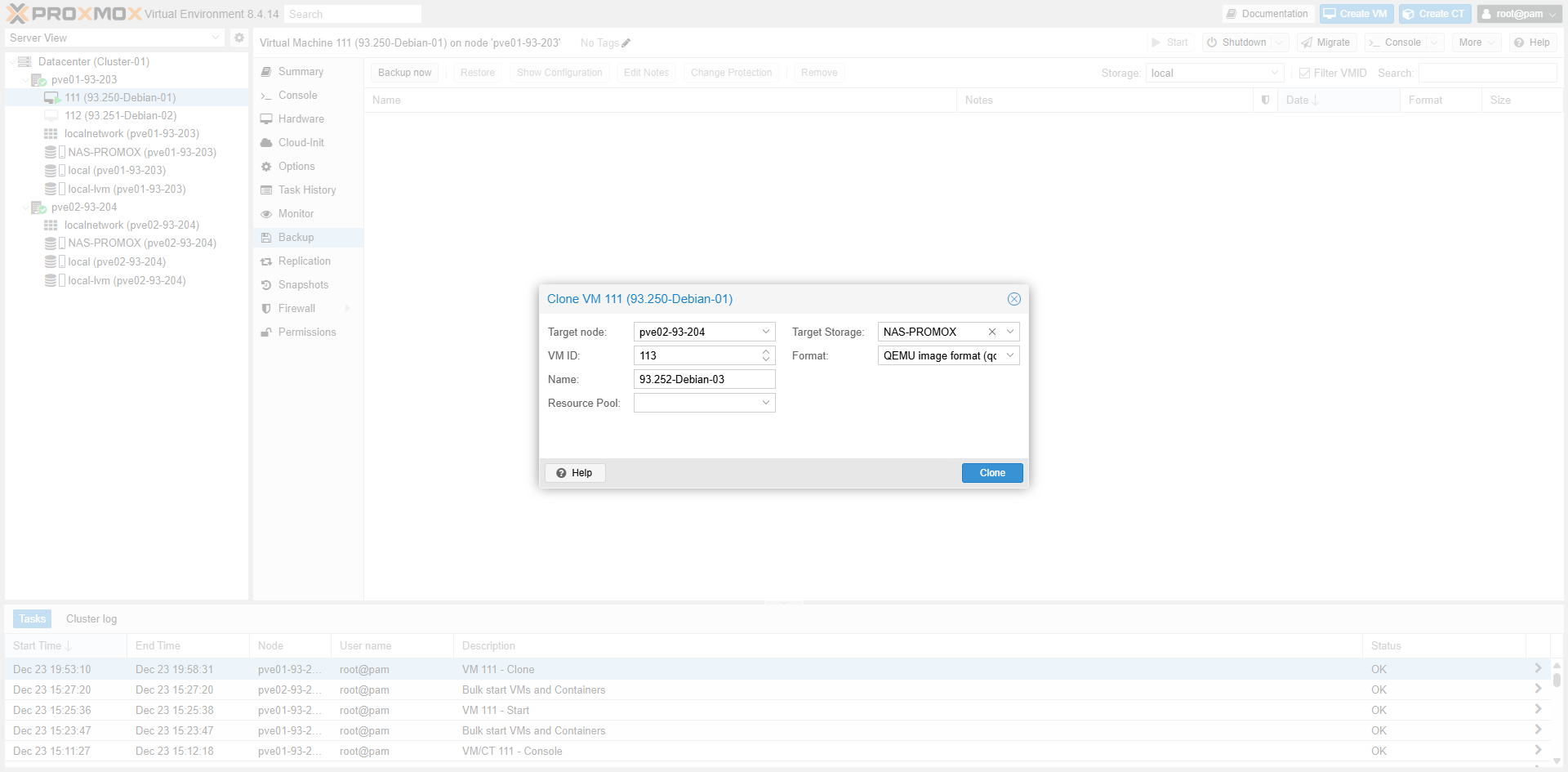 Fig V.2: Linked vs Full Clone
3. Completion
3. Hoàn tất
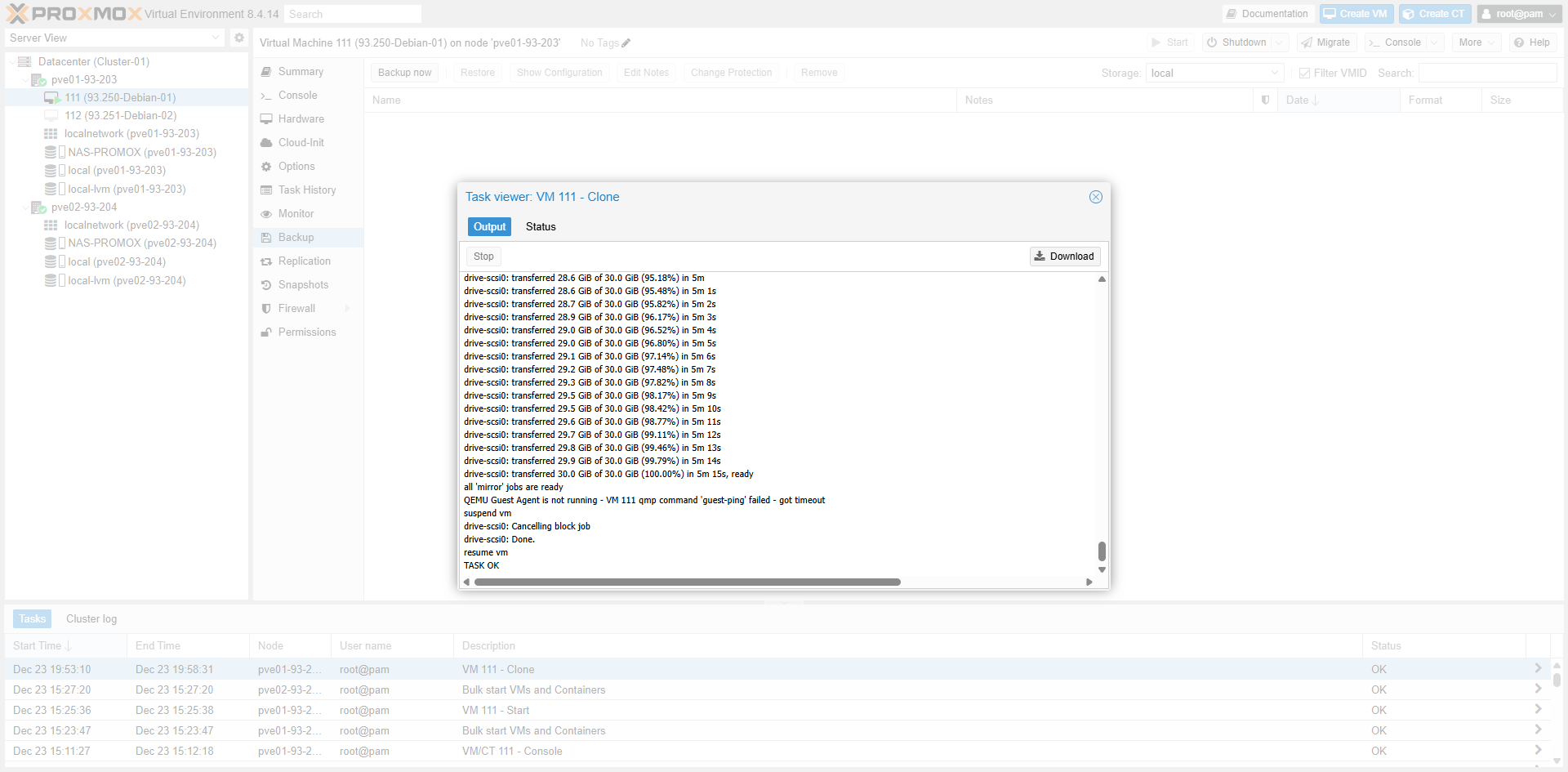 Fig V.3: Task Finished
VI. Other Enterprise Features VI. Các tính năng khác
| Hạng mục | Ý nghĩa | Vai trò (Production) | Best practice | Cách cấu hình (tóm tắt) |
|---|---|---|---|---|
| Fencing bằng IPMI (iDRAC/iLO/IMM) | Cơ chế power off/reset node lỗi qua kênh out-of-band (không phụ thuộc OS của node lỗi), để đảm bảo không có dual-writer | Bắt buộc cho workload quan trọng (DB, filesystem nhạy) để chống split-brain/duplicate VM | 1) Mgmt network riêng cho IPMI 2) Tạo user “fence” (quyền power-control) 3) Cho phép UDP 623 (RMCP+/lanplus) giữa các node ↔ IPMI 4) Test thật trước go-live | 1) Test IPMI: ipmitool -I lanplus -H ip-ipmi -U user -P ‘pass’ power status 2) Set chế độ fencing của HA: fencing: hardware hoặc both (Datacenter options / /etc/pve/datacenter.cfg) 3) Khai báo fence devices trong /etc/pve/ha/fence.cfg 4) Test fence (có thể qua API/CLI) và kiểm tra HA log sau khi fence. ([Proxmox Support Forum][1]) |
| Watchdog fencing (fallback/airbag) | Fencing dạng watchdog (thường là software watchdog/softdog nếu không có HW watchdog), node có thể tự reset khi watchdog hết hạn | Lớp dự phòng khi OS/agent treo; không thay thế IPMI cho production nghiêm túc | Không tắt watchdog khi đang dùng HA; chỉ test trong maintenance window | 1) Kiểm tra watchdog: ls -l /dev/watchdog* ; lsmod | grep -i watchdog 2) Xác nhận cluster đang dùng watchdog-based fencing (mặc định) 3) Khi cần truy vết: xem log boot trước bằng journalctl -b -1 tìm “watchdog”. ([Proxmox VE][2]) |
| Maintenance / Evacuate node (quy trình bảo trì) | Đưa node vào maintenance để HA migrate/relocate resource ra khỏi node đó trước khi reboot/bảo trì | Tránh downtime ngoài ý muốn; bảo trì có kiểm soát | Runbook bắt buộc: maintenance → xác nhận đã rỗng HA resources → reboot → disable maintenance | CLI chuẩn: ha-manager crm-command node-maintenance enable NODE → chờ VM/CT HA rời node → reboot node → ha-manager crm-command node-maintenance disable NODE; theo dõi ở Datacenter → HA → Status/Resources/Tasks. ([Proxmox VE][3]) |
| Replication (khi VM nằm local disk) | Đồng bộ disk VM theo lịch (async) để có bản chạy ở node khác khi không có shared storage (RPO > 0) | Giải pháp sống còn nếu không có shared storage | Ưu tiên shared storage cho Tier-1; nếu buộc local: xác định rõ RPO/RTO và network replication riêng | Datacenter → Replication → Add job (VMID, target node, schedule). Kiểm tra replica tồn tại trên node đích trước khi test failover; test bằng cách simulate node failure và xác nhận VM start từ replica (chấp nhận RPO theo lịch). |
| Network tách bạch & dự phòng (corosync/migration/storage/mgmt) | Tách luồng: Corosync (heartbeat/vote), Migration, Storage, Management | Giảm quorum loss do network flap; giảm migrate timeout; giảm storage contention | Corosync ưu tiên low-latency & ổn định; migration network riêng; storage riêng; mgmt riêng (và IPMI riêng nếu có) | 1) Migration network: Datacenter → Options hoặc /etc/pve/datacenter.cfg đặt migration: network=subnet 2) Kiểm tra corosync link ổn định, không share bừa với traffic nặng (backup/replication). |
| HA anti-flap tuning (Max Restart / Max Relocate / delay) | Giới hạn restart/relocate để tránh VM “bounce/ping-pong” và tránh loop | Ổn định dịch vụ sau sự cố; giảm “tự phá” khi app lỗi | Thường dùng: Restart 1–3, Relocate 1 cho production; app ổn định thấp thì giảm restart, app flaky thì tăng restart nhưng giữ relocate thấp | Datacenter → HA → Resources → Edit resource: set Max Restart/Relocate. Sau sự cố xem log pve-ha-* (qmstart/qmshutdown) để điều chỉnh. |
| QDevice placement đúng production (2-node) | Vote thứ 3 để 2-node vẫn giữ majority khi 1 node down | Tránh “1/2 votes → HA freeze” | QDevice đặt ngoài 2 node, tốt nhất khác host/switch/nguồn điện; chỉ chạy qnetd, không chạy VM prod | QDevice: systemctl enable –now corosync-qnetd; mở TCP 5403. Trên cluster: pvecm qdevice setup qdevice-ip; verify pvecm status thấy Qdevice và cluster Quorate. |
| Monitoring/Alerting (quorum/HA/fencing/storage) | Cảnh báo sớm: quorum, qdevice, fencing lỗi, HA task stuck, storage latency | Giảm sự cố “đến lúc mới biết” | Alert theo mức: critical (no quorum, fencing fail), warning (qdevice unreachable, storage latency tăng, HA task lâu) | Proxmox Notifications (mail/webhook) + monitor ngoài (Zabbix/Prometheus). Theo dõi định kỳ: pvecm status, ha-manager status, tasks/cluster log. |
| Backup/Restore (PBS) cho HA VM | HA = uptime; không thay backup. Backup để cứu dữ liệu (corruption/delete/ransomware) | Bắt buộc cho production | PBS riêng, retention theo tier, test restore định kỳ | Add PBS storage → tạo backup jobs theo lịch → kiểm tra task result → test restore (restore sang VM tạm để verify rồi xoá). |
| Category | Meaning | Role (Production) | Best practice | Config (Summary) |
|---|---|---|---|---|
| Fencing via IPMI (iDRAC/iLO/IMM) | Mechanism to power off/reset failed node via out-of-band channel (OS independent), ensuring no dual-writer | Mandatory for critical workloads (DB, sensitive filesystem) to prevent split-brain/duplicate VM | 1) Separate Mgmt network for IPMI 2) Create “fence” user (power-control rights) 3) Allow UDP 623 (RMCP+/lanplus) between nodes ↔ IPMI 4) Test thoroughly before go-live | 1) Test IPMI: ipmitool -I lanplus -H ipmi-ip -U user -P ‘pass’ power status 2) Set HA fencing mode: fencing: hardware or both (Datacenter options / /etc/pve/datacenter.cfg) 3) Declare fence devices in /etc/pve/ha/fence.cfg 4) Test fence (via API/CLI) and check HA log after fence. |
| Watchdog fencing (fallback/airbag) | Watchdog-style fencing (usually software watchdog/softdog if no HW watchdog), node self-resets when watchdog expires | Fallback layer when OS/agent hangs; does not replace IPMI for serious production | Do not disable watchdog when using HA; only test during maintenance window | 1) Check watchdog: ls -l /dev/watchdog* ; lsmod | grep -i watchdog 2) Confirm cluster uses watchdog-based fencing (default) 3) Trace if needed: check boot log via journalctl -b -1 searching “watchdog”. |
| Maintenance / Evacuate node | Put node into maintenance so HA migrates/relocates resources off it before reboot/maintenance | Avoid unintended downtime; controlled maintenance | Mandatory runbook: maintenance → confirm empty HA resources → reboot → disable maintenance | Standard CLI: ha-manager crm-command node-maintenance enable NODE → wait for HA VM/CT to leave node → reboot node → ha-manager crm-command node-maintenance disable NODE; monitor in Datacenter → HA → Status/Resources/Tasks. |
| Replication (VM on local disk) | Sync VM disk on schedule (async) to have a runnable copy on another node when no shared storage exists (RPO > 0) | Vital solution if no shared storage | Prioritize shared storage for Tier-1; if forced local: define clear RPO/RTO and separate replication network | Datacenter → Replication → Add job (VMID, target node, schedule). Check replica exists on target node before failover test; test by simulating node failure and confirm VM starts from replica (accept schedule-based RPO). |
| Network separation & redundancy (corosync/migration/storage/mgmt) | Split traffic: Corosync (heartbeat/vote), Migration, Storage, Management | Reduce quorum loss due to network flap; reduce migrate timeout; reduce storage contention | Corosync prioritizes low-latency & stability; separate migration network; separate storage; separate mgmt (and separate IPMI if available) | 1) Migration network: Datacenter → Options or /etc/pve/datacenter.cfg set migration: network=subnet 2) Check corosync link stability, do not share recklessly with heavy traffic (backup/replication). |
| HA anti-flap tuning (Max Restart / Max Relocate / delay) | Limit restart/relocate to avoid VM “bounce/ping-pong” and loops | Stabilize service after incident; reduce “self-destruction” on app error | Common usage: Restart 1–3, Relocate 1 for production; lower restart for low stability apps, higher restart but low relocate for flaky apps | Datacenter → HA → Resources → Edit resource: set Max Restart/Relocate. After incident check pve-ha-* logs (qmstart/qmshutdown) to adjust. |
| QDevice placement correct for production (2-node) | 3rd vote so 2-node cluster keeps majority when 1 node down | Prevent “1/2 votes → HA freeze” | Place QDevice outside 2 nodes, ideally different host/switch/power; runs only qnetd, no prod VM | QDevice: systemctl enable –now corosync-qnetd; open TCP 5403. On cluster: pvecm qdevice setup qdevice-ip; verify pvecm status shows Qdevice and cluster Quorate. |
| Monitoring/Alerting (quorum/HA/fencing/storage) | Early warning: quorum, qdevice, fencing error, HA task stuck, storage latency | Reduce “find out when it’s too late” incidents | Alert levels: critical (no quorum, fencing fail), warning (qdevice unreachable, storage latency up, HA task long) | Proxmox Notifications (mail/webhook) + external monitor (Zabbix/Prometheus). Periodic check: pvecm status, ha-manager status, tasks/cluster log. |
| Backup/Restore (PBS) for HA VM | HA = uptime; not backup replacement. Backup to salvage data (corruption/delete/ransomware) | Mandatory for production | Separate PBS, retention by tier, periodic restore test | Add PBS storage → create backup jobs by schedule → check task result → test restore (restore to temp VM to verify then delete). |
VII. Pre-Production Checklist VII. Checklist trước vận hành
| Mục kiểm tra | Mức độ | Lệnh xác thực | Kết quả mong đợi |
|---|---|---|---|
| Cluster đã hình thành | BẮT BUỘC | pvecm nodes | Liệt kê đủ 2 nodes, ID rõ ràng |
| Phiên bản Proxmox đồng nhất | BẮT BUỘC | pveversion -v | egrep 'pve-manager|pve-qemu-kvm' | Các phiên bản khớp nhau |
| QDevice online | BẮT BUỘC (2-node) | pvecm qdevice status | Qdevice Online, Total Votes = 3 |
| Quorum OK | BẮT BUỘC | pvecm status | Quorate: Yes (Flags: Qdevice) |
| Corosync rings | NÊN CÓ | corosync-cfgtool -s | Ring0 active, không flapping |
| Trạng thái link Corosync | BẮT BUỘC | journalctl -u corosync -n 200 | Không có timeout/link reset lặp lại, quorum ổn định |
| Cấu hình mạng Migration | BẮT BUỘC | grep 'migration' /etc/pve/datacenter.cfg | Có migration network đúng CIDR (vd 172.16.200.0/24) |
| Kết nối mạng Migration | BẮT BUỘC | ping -I src-mig-ip dst-mig-ip | Không packet loss, latency ổn định |
| Shared storage hiện diện | BẮT BUỘC | pvesm status | Storage dùng chung hiển thị OK trên cả 2 node |
| Shared storage đã mount | BẮT BUỘC | df -h | egrep 'NAS|NFS|iSCSI' | Mount OK trên cả 2 node |
| Kết nối IPMI | BẮT BUỘC (HA production) | ipmitool -I lanplus -H ip -U user -P 'pass' power status | Trả về power status thành công |
| Cấu hình Fencing | BẮT BUỘC (HA production) | grep -n '^fencing' /etc/pve/datacenter.cfg ; test -f /etc/pve/ha/fence.cfg && echo OK | fencing = hardware/both; có fence config |
| Watchdog sẵn sàng | NÊN CÓ | ls /dev/watchdog* | Device tồn tại |
| HA Resources đã đăng ký | BẮT BUỘC | ha-manager status | quorum OK; resources listed; state=started |
| Độ ưu tiên HA group | BẮT BUỘC | cat /etc/pve/ha/groups.cfg | Node ưu tiên có priority nhỏ hơn |
| Test Live migrate | BẮT BUỘC | qm migrate 111 pve02-93-204 --online | TASK OK |
| Log HA sạch | BẮT BUỘC | journalctl -u pve-ha-lrm -u pve-ha-crm -n 200 --no-pager | qmstart OK, không loop restart/relocate bất thường |
| Test Failover (maintenance) | BẮT BUỘC | ha-manager crm-command node-maintenance enable NODE | Resource relocate và started trên node còn lại |
| Test Failover (node down) | BẮT BUỘC (HA production) | Shutdown/poweroff 1 node → check | VM/CT relocate và started (thời gian phụ thuộc fencing/boot) |
| Backup jobs configured | BẮT BUỘC (production) | (GUI) Datacenter → Backup / PBS Tasks | Có lịch backup, task OK |
| Restore test performed | BẮT BUỘC (production) | (GUI) Restore 1 VM vào VM tạm | VM boot OK, verify dữ liệu, xoá VM tạm |
| Check Item | Level | Verify Command | Expected Output |
|---|---|---|---|
| Cluster Formed | MANDATORY | pvecm nodes | All nodes listed, IDs visible |
| Versions Aligned | MANDATORY | pveversion -v | egrep 'pve-manager|pve-qemu-kvm' | Versions match across nodes |
| QDevice Online | MANDATORY (2-node) | pvecm qdevice status | Qdevice Online, Total Votes = 3 |
| Quorum OK | MANDATORY | pvecm status | Quorate: Yes (Flags include Qdevice) |
| Corosync Rings | RECOMMENDED | corosync-cfgtool -s | Ring active, no flapping |
| Corosync Health | MANDATORY | journalctl -u corosync -n 200 --no-pager | No repeated timeout/link reset, quorum stable |
| Migration Network Configured | MANDATORY | grep -n 'migration' /etc/pve/datacenter.cfg | Migration network exists with correct CIDR |
| Migration Reachability | MANDATORY | ping -I src-mig-ip dst-mig-ip | No packet loss, stable latency |
| Shared Storage Present | MANDATORY | pvesm status | Shared storage shows OK on both nodes |
| Shared Storage Mounted | MANDATORY | df -h | egrep 'NAS|NFS|iSCSI' | Mount OK on both nodes |
| IPMI Connectivity | MANDATORY (HA) | ipmitool -I lanplus -H ip -U user -P 'pass' power status | Returns successful power status |
| Fencing Configured | MANDATORY (HA) | grep -n '^fencing' /etc/pve/datacenter.cfg ; test -f /etc/pve/ha/fence.cfg && echo OK | fencing = hardware/both; fence config exists |
| Watchdog Ready | RECOMMENDED | ls /dev/watchdog* | Device exists |
| HA Resources Registered | MANDATORY | ha-manager status | quorum OK; resources listed; state=started |
| HA Group Priority Sanity | MANDATORY | cat /etc/pve/ha/groups.cfg | Priority node has lower number |
| Live Migrate Test | MANDATORY | qm migrate 111 pve02-93-204 --online | Task completes OK |
| HA Logs Clean | MANDATORY | journalctl -u pve-ha-lrm -u pve-ha-crm -n 200 --no-pager | qmstart OK, no abnormal restart/relocate loops |
| Failover Test (Maint) | MANDATORY | ha-manager crm-command node-maintenance enable NODE | Resource relocate and started on remaining node |
| Failover Test (Down) | MANDATORY (HA) | Shutdown/poweroff 1 node → check | VM/CT relocate and started (time depends on fencing/boot) |
| Backup Jobs Configured | MANDATORY (production) | (GUI) Datacenter → Backup / PBS Tasks | Backup scheduled, task OK |
| Restore Test Performed | MANDATORY (production) | (GUI) Restore 1 VM to temp VM | VM boot OK, verify data, delete temp VM |
VIII. HAPPENED ISSUES & FIXES VIII. CÁC LỖI THƯỜNG GẶP
1. Lỗi: Online migrate failure – VirtIO-net MTU
Nguyên nhân: Do lệch phiên bản Proxmox/QEMU giữa 2 node (Node đích phiên bản cũ hơn node nguồn hoặc không tương thích tính năng VirtIO).
Hướng xử lý: Upgrade phiên bản 2 node same nhau (ưu tiên upgrade node thấp lên).
Hành động:
# a. Kiểm tra version trên cả 2 node 93.203 và 93.204:
root@pve02-93-204:~# pveversion -v
root@pve01-93-203:~# pveversion -v

# b. Kiểm tra source lists cả 2 node phải khớp nhau:
root@pve01-93-203:~# cat /etc/apt/sources.list
root@pve02-93-204:~# cat /etc/apt/sources.list

# c. Kiểm tra trong mục "Repositories" cả 2 node phải có:
# deb http://download.proxmox.com/debian/pve bookworm pve-no-subscription

# d. Upgrade node nào có phiên bản thấp hơn:
root@pve02-93-204:~# apt update
root@pve02-93-204:~# apt full-upgrade -y
root@pve02-93-204:~# reboot

# e. Kiểm tra lại version của 2 node:
root@pve01-93-203:~# pveversion -v | egrep 'pve-manager|qemu-server'
root@pve02-93-204:~# pveversion -v | egrep 'pve-manager|qemu-server'
2. Migrate thành công nhưng VM tự về lại node cũ
Nguyên nhân: VM-111 thuộc HA Group (HA-01) nên placement do HA quản lý. Khi migrate thủ công, HA thấy node ưu tiên (Priority 1) đang online nên tự động kéo VM về.
Hướng xử lý: Đổi priority trong HA-01 để pve02 ưu tiên cao hơn hoặc 2 node bằng nhau, hoặc bật nofailback=1.
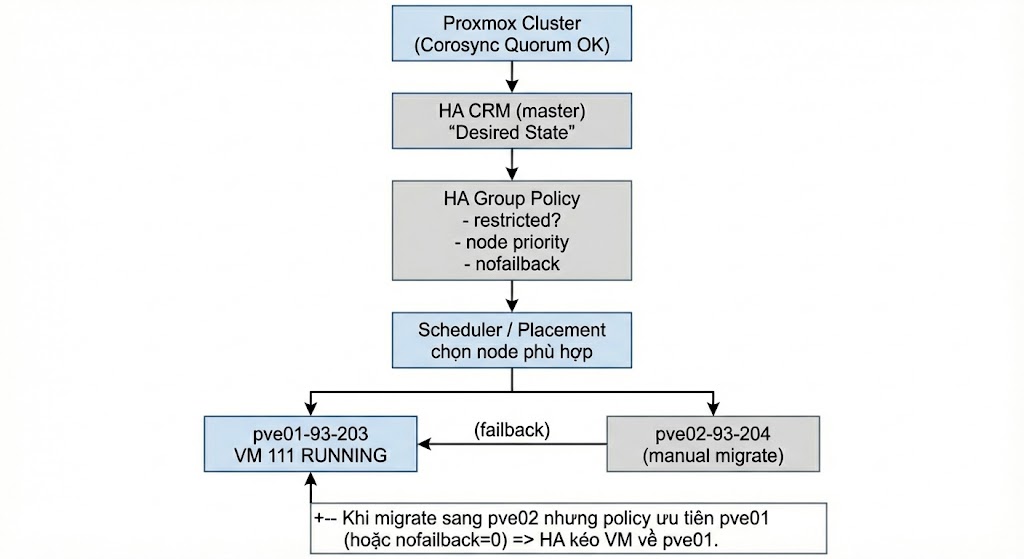 Fig VIII.2: Migrate Failback Issue
3. HA thất bại với cụm 2 Node
Nguyên nhân: Mất Quorum (1/2 votes = 50%). Khi 1 node chết, cluster không đủ đa số phiếu (cần >50%) nên HA đóng băng để chống Split-brain.
Hướng xử lý: Giả lập thêm 1 node thứ 3 (QDevice External Vote).
Hành động:
# a. Tạo 1 server Linux và cài đặt QNetd:
root@server:~# apt update && apt install -y corosync-qnetd
root@server:~# systemctl enable --now corosync-qnetd
root@server:~# systemctl status corosync-qnetd

# b. Trên 1 node bất kỳ của cluster, gán QDevice:
root@pve01-93-203:~# pvecm qdevice setup 10.10.93.249

# c. Sau khi hoàn tất, chạy lệnh kiểm tra:
root@pve01-93-203:~# pvecm status
# Output mẫu:
# Quorate:          Yes
# Votequorum information
# ----------------------
# Expected votes:   3
# Total votes:      3
# Flags:            Quorate Qdevice
1. Error: Online migrate failure – VirtIO-net MTU
Cause: Proxmox/QEMU version mismatch between source and target nodes.
Fix: Upgrade both nodes to the same version (focus on upgrading the lower version one).
Action:
# a. Check versions:
root@node1:~# pveversion -v
root@node2:~# pveversion -v

# b. Check sources.list consistency:
cat /etc/apt/sources.list

# c. Ensure repositories are valid (e.g. no-subscription)

# d. Upgrade:
apt update && apt full-upgrade -y
reboot

# e. Re-verify versions match for pve-manager/qemu-server.
2. Migrate successful but VM moves back to source
Cause: VM is in an HA Group with a higher priority on the source node. HA detects the preferred node is up and performs failback.
Fix: Equalize priority in HA Group or enable nofailback=1.
Fig VIII.2: Migrate Failback Issue
3. HA Fails on 2-Node Cluster
Cause: Quorum loss. A 2-node cluster has 2 votes. If 1 node fails, only 1 vote remains (50%), which is not a majority (>50%). HA freezes to prevent split-brain.
Fix: Add a QDevice (3rd vote arbiter).
Action:
# a. Install QNetd on external server:
apt update && apt install -y corosync-qnetd
systemctl enable --now corosync-qnetd

# b. Setup QDevice from Proxmox node:
pvecm qdevice setup <QDEVICE-IP>

# c. Verify Quorum:
pvecm status
# Look for 'Quorate: Yes' and 'Flags: Qdevice'